
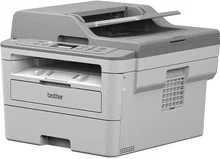
Brother DCP-B7535DW Driver provides stable results when performing standard printing operations in an office or at home. The optimized software ensures improved stability of the device by minimizing any connection problems during the printing process. The installation procedure is fast and easy due to simple settings that allow setting up all necessary features of the printer.
Brother DCP-B7535DW Drivers for Windows
48de1908dba1dae5102160695280876bd25647c0c5bb202e24987badd97f6e086722a890472e2cab4d5c8347e7f6d3b47aa1b0375cbb3179888873251b043bf06722a890472e2cab4d5c8347e7f6d3b47aa1b0375cbb3179888873251b043bf0a1eba9683e8b58e4686d7b8362f7297b80c9d454d051000da98ab810634f45d1Brother DCP-B7535DW Drivers for Linux
1345d3b44b135827c46d3ede9feafc69e3108e21168e891b0bd9fb461e4f617a65e502b5bb97ee3ad4262e216139d1de2b70b02173f2b6515357a80e458ed0e7027b73648722ac8c8eb1a9c419d284a6562cc763feac9740a2b75a683b09297289d82315fd9d629f8af7b5bc489f392da218acfe2436e42eec147246101636d54225e91dd7f7d0ba2a202f616b15b669be7800c271a7d25efed94191f71fc4500fec3bcffeb597b2d23ef7ff31f34dc7bd8d4736a35c2d1ff5e56784d709ce53Brother DCP-B7535DW Printer Specifications
Brother DCP-B7535DW utilizes laser printing technology based on the electrophotographic principle. It offers high-quality monochrome printing and has 128 MB of built-in memory necessary for efficient document processing. There is a 16-character two-line LCD panel, which makes navigation around the menu and printer functions easier. The printer works at 220 to 240 V AC while working with various modes of energy saving.
The Brother DCP-B7535DW prints up to 34 pages per minute when using A4 paper in monochrome mode. Automatic duplexer decreases paper usage, and the printer is able to work with A4 paper of 60 to 105 g/m² thickness. There is a standard paper tray with a capacity of up to 250 sheets. The manual feed slot allows printing with special kinds of paper, envelopes, labels, and other media. The face-down output tray can take up to 120 sheets of paper.
Brother DCP-B7535DW offers the combination of a flatbed scanner with a 50-sheet ADF for effective multifeed work. The scanner works with color and monochrome documents with optical resolutions of 1200 x 1200 dpi from the scanner glass. There are copy features, including the ability to make copies of up to 99 pages, scaling options ranging from 25 to 400 percent, and resolutions of up to 600 x 600 dpi. AirPrint capability, TWAIN, WIA, and ICA scanning support provide efficient scanning through Windows and supported macOS.
There are Hi-Speed USB 2.0, Ethernet, and IEEE 802.11b/g/n wireless connections available in the Brother DCP-B7535DW. Wi-Fi Direct allows direct printing via Wi-Fi connection and no need to connect the printer to the network. PCL6, BR-Script3, and PDF 1.7 emulator ensure the compatibility of the device with different business applications. There is SSL/TLS encryption, SNMP v3, WPA2-PSK security, and new network protocols used in printing and scanning.
Technical Details
| Title | Brother DCP-B7535DW Drivers |
|---|---|
| Device Type | All-in-one printer |
| Driver Version | Varies by driver and operating system |
| Available Downloads | Drivers |
| License | Free |
| Manufacturer | Brother Industries, Ltd. |