
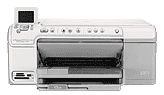
The HP Photosmart C5390 is an all-in-one device that provides built-in templates for various quality prints. These might include wide-ruled notebook paper, perfect music sheets, assignments or graph paper. Or you may also like to print out a checklist to track the list of what things you want to do. All these uses make the printer suitable for both office and private (home) use. The uniquely shaped machine has external features that suit its multiple purposes. These include CD/DVD holder storage, CD/DVD access door, color graphics display, as well as frontal and rear USB ports. Others include a power connection port using a recommended HP cable, main input tray, output tray, lid backing, and ink carriage door. Also, it contains a paper tray extender, memory card slots, and a photo light, etc.
HP Photosmart C5390 Drivers for Windows
028f53f4b1e160e510677defbdddf44b52bd6ec17e1c271de58614bae941a83bcac3b4a4ccc62e23f1c25a46fa0e313895b60f2e25f41449a812e3c43b517095b463e25d273f44b447c6f3abccb3ec3eae907af2f00581c7f55bc0894fe7f1c845d4b64fef184fa97a0ccbd0c0978970e9d71afc2836d60879e57b85a8b570b0HP Photosmart C5390 Drivers for macOS
c317b8b6587ebc5eb35675d1d1047b6aed832ef3f93be527c4e7b54e625577e787bd5eba71cd3b9ec3dacb1243ecb354ea7de42e92833cade9c2c72b150fe3f3HP Photosmart C5390 cartridges
Black Ink HP 564 Cartridge (~250 pages), HP 564 Cyan Ink Cartridge (~300 pages), HP 564 Magenta Ink Cartridge (~300 pages), HP 564 Yellow Original Ink Cartridge (~300 pages), HP 564 Photo Original Ink Cartridge (~130 pages)
Printer Specifications
1. From the control panel, you can access home, red-eye removal, print photos, cancel, zoom in and out, OK, Back, Menu, etc. Also, you can access start copy in black or color, the attention light, start scan and, very importantly, the power on button.
2. Print speeds depend primarily on the complexity of the document as well as the model of the printer in use.
3. This device also involves panorama-size printing.
4. The printing method of this machine is a drop-on-demand thermal inkjet technology.
5. The print language is the PCL3 GUI.
6. The copy resolution is quite high, up to 4800 x 1200 optimized dpi output using a scan resolution of 1200 dpi.
7. The copy function also includes digital image processing and makes up to 50 copies from the original document. This feature also varies by the model of the printer in use.
8. A zoom range of up to 400% and fit to page mode are critical features of the copier.
9. The copy speed is also proportional to the complexity of the document in print.
Technical Details
| Title | HP Photosmart C5390 Drivers |
|---|---|
| Device Type | All-in-one printer |
| Driver Version | Varies by driver and operating system |
| Available Downloads | Drivers |
| License | Free |
| Manufacturer | HP Inc. |