
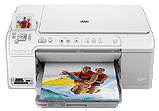
This printer comes with an exclusive design for office and home uses which include printing notebook, graph paper, music sheets. Other items that are printable include printing on CD/DVDs, from memory cards or through a computer. The all-in-one printer can print, copy, scan and send or receive fax messages at best results. This printer is very compatible with HP papers due to its unique design that suits different types of projects.
The visible part of the printer includes the control panel, color graphics display, memory card slots, photo light, and front USB port. Other consists of the primary input tray, an output tray, a paper tray extender, a CD/DVD holder storage, a photo tray, etc.
On the control panel, however, are many practical functions of the printer without turning on your computer. Such features include Home, Menu, Back, OK, cancel, scan, copy buttons, red-eye removal, etc.
HP Photosmart C5383 Drivers for Windows
028f53f4b1e160e510677defbdddf44b52bd6ec17e1c271de58614bae941a83bcac3b4a4ccc62e23f1c25a46fa0e313895b60f2e25f41449a812e3c43b517095b463e25d273f44b447c6f3abccb3ec3eae907af2f00581c7f55bc0894fe7f1c845d4b64fef184fa97a0ccbd0c0978970e9d71afc2836d60879e57b85a8b570b0HP Photosmart C5383 Drivers for macOS
c317b8b6587ebc5eb35675d1d1047b6aed832ef3f93be527c4e7b54e625577e787bd5eba71cd3b9ec3dacb1243ecb354ea7de42e92833cade9c2c72b150fe3f3HP Photosmart C5383 cartridges
Black Ink HP 564 Cartridge (~250 pages ), HP 564 Cyan Ink Cartridge (~300 pages ), HP 564 Magenta Ink Cartridge (~300 pages ), HP 564 Yellow Original Ink Cartridge (~300 pages ), HP 564 Photo Original Ink Cartridge (~130 pages )
Printer features
1. The input tray of this unique device holds a maximum of 125 sheets o plain paper while the output tray holds about 50. All other media sizes take a smaller number to fill the two plates.
2. The HP Photosmart C5383 printer supports legal paper, plain paper, transparencies, envelopes, photo paper, index cards, etc.
3. The output tray capacity of this device depends on the type of paper in the printer and the amount of ink in the printer available for use. therefore, the manufacturer recommends a continuous emptying of the output tray.
4. Not that when printing at the Fast Draft print quality mode, the extender tray needs to be out and the end of the tray pointing upwards. Without the end tray facing up, both legal and letter-sized paper will fall on the first sheet.
5. The scanner comes with an Integrated OCR software that automatically converts scanned text to editable text.
6. The color depth of scanning is 48-bit, 8-bit grayscale (256 levels of grey).
Technical Details
| Title | HP Photosmart C5383 Drivers |
|---|---|
| Device Type | All-in-one printer |
| Driver Version | Varies by driver and operating system |
| Available Downloads | Drivers |
| License | Free |
| Manufacturer | HP Inc. |