
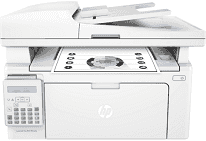
The product number of the HP LaserJet Pro MFP M132fn model is G3Q63A and sets it different from other models. In the package of the printer are the HP LaserJet toner cartridge, an imaging drum, and a power cord. Other items include a phone cord, a USB cable, a getting started guide, a setup poster, and a support flyer. In additional to begin to print, this printer allows hi-speed USB 2.0 port (device) and a built-in fast ethernet 10/100base-TX.
HP LaserJet Pro MFP M132fn Drivers for Windows
9a71627383fcbc17cd5d22ab64cd48156f3125f355d30f0168e4638077b18aa7ff06ce28848098bb2e0166f078ca1ffcccbdde126869087363a0b3ae0da7d527bf1f339d0b397b8bac8ed09b9d9f8e20802f3b4d0500dd01c8f0bd0c96a4b26cd2f18088da8df16f0017983756626431eeeeddb0e386dd19a223c89e5a6a9c4fce728403422ec1c590fb971561abec94e476484815326373058a39afd61bccc2f50dad657f400372a066f31d5596db54ad4d289fdcdaf11f1209f7c83f8ebfaef50dad657f400372a066f31d5596db54ad4d289fdcdaf11f1209f7c83f8ebfaef50dad657f400372a066f31d5596db54ad4d289fdcdaf11f1209f7c83f8ebfaeHP LaserJet Pro MFP M132fn Drivers for macOS
99e1d18847c64a405486ae34424f0a1c8d89920d17df86c45b6b0007f101d70aThe adjustable copier settings include the number of copies, optimization, and contrast adjustment for lighter or darker outputs. Users can also select the paper, optimize the production, and select multipage or draft mode copying. The HP LaserJet Pro MFP M132fn printer produces up to 99 copies from an original document with a 25 to 400% zoom range. The speed is 22 copies per minute (CPM), and the resolution is 600 x 400 dots per inch (dpi).
Faxing is also possible through this machine with a resolution of up to 300 x 300 dpi with an enabled halftone. This feature can also store up to 1000 pages and supports telephone handset, fax telephone modes. It also has a modem speed of 33.6 kbps and up to 120 numbers in the speed dials. On the other hand, the fax transmission speed is about 3 seconds per page and a standard memory of 256 MB.
The available mobile printing service comprises of Google Cloud Print 2.0, HP ePrint, Apple AirPrint, and Mopria certification. In terms of the network protocols, the formats include IPv6, IPv4, IP direct mode, LPD, SLP, Bonjour, WINS, and SNMP. HP LaserJet Pro MFP M132fn model can hold up to 150 sheets of plain paper and 100 sheets as output. The compatible media sizes include letter, executive, legal, envelopes, and other similar standard sizes.
Technical Details
| Title | HP LaserJet Pro MFP M132fn Drivers |
|---|---|
| Device Type | All-in-one printer |
| Driver Version | Varies by driver and operating system |
| Available Downloads | Drivers |
| License | Free |
| Manufacturer | HP Inc. |