
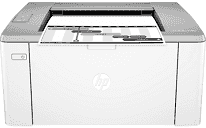
Printing with this device ensures absolute top-quality output through printing with the standard USB port or wireless Wi-Fi 802.11b/g/n component. The product number is G3Q39A while its package includes LaserJet toner cartridges, imaging drum, and getting started guide. Other items are setup poster, warranty guide flyer, support flyer, and errata in some countries with printer documentation on CD-ROM.
HP LaserJet Ultra M106w Drivers for Windows
1cf3dacce43dadb92618b4c6f1831e2779a73d9510540c7344aca01c8ae796bd6312a95778ec1ae9e4fbdb50a7db5132c6ed247afdd0ff8f5ea6e395b62db5e70621de09d33a3d470bbbfdf445870b2bf8f3c321194795cb7ed53d1bccf8d6d9d2f18088da8df16f0017983756626431eeeeddb0e386dd19a223c89e5a6a9c4fce728403422ec1c590fb971561abec94e476484815326373058a39afd61bccc2f50dad657f400372a066f31d5596db54ad4d289fdcdaf11f1209f7c83f8ebfaef50dad657f400372a066f31d5596db54ad4d289fdcdaf11f1209f7c83f8ebfaef50dad657f400372a066f31d5596db54ad4d289fdcdaf11f1209f7c83f8ebfaeHP LaserJet Ultra M106w Drivers for macOS
99e1d18847c64a405486ae34424f0a1c8d89920d17df86c45b6b0007f101d70aIn terms of the internal memory, the HP LaserJet Ultra M106w model of the printer has 128 MB of RAM. Also, mobile printing services supports apps such as Apple AirPrint, HP ePrint, and Google Cloud Print 2.0. Other supports are for Mopria certification and Wi-Fi direct printing. The network protocols involve TCP/IP, IPv4, IPv6, direct mode, LPD, Bonjour, SLP, WS-Discovery, BOOTP/DHCP/AutoIP, WINS, SNMP v 1/2/3, and HTTP/HTTPS.
The input proficiency of the printer is up to 150 sheets of paper as well as ten envelopes. In contrast, the output tray can hold up to 100 sheets of printed paper. The media sizes supported A4, A5, B5 (JIS) and A6, these by US standards include letter, legal, executive, and envelopes. Also, the media types are laser, plain, rough, vellum, photo, envelopes, labels, cardstock, and postcards. In terms of the weight, the acceptable range is 60 to 163 gsm, which is the same as 16 to 42 lbs.
The physical dimensions of the HP LaserJet Ultra M106w comprise of a width of 364.7 mm and depth of 466.6mm. On the other hand, weight is about 4.7 kg, which is equivalent to about 10.4 lbs. The energy-saving feature technology uses the HP auto-on/auto-off technology through internal power supply between 110 to 127 volts. Similarly, the power consumption at optimum performance is 380 watts in active printing. When the printer is regular for production, the power usage is 1.7 watts.
Technical Details
| Title | HP LaserJet Ultra M106w Drivers |
|---|---|
| Device Type | Printer |
| Driver Version | Varies by driver and operating system |
| Available Downloads | Drivers |
| License | Free |
| Manufacturer | HP Inc. |