
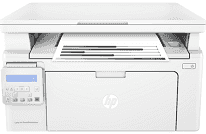
The printer has ideal connectivity options such as the hi-speed USB 2.0 port device. Another one is the built-in Ethernet 10/100 Base-TX as well as a standard Wi-Fi 802.11b/g/n. Ideally, the product number of the printer is also G3Q62A. The printer allows selection of the number of copies and contrast adjustment to be darker or lighter. Also, the maximum number of copies from the machine is up to 99, from an original document. The speed of the printer during the copying process is up to 23 copies per minute (CPM). Similarly, the copy resolution is 600 x 400 dots per inch (dpi).
HP LaserJet Pro MFP M132nw Drivers for Windows
a075adbe08976fdc9e3a6a25da229edd4a3b7bd654aec55a40021290155762de9a5ef4b51450ca9f30c1a22d084a7cc86c967e5072a0de5d690ab2c8c3c50e21cec7ce8c95f05da66b8a1f4461d916629ca6e06d68d8b52d0e686a8d34b8f628d2f18088da8df16f0017983756626431eeeeddb0e386dd19a223c89e5a6a9c4fce728403422ec1c590fb971561abec94e476484815326373058a39afd61bccc2f50dad657f400372a066f31d5596db54ad4d289fdcdaf11f1209f7c83f8ebfaef50dad657f400372a066f31d5596db54ad4d289fdcdaf11f1209f7c83f8ebfaef50dad657f400372a066f31d5596db54ad4d289fdcdaf11f1209f7c83f8ebfaeHP LaserJet Pro MFP M132nw Drivers for macOS
99e1d18847c64a405486ae34424f0a1c8d89920d17df86c45b6b0007f101d70aHP LaserJet Pro MFP M132nwf printer model has an internal memory of 256 MB of non-expandable memory. It also supports mobile printing services, with app options such as Apple AirPrint, HP ePrint, and Google Cloud Print. Other options are Mopria certification and Wi-Fi direct print option. In terms of the supported network protocols, the possibilities are TCP/IP, IPv4, IPv6, IP direct mode, SLP, Bonjour, and LPD.
This printer holds up to 150 sheets of plain paper for input paper load. On the other hand, the output capacity of the printer is up to 100 sheets of printed pages. In terms of the media sizes supported, the metric variables are A4, A5, A6, and B5. However, the supported media types are the label, plain, vellum, rough, photo, envelopes, labels, cardstock, and postcards. The compatible weight range is between 60 and 163 gsm.
The model has a width of 15.7 inches, a depth of 19 inches and a height of 15.3 inches. On the other hand, weight is about 6.8 kg, which is equivalent to 15 lbs. It also has an energy-saving feature using the technology of HP auto-on or auto-off as well as an internal power supply.
Technical Details
| Title | HP LaserJet Pro MFP M132nw Drivers |
|---|---|
| Device Type | All-in-one printer |
| Driver Version | Varies by driver and operating system |
| Available Downloads | Drivers |
| License | Free |
| Manufacturer | HP Inc. |