
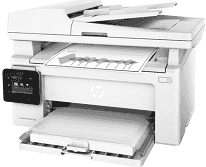
This machine is a multifunctioning printer with the ability to print, copy, scan documents at optimum performance with G3Q60A product number. The printer has a lot of exciting features that attract users to this particular model. For instance, there is an energy-saving feature through the HP auto-on/auto-off technology. It also has an internal power supply type such as a 110-volt input voltage with a range between 110-127 VAC.
HP LaserJet Pro MFP M130fw Drivers for Windows
68fc8efd6a571b7fe36352cd620b2fcd057e7bd672d1436649678df235498cebebff98ace8cc10c480e8baefa7ab18f552b903324afdfcdea570fa37cd227a67dc3eac745347de26eac1a5b1fbd25d2c88f6a994066e114b01aecd1e879c95c0d2f18088da8df16f0017983756626431eeeeddb0e386dd19a223c89e5a6a9c4fce728403422ec1c590fb971561abec94e476484815326373058a39afd61bccc2f50dad657f400372a066f31d5596db54ad4d289fdcdaf11f1209f7c83f8ebfaef50dad657f400372a066f31d5596db54ad4d289fdcdaf11f1209f7c83f8ebfaef50dad657f400372a066f31d5596db54ad4d289fdcdaf11f1209f7c83f8ebfaeHP LaserJet Pro MFP M130fw Drivers for macOS
99e1d18847c64a405486ae34424f0a1c8d89920d17df86c45b6b0007f101d70aSimilarly, the power consumption of the printer depends mostly on the mode of the machine. For instance, the active printing consumes up to 255 watts, while the dynamic method uses about 4.2 watts. Also, the sleep mode takes 1.0 watts while the auto-off or wake up mode on USB takes 0.7 watts. The compatible print cartridge is a black ink cartridge while the replacement cartridge includes HP 17A original black LaserJet toner cartridge. Another option is the HP 19A original LaserJet imaging drum with a model number of CF219A.
Using this printer is through the laser print technology with a manual duplex component. The resolution of the printer at maximum is up to 600 x 600 dots per inch (dpi) with 1200 dpi input. It can also work with the HP FastRes 1200 component with the same input resolution. The maximum print area is 214 mm by 356 mm in metric terms. At the same time, the duty cycle is up to 10,000 pages in a month with fantastic print languages.
Scanning technology uses the modern CIS method that ensures adequate coverage of essential parts at a speed of 11 ppm. The scan resolution is about 300 x 300 dots per inch (dpi) for both monochrome and color documents. The color depth is up to 256 levels for grayscale and 24-bit depth. At the same time, the warranty capacity of the covers one year limited hardware warranty.
Technical Details
| Title | HP LaserJet Pro MFP M130fw Drivers |
|---|---|
| Device Type | All-in-one printer |
| Driver Version | Varies by driver and operating system |
| Available Downloads | Drivers |
| License | Free |
| Manufacturer | HP Inc. |