
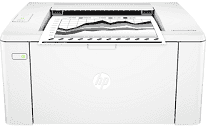
The printer, HP LaserJet Pro M102w, has many exceptional qualities towards the satisfaction of the user. Its product number is G3Q35A while the connectivity options include one hi-speed USB 2.0 port and wireless connection. Additional connectivity is through the wireless card dual-band with a speed of 2.4 GHz to 5 GHz channels. The contents of the printer container include an HP Black LaserJet toner cartridge and HP LaserJet imaging drum. Other present items include a getting started guide, a setup poster, support flyer, warranty guide flyer, and errata for some countries.
HP LaserJet Pro M102w Drivers for Windows
1cf3dacce43dadb92618b4c6f1831e2779a73d9510540c7344aca01c8ae796bd6312a95778ec1ae9e4fbdb50a7db5132c6ed247afdd0ff8f5ea6e395b62db5e70621de09d33a3d470bbbfdf445870b2bf8f3c321194795cb7ed53d1bccf8d6d9f50dad657f400372a066f31d5596db54ad4d289fdcdaf11f1209f7c83f8ebfaef50dad657f400372a066f31d5596db54ad4d289fdcdaf11f1209f7c83f8ebfaef50dad657f400372a066f31d5596db54ad4d289fdcdaf11f1209f7c83f8ebfaeHP LaserJet Pro M102w Drivers for macOS
99e1d18847c64a405486ae34424f0a1c8d89920d17df86c45b6b0007f101d70aIn terms of the paper handling properties, the input capacity of this printer is about 150 sheets with ten envelopes. On the other hand, the output paper tray capacity is about 100 sheets of printed paper. Also, the media sizes cover A4, A5, A6, B5, as well as the letter, legal, executive, and photo sizes. The exciting paper dimensions by US standards are 3 x 5 to 8.5 x 14 inches with a weight between 16-43 lbs. Also, the supported paper types include laser, plain, photo, rough, vellum, cardstock, and postcards.
The physical dimensions of the HP LaserJet Pro M102w printer model include 14.4 inches in width. At the same time, the depth is about 18.4 inches while the height is approximately 13.1 inches. On the other hand, the weight of the printer is 4.7 kg, which is equivalent to 10.4 lbs. It also has an energy-saving feature, which is the HP Auto-on/Auto-off technology with an internal power supply type. At the same time, the voltage capability of the printer is between 110 and 127 volts AC.
Only one print cartridge works with this printer model while the replacement types vary. One of the replacement options includes the HP 17A original black LaserJet toner cartridge with model number CF217A.
Technical Details
| Title | HP LaserJet Pro M102w Drivers |
|---|---|
| Device Type | Printer |
| Driver Version | Varies by driver and operating system |
| Available Downloads | Drivers |
| License | Free |
| Manufacturer | HP Inc. |