
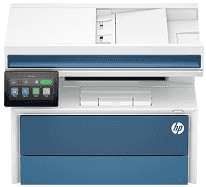
The HP LaserJet Pro MFP 4113dwg Driver lets the operating system send print and scan data to this monochrome multifunction machine. A nearby computer can use USB, or the printer can join a wired network over Ethernet. Wireless network access gives another route for jobs from compatible computers and devices. Scanned files return over the connection chosen for the setup. Copying does not depend on the computer, since copy jobs can be started from the printer’s own control panel.
HP LaserJet Pro MFP 4113dwg Drivers for Windows
620068045902345004931235f980d18321eb73b2b9e83672a905b17b6e82367733a48d17157441a5f626bf8b2b5f85c04c1a524bacff1c548f899ad90978765ec11fe40d2b794ffeb0c9f87b6f22efe7b178646c583b58276f0dc4b24872778aedbacbbb0124ff5ef320c4023d7b540c8435263b37ba06812ab63da2919534a20d6de14ae6fd549b6028ac38231b625b96f6a525a585950016ad295d97e1021092e170370e3bb5b70fc12d12bb461e94e3c7ae98a867935587164e5f02234af7f1e247debf6a84792953ce954ec0c99677259ffbd5e4af1981be2204457c15bc26b228e9035ff93fbef9c2f7272389b7afd5f7299efbb6e73956d2f225d62a29849fc3ce81c2357b3044d69ef8b849738b73c0ea856961a67d5596f598e7a60883d239d64aa753b224ac1a5c229527fba7a264eb3653fb95af54a387b27b3b1bHP LaserJet Pro MFP 4113dwg Drivers for macOS
af7c3549c57dd2fca64ed538b92fe377ed5dfd4c10c4f5ea5be569fb6a690c80a9f26effe738cf9095ac417c9527a05ea18ce88f7b814d6ddfd0a034c5acaa26HP LaserJet Pro MFP 4113dwg Specifications
The HP LaserJet Pro MFP 4113dwg is a monochrome laser multifunction machine for printing, scanning, and copying. Fax hardware is not fitted to this version. The control panel carries a 4.3-inch colour touchscreen, backed by 512 MB of memory and a 1.2 GHz processor. Black output uses a single toner cartridge, with 162A and higher-yield 162X supplies listed for the machine.
On A4 paper, print speed reaches up to 45 ppm and rises to 47 ppm on Letter. The first A4 page can come out in as little as 3.8 seconds. Black print resolution reaches 1200 x 1200 dpi, and automatic duplexing takes care of two-sided pages without manual reloading. Scanning relies on a CIS unit in the flatbed and the 50-sheet ADF, with optical resolution reaching 1200 x 1200 dpi.
Paper starts in either the 250-sheet main tray or the 100-sheet multipurpose tray. Printed sheets collect in a 150-sheet output bin, so the output side holds less paper than the standard input capacity. Tray 1 takes sizes from 76.2 x 127 mm up to 215.9 x 355.6 mm, including envelopes and labels. Longer office runs can use an optional 550-sheet tray. For stacks of originals, the 50-sheet ADF can scan both sides automatically.
A wired office setup can use Gigabit Ethernet or Hi-Speed USB 2.0, and walk-up USB is also present. Wireless jobs can travel over dual-band 802.11a/b/g/n/ac/ax networking or a direct wireless connection, with AirPrint and Mopria available for compatible devices. With the trays closed, the body measures 420 x 386 x 307 mm and weighs about 12.2 kg with toner installed. HP rates the monthly duty cycle at up to 80,000 pages, although its recommended monthly volume is much lower at up to 4,000 pages.
Technical Details
| Title | HP LaserJet Pro MFP 4113dwg Drivers |
|---|---|
| Device Type | All-in-one printer |
| Driver Version | Varies by driver and operating system |
| Available Downloads | Drivers |
| License | Free |
| Manufacturer | HP Inc. |