
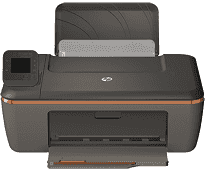
The model part number of this particular printer is CX040A, which distinguishes it from other member models of this printer series. The other models include HP Deskjet 3512 eAll-in-One, HP Deskjet Ink Advantage 3516 eAll-in-One, and others. The HP Deskjet 3511 all-in-one Printer has an 802.11 b/g/n-supported wireless feature and a rear hi-speed USB port. There is no Ethernet connection for networking.
HP Deskjet 3511 driver supports Windows XP (32-bit) Service Pack 3, Windows Vista, Windows 7 and Windows 8. The particular requirements involve an Intel Pentium III or higher processor, and a minimum of 512 MB of RAM. Others are a minimum disk free space of 750 MB for Windows XP.
HP Deskjet 3511 Drivers for Windows
a2f981526f0c15cc151f35b3fb04b11c8e4eeeb05cff9bcd7e17ed48c3713e0568367e43ff442e85bcd5106e0b6e705cccde01671affbfaf65498fe321ee9aa2bf90e80c1ccf142180079d1d821261fcbad2a20f3211d99e79b9095b2309f9fcd2f18088da8df16f0017983756626431eeeeddb0e386dd19a223c89e5a6a9c4fce728403422ec1c590fb971561abec94e476484815326373058a39afd61bccc2HP Deskjet 3511 Drivers for macOS
99e1d18847c64a405486ae34424f0a1c8d89920d17df86c45b6b0007f101d70a7400fdce2779c7a0444b368bdc9e3f167eb68a8fd1157dd01009901d27c3f6d5a677efe1b629c2695875961de9e5c4e6703f35e1c7a9d2d69b58352543008844HP Deskjet 3511 cartridges.
HP61 Black Ink Cartridge (~190 pages ), HP 61 Tri-color Ink Cartridge (~165 pages )
Drivers are available for Windows XP to Windows 11, macOS 10.6 to 10.7 and macOS 10.9 to 13 in the download section on this page. This printer gives excellent support for Mobile printing which provides for the use of Apple AirPrint and HP ePrint. Other web services applicable to this printer contain Print Apps, Scheduled Delivery Print App, etc.
The printer has interesting physical dimensions that suit it for different uses: 6.14 inches in height and 16.81 inches in width. The depth is 12.05 inches and the weight is 7.94 lbs. Bear in mind also that the measurements apply to retracted paper trays. The supported media types include envelopes, plain paper, legal, labels, photo paper, index cards and transparent films.
The print speed depends on the print mode. But at the default mode, the printer works at 7.5 pages per minute (ppm) and 8 ISO ppm speed. The printer method is a drop-on-demand thermal inkjet technology with a PCL3 GUI language. Copying is at a rate of 4.5 ppm for black and 2.5 ppm for color. The speed varies with the complexity of the document and the model in use. Notable among the copying functions is the Digital image processing.
Technical Details
| Title | HP Deskjet 3511 Drivers |
|---|---|
| Device Type | All-in-one printer |
| Driver Version | Varies by driver and operating system |
| Available Downloads | Drivers |
| License | Free |
| Manufacturer | HP Inc. |