
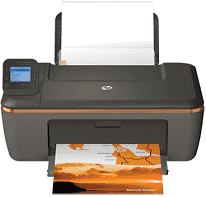
HP has designed many cost-effective and efficient printers and HP printer Deskjet 3510 is also one of them. The simple and sleek design of the printer makes it easy to keep the printer in any place you see fit. As it is an all-in-one printer, it provides a complete function of copying, printing, and scanning. You can use the printer to print, scan and copy your everyday documents with ease.
The HP Deskjet 3510 driver is compatible with both Windows and Mac OS but has different requirements for each of the operating systems. The minimum processor requirement for Windows depends on the version of Windows: Windows Vista requires an 800MHz 32- or 64-bit processor; Windows 7 and 8 need a 1GHz 32- or 64-bit processor; and Windows XP requires an Intel Pentium II or Celeron. The minimum RAM requirement is also more than 128 MB for XP, and it increases with Windows Vista, 7 and 8. For Mac, the HP Deskjet 3510 driver minimum requirement is Mac OS X Lion or OS X Mountain Lion.
HP Deskjet 3510 Drivers for Windows
a2f981526f0c15cc151f35b3fb04b11c8e4eeeb05cff9bcd7e17ed48c3713e0568367e43ff442e85bcd5106e0b6e705cccde01671affbfaf65498fe321ee9aa2bf90e80c1ccf142180079d1d821261fcbad2a20f3211d99e79b9095b2309f9fcd2f18088da8df16f0017983756626431eeeeddb0e386dd19a223c89e5a6a9c4fce728403422ec1c590fb971561abec94e476484815326373058a39afd61bccc2HP Deskjet 3510 Drivers for macOS
99e1d18847c64a405486ae34424f0a1c8d89920d17df86c45b6b0007f101d70a7400fdce2779c7a0444b368bdc9e3f167eb68a8fd1157dd01009901d27c3f6d5a677efe1b629c2695875961de9e5c4e6703f35e1c7a9d2d69b58352543008844HP Deskjet 3510 cartridges
HP61 Black Ink Cartridge (~190 pages), HP 61 Tri-color Ink Cartridge (~165 pages)
Specification:
Printing:
The printer has a speed of 7.5 pages per minute for black and white paper and 4.5 pages per minute for the colored paper. It uses a drop-on-demand thermal inkjet printing technology.
Copying:
The default copying speed of the printer is 4.5 pages per minute for black sheets and 2.5 pages per minute
Scanning:
The scanning specifications include 1200x 1200 ppi optical resolution with 24-bit color and 8-bit grayscale.
Features:
1. This printer is based on thermal inkjet technology.
2. Can Provide digital image processing.
3. It comes with an Energy Star rating.
Technical Details
| Title | HP Deskjet 3510 Drivers |
|---|---|
| Device Type | All-in-one printer |
| Driver Version | Varies by driver and operating system |
| Available Downloads | Drivers |
| License | Free |
| Manufacturer | HP Inc. |