
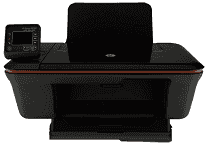
If you are seeking a wireless, multi-function and all-in-one printer, then HP Deskjet 3056A is a perfect choice for you. It can print, scan and copy documents without much trouble. This device is very light in weight, and that’s why it is appropriate for small companies and personal use.
HP Deskjet 3056A Drivers for Windows
02e57c63b698747dbf74e503cd4f0c9588fac2497cfbfbda3543ca9f6800c5089c0953e2fe2536128fd8b542f9a06c116506c592311d61271b4115800e8c6b355dd244a5286453ff13b4256284b2c5d65f4216ed9c11ad75327f5340d1ba7c3cd2f18088da8df16f0017983756626431eeeeddb0e386dd19a223c89e5a6a9c4fce728403422ec1c590fb971561abec94e476484815326373058a39afd61bccc2HP Deskjet 3056A Drivers for macOS
cba1598dc5d03fbf28fa649dafca5cd251f273066cc3a050966834a73ba66c3ebdab23450e2ecac756e19bfc66b4877b2e927e8f172489ea00708b31d9e03d993d8df9a73da44ce681f118ca9f8ad517d11efa23258dbacb8872f6160dde4f95The physical dimensions of the device are 156 mm in height, 427 mm in width and 306 mm in depth. And the weight of the device is 3.6 kg. This printer has both an input and an output tray. Both trays of the printer support a wide range of paper types, such as paper, envelopes, index cards, and photo paper. The HP Deskjet 3056A input tray capacity for plain paper is up to 50 sheets, and the output tray capacity for the same type is up to 30 sheets.
With this device, you can print documents in fast draft mode at a speed of 20 ppm for Black text and plain paper type, and it is up to 16 ppm for color paper type in the same mode. As of its copy specifications, its copy speed depends on the document complexity. The printer uses a digital image processing method to copy top-notch documents.
The scan resolution of the device is up to 1200X1200 dpi, and it comes with a TWAIN-compliant software interface to scan documents. The printer’s color bit depth stands at 24-bit and grayscale stands at 8-bit. Also, it requires an input voltage of 200 to 240 VAC, and the input frequency requirement is 50 to 60 Hz.
For its proper working, the recommended temperature is 15 to 32 degrees Celsius. It is an Energy Star device that saves natural resources and money without compromising the performance. Thus, if you want a multi-purpose printer at an affordable price, then the HP Deskjet 3056A is the one that can meet all your requirements.
Technical Details
| Title | HP Deskjet 3056A Drivers |
|---|---|
| Device Type | All-in-one printer |
| Driver Version | Varies by driver and operating system |
| Available Downloads | Drivers |
| License | Free |
| Manufacturer | HP Inc. |