
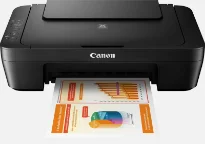
The Canon PIXMA MG2555S printer model belongs to the Canon PIXMA MG2550S inkjet printer series with a tri-function performance. The machine has a print resolution of up to 4800 x 600 dots per inch (dpi) through modern print technology, which includes printing, copying, and scanning documents, which brings out the best yield.
PIXMA MG2555S driver Downloads for Microsoft Windows 32-bit – 64-bit and Macintosh Operating System.
Canon PIXMA MG2555S Drivers for Windows
1779d9c7a2c12d958e8a7518ee0c3f9f6186ad0f1139878cbaf6b3eb0ad23c7bb1af9c7ab98ad05424e7c6117e5c82a524b0ccb55e2a0956a137a6eec291659fc95b1f057437ef6ae88907f4a6f8e0ee3ab02e5f1770529f291c5e1bf290e3988dd427942e8e31c574841b714286f9171dafe7b49dd781ec9b62ff0cc61cf1a415e26104a051d3f79061242bb8114e3d81f35bbe709d14bb07a6284eb01471d0Canon PIXMA MG2555S Drivers for macOS
49b2e3a89e2ddf0172a022ace7d2a7ab924cad3c47b890eb7fdf40ae5ba5ca1a62562cd706fa4a34403dec7eec8cb0c13b0c4654e3284c089740abfed8c3df50eb24012644d893cd992b9f42c1db83d81db76835dc320453d404faa44e2520153181a930a18df5a3a324414de19958b2b1228b071a99d33b3ff346e5cf372effd91cf94015a8df158d1689bda0deb38103381abafeb7b09ccd4e0e9b9f4c9d53806327eca528d000b69de6f98a97e326e6d01e013ea0abe1a0d55d2d850b2414806327eca528d000b69de6f98a97e326e6d01e013ea0abe1a0d55d2d850b2414Canon PIXMA MG2555S Specifications
Supported Ink Cartridges
Black PG-445 Inkjet Cartridge – Approx 180 pages
CL-446 Tri-Colour Ink Cartridge – Page Yield upto 180 pages
There are 2 FINE cartridges, one each for black and color documents. Monochrome printing runs at a rate of 6.0 images per minute (ipm). Color print speed is at the rate of 4.0 ipm without support for borderless printing. However, it supports two-sided printing, which is also duplex printing by manual operation. The weight of the Canon PIXMA MG2555S model is approximately 3.5 kg. It has a width of 426 mm, a depth of 306 mm, and the height is 145 mm. The device’s operating temperature is between 5 and 35°C. Besides, the operating humidity is between 10 and 90% with no dew condensation.
The power source for the machine is an alternating current between 100 and 240 volts at 50/60 Hz. In terms of power consumption, when the printer is off, it uses only 0.4 watts. But the standby mode with connection to the PC via USB uses only 1.0 watts. It takes only about 7 minutes for the machine to enter the standby mode while copying requires 9 watts. The Canon PIXMA MG2555S device is compatible with Microsoft components with exceptional support for Windows OS and Mac OS brands.
When copying with this device, the rate of work is approximately 31 seconds for the first page. But subsequent pages can copy at 1.6 ipm while other factors remain constant. Some of the other copy functions include the use of A4 with a 17 mm bottom print margin. Besides, the document copying works with plain paper.
Technical Details
| Title | Canon PIXMA MG2555S Drivers |
|---|---|
| Device Type | All-in-one printer |
| Driver Version | Varies by driver and operating system |
| Available Downloads | Drivers |
| License | Free |
| Manufacturer | Canon Inc. |