
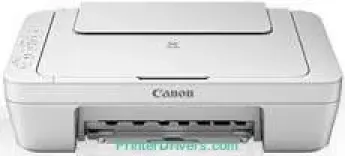
The Canon PIXMA MG2940 printer model’s ideal functions include printing, scanning, copying, cloud storage, and Wi-Fi print. Users can expect a maximum resolution of 4800 x 600 dots per inch (dpi) from this printer. Also, its integrated print technology is the modern inkjet system with a minimum ink droplet size of 2 picolitres (pl). The speed of machine printing largely depends on the printing mode.
PIXMA MG2940 driver Downloads for Microsoft Windows 32-bit – 64-bit and Macintosh Operating System.
Supported Ink Cartridges
PG-445 Black Ink Cartridge – Approx 180 pages
Colour CL-446 Ink Cartridge – Yields upto 180 pages
Canon PIXMA MG2940 Drivers for Windows
94ccafea61ef8ce2c6038a0f8001971e1e00075630b7c06a93dd23ebba7f130545e7547802c419056493d11c607a377aa66870cb1704e7f1738190035a13873c89e88bf1c8e0963d5c07bd98001c6022fefe5b98cba487b49d5ab7e3767d66008dd427942e8e31c574841b714286f9171dafe7b49dd781ec9b62ff0cc61cf1a415e26104a051d3f79061242bb8114e3d81f35bbe709d14bb07a6284eb01471d0Canon PIXMA MG2940 Drivers for macOS
b219dcba0f4008395e336399e5e441469c3ef651496500802afc00a16408ce2c05051b78f85d213c11c87ddc8aed2e84b7e17b06742c9487a790917f3cc89b3fb0d12519e79bb60c4cc8d37171bec8178158d0f2c81aa152f9e5aa3766eb84ea1afeb535ed397255d08a42020061171252a1a3849ea8a8a96d7cfaa19ec0d7ac8946a6442a6cae0e5642f76103e12a7bbc9855fe176f36a73fd5777f10b8e9a9Canon PIXMA MG2940 Drivers for Linux
07a441231fa9e7cc7c32e1ef126916ab54945382facf01e68a00785beacebf92e5bbd191ec8b36a204cc2c8c2468d1ee1050ea53b68b304c5c268eda8537f51c42a5c9e956c701f88537471eb1054f38a293e3df4396cdb337c0c3ecdcaa5ae4015e689b9106804871be22771742a2c5046ee40f89bf856058036c909055bdf15482b5bac88cc7a857a527573de16a95c7bfae5d3fac9efd7c5dbd957cc59c8c468103a27a4bfeb20f9233c45f97afa807091ca97255b94b129402a00a56cb20Canon PIXMA MG2940 Specifications
For instance, when the printer is working on a black and white document, the speed is about 8.0 ipm. But printing in color has a rate of 4.0 images per minute (ipm). It also has duplex printing, which is also two-sided printing for both sides of the print paper. In terms of the cartridge types and capacity, standard cartridge models are the PG-445 for black and CL-446 for color. But there are also XL cartridge models for higher print yield than the standard cartridge types.
Considering the media types, the Canon PIXMA MG2940 model can print on plain paper, envelopes, and photo paper types. Besides, the compatible standard sizes are A4, B5, A5, legal, letter, photo paper, and envelope sizes. The maximum paper input load is up to 60 sheets of plain paper that pass through the rear tray. When the machine is at work, the plain paper load must have a weight range between 64 and 105 gsm. However, Canon photo paper can allow a maximum weight of 275 gsm.
Under the scanning specifications, its working component is the contact image sensor (CIS) with a document and photo scanner. The maximum optical resolution is about 600 x 1200 dots per inch (dpi), while the average speed is 14 seconds. Also, the scanning depth by input/output is 48bit/24bit for color and 16bit/8bit for greyscale. Also, the maximum document size for scanning is about 216 x 297 mm.
Technical Details
| Title | Canon PIXMA MG2940 Drivers |
|---|---|
| Device Type | All-in-one printer |
| Driver Version | Varies by driver and operating system |
| Available Downloads | Drivers |
| License | Free |
| Manufacturer | Canon Inc. |