
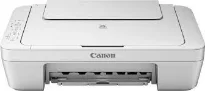
Canon PIXMA MG2550 is a unique machine in its sense with its multifunction ability to print, copy, or scan. The model’s print resolution is up to 4800 x 600 dots per inch (dpi) to produce the optimum yield of performance. Inside this printer, the infused print technology has 2 FINE cartridges that can print in black and color. This technology comes with a minimum ink droplet size of 2 picolitres (pl). Monochrome or black and white printing runs at a rate of 8.0 images per minute (ipm).
Canon PIXMA MG2550 Drivers for Windows
b1af9c7ab98ad05424e7c6117e5c82a524b0ccb55e2a0956a137a6eec291659f1779d9c7a2c12d958e8a7518ee0c3f9f6186ad0f1139878cbaf6b3eb0ad23c7bc95b1f057437ef6ae88907f4a6f8e0ee3ab02e5f1770529f291c5e1bf290e3988dd427942e8e31c574841b714286f9171dafe7b49dd781ec9b62ff0cc61cf1a415e26104a051d3f79061242bb8114e3d81f35bbe709d14bb07a6284eb01471d0Canon PIXMA MG2550 Drivers for macOS
1e8ac6b36e6463bc97681c359bf68bc4572982f7cfd716a34c93af1e9c28711984bd69329d3584c63454549048dcfa7e80ab7093076f4b018401f817b9c31c98eb24012644d893cd992b9f42c1db83d81db76835dc320453d404faa44e2520153181a930a18df5a3a324414de19958b2b1228b071a99d33b3ff346e5cf372effd91cf94015a8df158d1689bda0deb38103381abafeb7b09ccd4e0e9b9f4c9d53806327eca528d000b69de6f98a97e326e6d01e013ea0abe1a0d55d2d850b2414806327eca528d000b69de6f98a97e326e6d01e013ea0abe1a0d55d2d850b2414fcaa71492dc0e6f81ffd11c9b61bc1c8ceca490369f5cb38c71823179b8c401fa4cf827450cf8054b2ef3feffac6121a3511e3ad2ae6f2dbf298de0e9b600863Canon PIXMA MG2550 Drivers for Linux
5e39576edadd2aebf4522f5fd7c647159c95a1a725df6c6c91481432805d0e74388710d24632d791a80b626166f40c1e56261b5aa4d5432e7c057a54d7601141f722567b3c24dd12a07ca00952a09859cff875585e794f15dc1814c45f5d02bc35b56a27bde8eade5eba24fa44cc2d203acd17ce947900b7f6759af81ba7499802cf66aaa3f1f8b50e2c105720f710b97d4539706918bcb4f5a9667b546b0774a5741c9f7219f02b68b53cd295d695a7782e070f7e681634f06cd15eefae2a6cPIXMA MG2550 driver Downloads for Microsoft Windows 32-bit – 64-bit and Macintosh Operating System.
Ink Cartridge Details
PG-545 Black Ink Cartridge – Upto 180 pages
Colour CL-546 Ink Cartridge – Yields approx 180 pages
On the other hand, color printing has a speed of 4.0 ipm but cannot work with borderless printing. Canon PIXMA MG2550 printer model also supports the manual operation. It uses standard ink cartridges including PG-545 for black print and CL-546 for color printing. Conversely, there are two optional cartridge models, such as PG-545 XL and CL-546 XL. On the one side, the standard cartridges can print 180 pages each, while XL models produce 400 and 300 pages.
The basic paper types include plain paper, envelopes, photo paper plus glossy II, and photo paper bright “everyday use.” It also has a rear tray that can hold up to 60 sheets of plain paper. However, the standard paper sizes include DL envelopes, COM10 envelopes, A4, A5, B5, legal, letter, and photo sizes. But the paperweight is between 64 and 105 gsm while Canon photo paper allows a maximum of 275 gsm. The machine has no display component for measuring status.
The machine can connect with both PC and Mac systems through a hi-speed USB 2.0 B-port for both. The supported mobile system is Windows RT, which works for mobile phones and tablets. It also supports operating system versions such as Windows 10, 8, 7, Vista, XP SP3, and MacOS X 10.6.8. A printer driver is available for Windows 11.
Technical Details
| Title | Canon PIXMA MG2550 Drivers |
|---|---|
| Device Type | All-in-one printer |
| Driver Version | Varies by driver and operating system |
| Available Downloads | Drivers |
| License | Free |
| Manufacturer | Canon Inc. |