
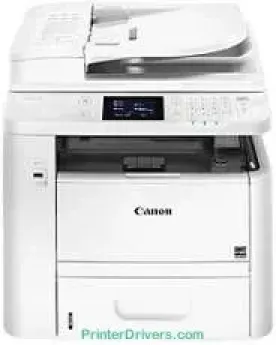
Canon imageCLASS MF419dw is another tremendous printer model with an exceptional monochrome printer that produces excellent speed. Simultaneously, the rate of printing in the duplex mode is up to 17 pages per minute (ppm). On the flip side, the speed of printing in a one-sided manner is up to 35 ppm with letter paper. But the first print time is up to 6.4 seconds or even less with letter size. The supported printer language includes UFR II with a host-based component.
imageCLASS MF419dw driver Downloads for Microsoft Windows 32-bit – 64-bit and Macintosh Operating System.
Supported Toner Cartridges: 119 Black Toner Cartridge
Canon imageCLASS MF419dw Drivers for Windows
c1c5055f92d0038dc413afca50da81a9b479a8e89030436dff52f367df0283efc1c5055f92d0038dc413afca50da81a9b479a8e89030436dff52f367df0283ef04d2e8b6f97ecdbf6149ef728dccd1e27a7ad604327a8fa2972b7d5b6323ac32484d887fc334579b3dc3a8bc75da393a9e3965472a7d23778e61bd2de5b0bee20f9c6406c46b234f582a575d1581efe532fa405c5390a18408e0a3cd074c9611c60ae7abde74362ee1fc65c30bd9d6dbd210613ae7713e332cb28ca73d2602cecc9fe8041f6b7403c0108aa3c9b9209210547ba60a10856077b549ca8eb5091d619b667d35e5321311eb164c1208530c41dc9e0ce5760b4f402d484aaf844cb3427b89bc8d04fad2cd44ff669aa188f9c594e14fa7a4377a6036d303db7140f33ae3a9bec19da4981fa9ffa55ea4f53d8846c5a1f2e740bf9ee2b1e5f1a7507a67848f2ffe82014020b49aa76457fe642a2f64a872ec988c6ab9971ee61ddd66ebb6942bb8085863a46395bb3dd10ea6a7bddb9f20737ac093b183549c03de690cbcdc48fadbe7ec928ffd8b05bb6813ea056ad9d4b3e7473fa76dd1f5d1de7284c3f334b0f856222b8eed352c7ba34b7b81539648effe54499b3e74fab8d55929e364d2f61030c452e4bc1fe021763f9104df7571c9f424ea1e6cb7d3ae3db10720c4746a3ae9e275062dca7e8ad87cd65fc39927feb844f0f05b8cf64ad571a2bc8d3788b40a988e601879c7178b38569e43ea26256cddb57d63fac655fdec0d4f501e637282f476f558da6d428a536f40bdaf69f972730f29ca6ed53bfe027041e132bc8cb51f82da4f68b9431414fb5a3421b8eccf71b772c16d24b7a185bb1077d07d7227f4ad228fb4e533fa207297ad682564f2a8f0fb15e49f3d2b9a636afb70d89aad0eddbd50fb1d8a784344bf23a95c5f078a00be3d231680db8e57f0f872dd5399978d93341ed0cb55757a432d7fb27ad51a2da192a6b74d580e8489588dc560880fa58e7af3f4a0b67d115b55dfbf3ee02e20ba4e64f1a399d35ce34dce406f36dd4468fa4e86676ad211a0ebe5026fd2007168c92b420d76511323957bc0dfb873feb7615df02432e15cf188e7fe6cdcac00f6ac0d4566f71d208591d3c62613ef02343cfcd7f8c7c6b45dddefcf416acfa279ee14f3a9b898718da3e0d2ed9e4a733cf17978feb753b4d1893c6592e3b445e0d563083f9f2a62814c49ae0caf9cce45a46e56a251fc5a3590abad2b4ce28b41d0bc591b89a06ab4cde98bfb0e091794c5c7559dabe695a1a51a6290bce5bd933cee4974b99fd71391ae208d0bd8009c2bd5bd3828d2bff8f394808ccf482e345c6adc373144a1d0b961fdd798587bb750d58bd88e2d4d862e5c59dbd8da495333aaf3a7cd41e28f9a1833e68475afc71d7ef976dd021c8b8cdf16b52839422c8e9cfc5b6ae94d55a4a3e3f5a130bc7a9ccfc5f72f91edf71646e99efe25e959fc74157e973fCanon imageCLASS MF419dw Drivers for macOS
d5f10278e0dd91a898757299adb4a566e5f14e6ad073c885da268768b7b8172edc0b747649fd9f72c6908765afdccac3720f84838bd6491360b431c69ee2fd6aff5d80d992a0f8b003104ffdc1bdf36bfe8bce0aa49cce77b27cdc9a95a5776ca2f4cd0e35483928ff487a3267ea5c930711de5d487220a3d3402f65c263e8e66708a180dad9484c82047dc4624ec4b3dd3438231e6ac5cbcdba793755e1ddb46790fad87cfd6df48f74ed732c2c222f5baa62e7a17958b029f2efd102ce36315efcaeccd8b1f1103d2bb966199a47fc50f0116996d987bd51178d61474c215169ef5f30da4c92762d2a5b614957892f1b542e16a07d53fec92f92bc3051fe328a9fe8a3ad9ee02fb65e10e05eda1e6d8e6ba268fa987a6e164d5ba661bb1240ddd1a155fe623f7f913e5bf860233ad73ccaaa5a5814b9b1e9353dd6501d88f735dc19aa61aba625226444a79ce3488bb61f99b0c653d1abf054c9b471d5a1b36321f7ffd7900bcf8e4b8ce99f0d3d7af91556b836e302306ae8a25a2e16df9de7931af2339fea2198ae845c6357e921538761f3610de796cbbf426d81eebfd382479e45d013253d1629fa59133d3c05fa5002f39303f4f772912d334dc6f395e36a86682555814ab749d6fcc4df5ae336b34c5effd7760bbbc8330cb7e07d40272765a3f84315bd212c67b3fff1852f23a365abc5b0e061b1b5e25ed0dd811a917e7c7089148ed46d637656f66159b2042287e9084b2b921ae5b5f5c0eb0e48c5310bca335d137d5d319b3536e7bd3bca38355c1bd03236c03a8c33fc0acd3ee65a67c44f07e8c6ecf20e167ae2d83d355023809358287d3a2badbce6507585e6a48ab862ab2fa01c7793bae9776d4de130b89fe50e189ff8c78d1e5fa6183dc5875b37125b8c8a32cad84148bab04417f7abf39551d213d21db0084be432cc0297641744ea447acd804af112d0693e6588ba52e03feaf0d3150446eb3e84f5cd403b42f9117b3534b580cc059e657ae4f18497b4b9c846bd39602446daae289dd3f1b1c7dc175ab7cd4bb929f902c55966150a6a0273dbb36ccad0f146006aCanon imageCLASS MF419dw Drivers for Linux
b39c36f244b3a910c952a0b10342f846f5065c4decdbee1babc2505c65343f19Canon imageCLASS MF419dw Specifications
The print resolution may vary, but the maximum quality is up to 1200 x 600 dots per inch (dpi). It also supports a full print size of up to 8.5 x 14 inches for legal-sized paper. This machine in the print mode can also produce a watermark, page composer, booklet, and toner saver. Its internal shared memory is up to 1 GB and is responsible for data storage and printing. In a direct print mode, the supported formats include PDF, TIFF, and JPEG.
The device’s modem speed is up to 33.6 kbps while using the Super G3 processor under faxing. Simultaneously, the faxing resolution is not more than 406 x 391 dpi with an ultra subtle component. In comparison, the transmission time of the mode is approximately 3 seconds per page. This model also has a memory capacity of up to 512 sheets with about 281-speed dials. It also supports up to 310 destinations for its broadcasting.
Faxing also supports receive modes such as Fax only, answering, manual, fax/tel auto switch. But the other faxing features include fax forwarding, dual access, PC fax when sending, and ECM. Its activity reports include fax activity, result reports, fax activity management reports. Similarly, fax forwarding includes SMB, FTP, iFax sample, and E-mail.
Technical Details
| Title | Canon imageCLASS MF419dw Drivers |
|---|---|
| Device Type | All-in-one printer |
| Driver Version | Varies by driver and operating system |
| Available Downloads | Drivers |
| License | Free |
| Manufacturer | Canon Inc. |