
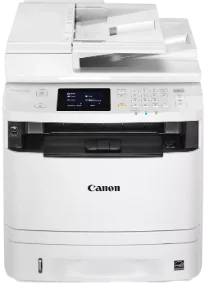
Monochrome printing with the Canon imageCLASS MF414dw model produces top-quality output at fantastic speed. It also has a speed of up to 17 pages per minute (ppm) when printing on both sides of the paper. On the flip side, the printing rate is up to 35 ppm during the one-sided printing mode. Besides, the first print time is about 6.4 seconds or even less when using the letter-sized paper. Similarly, the supported printer languages include the PCL 5c, PCL XL, and the host-based UFR II.
Canon imageCLASS MF414dw Drivers for Windows
c1c5055f92d0038dc413afca50da81a9b479a8e89030436dff52f367df0283efc1c5055f92d0038dc413afca50da81a9b479a8e89030436dff52f367df0283efd8e463505298f05934015f45615c10b5a46fd76a8891d9656d2715be490786a96e0231df2bc994176723bf67b28263786b2b3e6ac5df81286842a78a1c27114d0a54440677db13a6306081b5281edd2265717657d96e00e05d61cab0fd6ab0b7ab06b4ca4e6b96740e86bc83f313b9da6af77fed24ede730682fd05be1c26baf0d4f501e637282f476f558da6d428a536f40bdaf69f972730f29ca6ed53bfe02a2bc8d3788b40a988e601879c7178b38569e43ea26256cddb57d63fac655fdecc60ae7abde74362ee1fc65c30bd9d6dbd210613ae7713e332cb28ca73d2602cebb1077d07d7227f4ad228fb4e533fa207297ad682564f2a8f0fb15e49f3d2b9a7041e132bc8cb51f82da4f68b9431414fb5a3421b8eccf71b772c16d24b7a18557f0f872dd5399978d93341ed0cb55757a432d7fb27ad51a2da192a6b74d580e636afb70d89aad0eddbd50fb1d8a784344bf23a95c5f078a00be3d231680db8e04d2e8b6f97ecdbf6149ef728dccd1e27a7ad604327a8fa2972b7d5b6323ac325ce34dce406f36dd4468fa4e86676ad211a0ebe5026fd2007168c92b420d76518489588dc560880fa58e7af3f4a0b67d115b55dfbf3ee02e20ba4e64f1a399d30f9c6406c46b234f582a575d1581efe532fa405c5390a18408e0a3cd074c96112d97ead841d426ddb38a488cfe967b2b49aa89286fcf271af0ce96685b45ad2c041d82c9bcc80559e68ff68c6ba4ad4b306aa68506bf8ce00e71b99fdb985558cfe557946e69a58fbd83d2cf6ff6641be9e10624362f28ec6d414790303e17c6ec252ebd13b65d30d03910b256ba25720b7f8f84ab958a3e343a9ff44c0198f93ae3a9bec19da4981fa9ffa55ea4f53d8846c5a1f2e740bf9ee2b1e5f1a7507a427b89bc8d04fad2cd44ff669aa188f9c594e14fa7a4377a6036d303db7140f3484d887fc334579b3dc3a8bc75da393a9e3965472a7d23778e61bd2de5b0bee2208591d3c62613ef02343cfcd7f8c7c6b45dddefcf416acfa279ee14f3a9b8981323957bc0dfb873feb7615df02432e15cf188e7fe6cdcac00f6ac0d4566f71dbfe0eb5da0704a1ead08d62abcaad77b93dbe9887cbbef1220fe9ac8b47ffa0993fe1355abd4a92e1f64fd2c59ed2fadbd86a63ad22776f06d63b753f56541fc0793ccc7bbcb9b575bde84842a172c08ca890a97938e35b82d0ff7c8cb0379b5de56033f3245fcb34e2e7b291a7aaa4c5c3810bb3294ae9cbdf27e8908830120e28f9a1833e68475afc71d7ef976dd021c8b8cdf16b52839422c8e9cfc5b6ae9a1d0b961fdd798587bb750d58bd88e2d4d862e5c59dbd8da495333aaf3a7cd414d55a4a3e3f5a130bc7a9ccfc5f72f91edf71646e99efe25e959fc74157e973fCanon imageCLASS MF414dw Drivers for macOS
b6ddb33c456e76b77c69654f2216908bce41d1c2f4c7b496f268dd5603748e09aaada4153be3b6cfa1ce7ebcf30b0758b1929a6ef8aea97857a0955911ce9e12fe736014202dd4dc2cc4b5618076a08306ebd2cadd738ee8c501bc1619fc19e735223b2977d71ab373eafd6f14f28daa933cd2dcdc4b0d818da4a4432b14366879b3e920a4196ee4aaf6d17c5a095266ecf44e51626bd2902b01fa785dcd4075d5f10278e0dd91a898757299adb4a566e5f14e6ad073c885da268768b7b8172eff5d80d992a0f8b003104ffdc1bdf36bfe8bce0aa49cce77b27cdc9a95a5776c86d5330d84af4dcc7458630c4999aae2495eebf5e1e3c6688e6e7c0453cb25a16708a180dad9484c82047dc4624ec4b3dd3438231e6ac5cbcdba793755e1ddb45efcaeccd8b1f1103d2bb966199a47fc50f0116996d987bd51178d61474c215169ef5f30da4c92762d2a5b614957892f1b542e16a07d53fec92f92bc3051fe328a9fe8a3ad9ee02fb65e10e05eda1e6d8e6ba268fa987a6e164d5ba661bb1240917e7c7089148ed46d637656f66159b2042287e9084b2b921ae5b5f5c0eb0e48c5875b37125b8c8a32cad84148bab04417f7abf39551d213d21db0084be432ccddd1a155fe623f7f913e5bf860233ad73ccaaa5a5814b9b1e9353dd6501d88f7c5310bca335d137d5d319b3536e7bd3bca38355c1bd03236c03a8c33fc0acd3e0297641744ea447acd804af112d0693e6588ba52e03feaf0d3150446eb3e84f535dc19aa61aba625226444a79ce3488bb61f99b0c653d1abf054c9b471d5a1b3e65a67c44f07e8c6ecf20e167ae2d83d355023809358287d3a2badbce6507585cd403b42f9117b3534b580cc059e657ae4f18497b4b9c846bd39602446daae286321f7ffd7900bcf8e4b8ce99f0d3d7af91556b836e302306ae8a25a2e16df9de6a48ab862ab2fa01c7793bae9776d4de130b89fe50e189ff8c78d1e5fa6183d9dd3f1b1c7dc175ab7cd4bb929f902c55966150a6a0273dbb36ccad0f146006aCanon imageCLASS MF414dw Drivers for Linux
d58796ee5518feee485119683cf7caa705668652803b8f0fb60177472ebe6d3bimageCLASS MF414dw driver Downloads for Microsoft Windows 32-bit – 64-bit and Macintosh Operating System.
Toner Cartridge Details: Black 119 Toner Cartridge
The Canon imageCLASS MF414dw printer model can print at a resolution of up to 1200 x 600 dots per inch (dpi). It has a maximum print paper size of 8.5 x 14 inches and supports duplex printing. The print modes that apply to this machine include poster, booklet, toner saver, and page composer. This device also has 1 GB of internal shared memory with its supported formats: the supported file formats are JPEG, TIFF, and PDF.
Copy specifications of this Canon imageCLASS MF414dw machine show that the device produces the same resolution and speed for printing and copying processes. Original file types for this device include text, photo, or a combination of both types. It has 256 levels of halftones, while the warm-up time is about 16 seconds from ‘power on’ mode. The first copy time is about 10 seconds or less, while the recovery time is 5 seconds or even less.
The modem speed of the machine is up to 33.6 kbps with the Super G3 processor. Simultaneously, this mode produces a faxing resolution of 406 x 391 dots per inch (dpi) for the ultra-fine mode. It also has a transmission time of up to 3 seconds per page using all necessary components.
Technical Details
| Title | Canon imageCLASS MF414dw Drivers |
|---|---|
| Device Type | All-in-one printer |
| Driver Version | Varies by driver and operating system |
| Available Downloads | Drivers |
| License | Free |
| Manufacturer | Canon Inc. |