
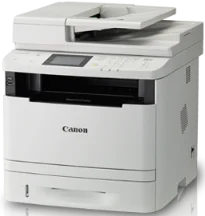
Printing with the Canon imageCLASS MF416dw model of printer ensures an optimum print service at a great speed and quality. The machine is a monochrome laser beam printing device with an average speed of 33 pages per minute. This rate applies to the use of A4 paper, whereas the print quality resolution is 600 x 600 dots per inch (dpi). But the print quality of image printing is 1200 x 1200 dpi.
Canon imageCLASS MF416dw Drivers for Windows
c1c5055f92d0038dc413afca50da81a9b479a8e89030436dff52f367df0283efc1c5055f92d0038dc413afca50da81a9b479a8e89030436dff52f367df0283efd8e463505298f05934015f45615c10b5a46fd76a8891d9656d2715be490786a96e0231df2bc994176723bf67b28263786b2b3e6ac5df81286842a78a1c27114d0a54440677db13a6306081b5281edd2265717657d96e00e05d61cab0fd6ab0b7ab06b4ca4e6b96740e86bc83f313b9da6af77fed24ede730682fd05be1c26baf0d4f501e637282f476f558da6d428a536f40bdaf69f972730f29ca6ed53bfe02a2bc8d3788b40a988e601879c7178b38569e43ea26256cddb57d63fac655fdecc60ae7abde74362ee1fc65c30bd9d6dbd210613ae7713e332cb28ca73d2602cebb1077d07d7227f4ad228fb4e533fa207297ad682564f2a8f0fb15e49f3d2b9a7041e132bc8cb51f82da4f68b9431414fb5a3421b8eccf71b772c16d24b7a18557f0f872dd5399978d93341ed0cb55757a432d7fb27ad51a2da192a6b74d580e636afb70d89aad0eddbd50fb1d8a784344bf23a95c5f078a00be3d231680db8e04d2e8b6f97ecdbf6149ef728dccd1e27a7ad604327a8fa2972b7d5b6323ac324a98330af919b0fac3a1a441d032f5850a117403e84f288e284d681df52a13be2fc5d695d5a90c870505748cf09fa944f64d9d731257651dae8d32af4134a9d10dcd01f780afdd8ea6159f16beace40bd5a7f313268f194ec60fb5f4b8a813bbfaf3b14fd344e4824698372d4669b7a90aba0822f5c3b317a3608b90842f857484c3f334b0f856222b8eed352c7ba34b7b81539648effe54499b3e74fab8d5590cbcdc48fadbe7ec928ffd8b05bb6813ea056ad9d4b3e7473fa76dd1f5d1de7262814c49ae0caf9cce45a46e56a251fc5a3590abad2b4ce28b41d0bc591b89a0718da3e0d2ed9e4a733cf17978feb753b4d1893c6592e3b445e0d563083f9f2a5ce34dce406f36dd4468fa4e86676ad211a0ebe5026fd2007168c92b420d76518489588dc560880fa58e7af3f4a0b67d115b55dfbf3ee02e20ba4e64f1a399d30f9c6406c46b234f582a575d1581efe532fa405c5390a18408e0a3cd074c96112d97ead841d426ddb38a488cfe967b2b49aa89286fcf271af0ce96685b45ad2c041d82c9bcc80559e68ff68c6ba4ad4b306aa68506bf8ce00e71b99fdb985558cfe557946e69a58fbd83d2cf6ff6641be9e10624362f28ec6d414790303e17c6ec252ebd13b65d30d03910b256ba25720b7f8f84ab958a3e343a9ff44c0198f93ae3a9bec19da4981fa9ffa55ea4f53d8846c5a1f2e740bf9ee2b1e5f1a7507a427b89bc8d04fad2cd44ff669aa188f9c594e14fa7a4377a6036d303db7140f3484d887fc334579b3dc3a8bc75da393a9e3965472a7d23778e61bd2de5b0bee2208591d3c62613ef02343cfcd7f8c7c6b45dddefcf416acfa279ee14f3a9b8981323957bc0dfb873feb7615df02432e15cf188e7fe6cdcac00f6ac0d4566f71dbfe0eb5da0704a1ead08d62abcaad77b93dbe9887cbbef1220fe9ac8b47ffa0993fe1355abd4a92e1f64fd2c59ed2fadbd86a63ad22776f06d63b753f56541fc0793ccc7bbcb9b575bde84842a172c08ca890a97938e35b82d0ff7c8cb0379b5de56033f3245fcb34e2e7b291a7aaa4c5c3810bb3294ae9cbdf27e8908830120e28f9a1833e68475afc71d7ef976dd021c8b8cdf16b52839422c8e9cfc5b6ae9a1d0b961fdd798587bb750d58bd88e2d4d862e5c59dbd8da495333aaf3a7cd414d55a4a3e3f5a130bc7a9ccfc5f72f91edf71646e99efe25e959fc74157e973fCanon imageCLASS MF416dw Drivers for macOS
96a508b8817dcf2f4b7b59ad21e195a640c540ff08a6411639aa7834d23e0743f1060d911d60e9eec0d8bbce4eea0ce63bad2dc9ce7f31cf9f8dd79e64d2b9c5cb41803f7db3dba7467715a8b0eb892c101e0c4c2dd082f285dfd820d8f432a36ad260f511b97e8c3121c13e74d8266d5288007f6a56b64927f5f675629ac29db6ddb33c456e76b77c69654f2216908bce41d1c2f4c7b496f268dd5603748e09120d84051404d68ff23facc20ca6068b52d890770b6a9f100e82adfa5277a5aa35223b2977d71ab373eafd6f14f28daa933cd2dcdc4b0d818da4a4432b14366879b3e920a4196ee4aaf6d17c5a095266ecf44e51626bd2902b01fa785dcd4075d5f10278e0dd91a898757299adb4a566e5f14e6ad073c885da268768b7b8172edc0b747649fd9f72c6908765afdccac3720f84838bd6491360b431c69ee2fd6aff5d80d992a0f8b003104ffdc1bdf36bfe8bce0aa49cce77b27cdc9a95a5776c86d5330d84af4dcc7458630c4999aae2495eebf5e1e3c6688e6e7c0453cb25a16708a180dad9484c82047dc4624ec4b3dd3438231e6ac5cbcdba793755e1ddb46790fad87cfd6df48f74ed732c2c222f5baa62e7a17958b029f2efd102ce36315efcaeccd8b1f1103d2bb966199a47fc50f0116996d987bd51178d61474c2151c98999b876d4bc8928e9adbfd33748039773dbb01850e711679363ae3e93785b8a9fe8a3ad9ee02fb65e10e05eda1e6d8e6ba268fa987a6e164d5ba661bb1240e7931af2339fea2198ae845c6357e921538761f3610de796cbbf426d81eebfd3917e7c7089148ed46d637656f66159b2042287e9084b2b921ae5b5f5c0eb0e48c5875b37125b8c8a32cad84148bab04417f7abf39551d213d21db0084be432ccddd1a155fe623f7f913e5bf860233ad73ccaaa5a5814b9b1e9353dd6501d88f782479e45d013253d1629fa59133d3c05fa5002f39303f4f772912d334dc6f395c5310bca335d137d5d319b3536e7bd3bca38355c1bd03236c03a8c33fc0acd3e0297641744ea447acd804af112d0693e6588ba52e03feaf0d3150446eb3e84f535dc19aa61aba625226444a79ce3488bb61f99b0c653d1abf054c9b471d5a1b3e36a86682555814ab749d6fcc4df5ae336b34c5effd7760bbbc8330cb7e07d40e65a67c44f07e8c6ecf20e167ae2d83d355023809358287d3a2badbce6507585cd403b42f9117b3534b580cc059e657ae4f18497b4b9c846bd39602446daae286321f7ffd7900bcf8e4b8ce99f0d3d7af91556b836e302306ae8a25a2e16df9d272765a3f84315bd212c67b3fff1852f23a365abc5b0e061b1b5e25ed0dd811ae6a48ab862ab2fa01c7793bae9776d4de130b89fe50e189ff8c78d1e5fa6183d9dd3f1b1c7dc175ab7cd4bb929f902c55966150a6a0273dbb36ccad0f146006aCanon imageCLASS MF416dw Drivers for Linux
d58796ee5518feee485119683cf7caa705668652803b8f0fb60177472ebe6d3bCanon imageCLASS MF416dw Supported Toner Catridges
Toner Catridge Canon 119 : Yield upto 2,100 Pages
Cartridge Canon 119II Toner : Yield Approx. 6,400 Pages based on ISO/IEC Standard
Furthermore, with the use of a refinement technology, the resolution can reach 2400 x 600 dpi or equivalent. The warm-up time from the Power On is about 16 seconds or even less. And the first printout time is 6.3 seconds or less when the A4 paper is in use with the machine. Also, the recovery time from Sleep mode is about 5.0 seconds or even less. The device is also compatible with some print languages such as UFR II, PCL 6, and Adobe PostScript 3 emulation.
The machine Canon imageCLASS MF416dw also has an automatic duplex component for standard printing, and it supports A4, legal, letter, and foolscap sheets. The print margins include a 5 mm space at the top, bottom, left, and right sides of the paper, whereas when an envelope paper is in use, the print margin is a 10 mm space on all four sides. It supports file formats like JPEG, TIFF, and PDF for direct print from the USB 2.0 hi-speed port. Other critical print features include the poster, page composer, toner saver, watermark, and booklet.
Scanning with this device is through the color contact image sensor (CIS) technology. It has a speed of 3 seconds for the monochrome and 7 seconds for color scanning. Also, the color depth is 24 bits while there is duplex scan support for both sides of the paper.
Technical Details
| Title | Canon imageCLASS MF416dw Drivers |
|---|---|
| Device Type | All-in-one printer |
| Driver Version | Varies by driver and operating system |
| Available Downloads | Drivers |
| License | Free |
| Manufacturer | Canon Inc. |