
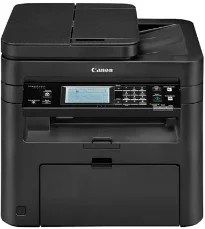
The Canon imageCLASS MF249dw printer has physical dimensions that include a width of 15.4 inches and a depth of 14.9 inches. Besides, the height is up to 14.2 inches, while the net weight is about 28.9 lbs without the cartridge. Nevertheless, when the cartridge is in place, the machine’s weight is about 30.3 lbs. At the same time, the package weight of this device is up to 37.5. The printer has a liquid crystal display (LCD) screen that is tiltable and touchable.
Canon imageCLASS MF249dw Drivers for Windows
82c7dd01ab984e76a694c4ac136664d92424f168e790b1a31d1ef9807989167d82c7dd01ab984e76a694c4ac136664d92424f168e790b1a31d1ef9807989167dab08c7e945c06ef915886b877d131455f84a7de9058c4e5177a031ec2ab5f4fd5cdf54609f86f5a6fe01e97458b36ed23c25c43e0b8e3acc7fd1e4573857c755baaa11e8addccaf105739b35741e6fd6213af1b3fa41acb22e122b1b2eb446974b19a11189d06ab953c8960157e1058cf40c65fbfe7b35b52222102db4d22d7304d2e8b6f97ecdbf6149ef728dccd1e27a7ad604327a8fa2972b7d5b6323ac3257f0f872dd5399978d93341ed0cb55757a432d7fb27ad51a2da192a6b74d580e636afb70d89aad0eddbd50fb1d8a784344bf23a95c5f078a00be3d231680db8e5ce34dce406f36dd4468fa4e86676ad211a0ebe5026fd2007168c92b420d76518489588dc560880fa58e7af3f4a0b67d115b55dfbf3ee02e20ba4e64f1a399d30f9c6406c46b234f582a575d1581efe532fa405c5390a18408e0a3cd074c9611b61dc3d97292c5b398738861d93bde601e4bef0b6df07b51f038ac409ed9a979ba516521903a6d3f420ee99db46038790be4c52c00f08e5f40dadb4103727ee33ae3a9bec19da4981fa9ffa55ea4f53d8846c5a1f2e740bf9ee2b1e5f1a7507a427b89bc8d04fad2cd44ff669aa188f9c594e14fa7a4377a6036d303db7140f3208591d3c62613ef02343cfcd7f8c7c6b45dddefcf416acfa279ee14f3a9b8981323957bc0dfb873feb7615df02432e15cf188e7fe6cdcac00f6ac0d4566f71d484d887fc334579b3dc3a8bc75da393a9e3965472a7d23778e61bd2de5b0bee2d71391ae208d0bd8009c2bd5bd3828d2bff8f394808ccf482e345c6adc373144de56033f3245fcb34e2e7b291a7aaa4c5c3810bb3294ae9cbdf27e8908830120e28f9a1833e68475afc71d7ef976dd021c8b8cdf16b52839422c8e9cfc5b6ae9a1d0b961fdd798587bb750d58bd88e2d4d862e5c59dbd8da495333aaf3a7cd41Canon imageCLASS MF249dw Drivers for macOS
d5f10278e0dd91a898757299adb4a566e5f14e6ad073c885da268768b7b8172e0485a03ef39ecfdf93f0d306d06db70162ec51ee6101b8b216a6bf379343eb35503619d05f501b7a04c15b3f849f415878d501725df252139d81841280c628e8ff5d80d992a0f8b003104ffdc1bdf36bfe8bce0aa49cce77b27cdc9a95a5776ca2f4cd0e35483928ff487a3267ea5c930711de5d487220a3d3402f65c263e8e66708a180dad9484c82047dc4624ec4b3dd3438231e6ac5cbcdba793755e1ddb45efcaeccd8b1f1103d2bb966199a47fc50f0116996d987bd51178d61474c215169ef5f30da4c92762d2a5b614957892f1b542e16a07d53fec92f92bc3051fe328a9fe8a3ad9ee02fb65e10e05eda1e6d8e6ba268fa987a6e164d5ba661bb1240917e7c7089148ed46d637656f66159b2042287e9084b2b921ae5b5f5c0eb0e48c5875b37125b8c8a32cad84148bab04417f7abf39551d213d21db0084be432ccddd1a155fe623f7f913e5bf860233ad73ccaaa5a5814b9b1e9353dd6501d88f7c5310bca335d137d5d319b3536e7bd3bca38355c1bd03236c03a8c33fc0acd3e0297641744ea447acd804af112d0693e6588ba52e03feaf0d3150446eb3e84f535dc19aa61aba625226444a79ce3488bb61f99b0c653d1abf054c9b471d5a1b3e65a67c44f07e8c6ecf20e167ae2d83d355023809358287d3a2badbce6507585cd403b42f9117b3534b580cc059e657ae4f18497b4b9c846bd39602446daae286321f7ffd7900bcf8e4b8ce99f0d3d7af91556b836e302306ae8a25a2e16df9de6a48ab862ab2fa01c7793bae9776d4de130b89fe50e189ff8c78d1e5fa6183d9dd3f1b1c7dc175ab7cd4bb929f902c55966150a6a0273dbb36ccad0f146006aCanon imageCLASS MF249dw Drivers for Linux
c0c2d391a4fd6e2f014a1e7e30a8cb20c7464112e1430532d3a5116f0cf648cbimageCLASS MF249dw driver Downloads for Microsoft Windows 32-bit – 64-bit and Macintosh Operating System.
Supported Toner Cartridges: 137 Toner Cartridge – up to 2,400 pages
The machine Canon imageCLASS MF249dw can produce up to 15000 pages of print in a single month. However, the manufacturer recommends that the monthly usage should remain between 750 and 3000 pages in a single month. Security features of the machine include the IP/MAC address that filters the wireless connection options. At the same time, the wireless components include IEEE802.1x, SNMPSv3, and HTTPS/IPPS. The machine also comes with a full-year limited exchange and carry-in warranty.
As a multifunction printer, it can print, copy, scan, and send or receive fax messages. The printer speed depends on the type of paper in use and the complexity of the document. For instance, during the duplex mode, the black printing rate is up to 16 pages per minute (ppm). The Canon imageCLASS MF249dw machine’s print speed is up to 28 ppm for the single-mode when using a letter sheet on the flip side. At the same time, the first page print time is about 6 seconds or even less.
The optimum resolution that the user can expect includes 600 x 600 dots per inch (dpi). It also has an internal shared memory of up to 512 MB, while supporting the standard size of paper. Similarly, the print modes may include a watermark, toner saver, and the page composer. It also comes with a full-year limited warranty.
Technical Details
| Title | Canon imageCLASS MF249dw Drivers |
|---|---|
| Device Type | All-in-one printer |
| Driver Version | Varies by driver and operating system |
| Available Downloads | Drivers |
| License | Free |
| Manufacturer | Canon Inc. |