
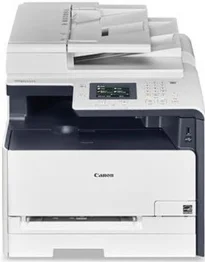
The Canon i-SENSYS MF628Cw printer model supports multifunction features, including print, copy, scan, and fax. When printing on A4 paper, the print rate is up to 14 pages per minute (ppm) for both color and monochrome documents. It also uses the color laser-beam print technology that optimizes its quality and speed. The average print resolution is up to 600 x 600 dots per inch (dpi). At the same time, the optimum is up to 1200 x 1200 dpi.
Canon i-SENSYS MF628Cw Drivers for Windows
8909132ac711a34bf50a3a457e36d43d94800370a0378f10734baeb415df4f688909132ac711a34bf50a3a457e36d43d94800370a0378f10734baeb415df4f6804d2e8b6f97ecdbf6149ef728dccd1e27a7ad604327a8fa2972b7d5b6323ac327a200f2859ea45211c0c938d625b3d4b93d88451d47d4b902f0cf9f5868ea37a4d55a4a3e3f5a130bc7a9ccfc5f72f91edf71646e99efe25e959fc74157e973fCanon i-SENSYS MF628Cw Drivers for macOS
b6ddb33c456e76b77c69654f2216908bce41d1c2f4c7b496f268dd5603748e09db4bd12b92b8a2e9c7a25ac0d3bae568b640c30b1739dbb30a4fa5b89a977d2caf80abbfffc6c226407dfc5c2ea7fe751fb9c52c56dd4bf9a5cb587899b1368fd5f10278e0dd91a898757299adb4a566e5f14e6ad073c885da268768b7b8172e35223b2977d71ab373eafd6f14f28daa933cd2dcdc4b0d818da4a4432b14366879b3e920a4196ee4aaf6d17c5a095266ecf44e51626bd2902b01fa785dcd4075ff5d80d992a0f8b003104ffdc1bdf36bfe8bce0aa49cce77b27cdc9a95a5776c02735f008f6d8f5882c2824e3f2b83f7ccf7de77a1e3cca3f3007e0d40da0aef86d5330d84af4dcc7458630c4999aae2495eebf5e1e3c6688e6e7c0453cb25a1317cf79acc2b5c650f2d0487297a075500cf16bac82b4995036f450d7eb267a86708a180dad9484c82047dc4624ec4b3dd3438231e6ac5cbcdba793755e1ddb45efcaeccd8b1f1103d2bb966199a47fc50f0116996d987bd51178d61474c2151c98999b876d4bc8928e9adbfd33748039773dbb01850e711679363ae3e93785b8a9fe8a3ad9ee02fb65e10e05eda1e6d8e6ba268fa987a6e164d5ba661bb1240917e7c7089148ed46d637656f66159b2042287e9084b2b921ae5b5f5c0eb0e4837c7892368c2313a0619c97b4f71f32be34757bfcc84538a957d6f23e43e81f0da6c9cbd85a75754061053b0cd0086f0297ea2f9d52a2bb0056fff1438bcff1209431107d2b98a5c1a3d4ae6141590e902abf12a5f16be1d69712e8cfe9845590297641744ea447acd804af112d0693e6588ba52e03feaf0d3150446eb3e84f535dc19aa61aba625226444a79ce3488bb61f99b0c653d1abf054c9b471d5a1b3e65a67c44f07e8c6ecf20e167ae2d83d355023809358287d3a2badbce6507585319819327b889a34a931905184cbeb1e9c986e5d635fa77c88f5de1e424c30886321f7ffd7900bcf8e4b8ce99f0d3d7af91556b836e302306ae8a25a2e16df9de6a48ab862ab2fa01c7793bae9776d4de130b89fe50e189ff8c78d1e5fa6183d9dd3f1b1c7dc175ab7cd4bb929f902c55966150a6a0273dbb36ccad0f146006a360e961225a3a218f8f019abb06cafb6699a0ae2279c20467a32e972a2b98b6dCanon i-SENSYS MF628Cw Drivers for Linux
29e2380e21bda8c31f8c08435a2ba49cba61c13abfa47ba78081a9b0e55df333Canon i-SENSYS MF628Cw driver Downloads for Microsoft Windows 32-bit – 64-bit and Macintosh Operating System.
Toner Cartridge Details
731 Black Toner Cartridge – Approx 1400 Pages
Cyan 731 Toner Cartridge – Yield upto 1500 Pages
Toner Cartridge Magenta 731 – Upto 1500 Pages
731 Yellow Toner Cartridge – Yield approx 1500 Pages
The machine attains this maximum quality output resolution by an automatic image refinement (AIR) component. It also takes about 18 seconds or less for the first page of monochrome or color documents. The supported printer language is the UFR II LT with a 5 mm print margin on all four sides of the paper. However, when an envelope paper size is in use, the print margin is up to 10 mm for all four sides, including top, bottom, left, and right.
It has a toner saver mode together with some advanced printing features. For instance, it can print from a USB memory key that supports JPEG and TIFF formats. Also, the mobile printing features include Google Cloud Print Ready and some mobile printing features. The mobile printing features include AirPrint and Canon PRINT Business app for iOS. On the other hand, it supports Mopria certification, Canon Print Service Plug-in, and Canon PRINT Business app for Android.
The copying speed is up to 14 copies per minute for color and monochrome documents on an A4. The first copy output time is about 19 seconds or less for both color and monochrome documents. However, it has a copy resolution of up to 600 x 600 dpi, supporting various copy modes. The copy modes include text, photo, map, printed image, and text. It has a multiple copy mode that can produce up to 99 copies from one original document.
Technical Details
| Title | Canon i-SENSYS MF628Cw Drivers |
|---|---|
| Device Type | All-in-one printer |
| Driver Version | Varies by driver and operating system |
| Available Downloads | Drivers |
| License | Free |
| Manufacturer | Canon Inc. |