
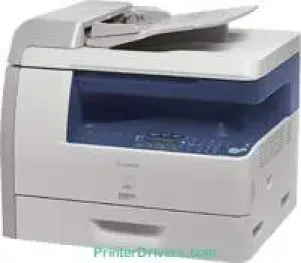
With the Canon i-SENSYS MF6580PL model, the machine can only work as a monochrome printer for black and white documents. Besides, it is also a multifunction printer that can print, copy, scan, and fax documents. Furthermore, the print speed is up t0 22 pages per minute (ppm) when working on A4 paper. The compatible printing method is also the monochrome laser-beam print technology that can produce optimal output.
Canon i-SENSYS MF6580PL driver Downloads for Microsoft Windows 32-bit – 64-bit and Macintosh Operating System.
Supported Toner Cartridges: 706 Toner Cartridge Black – Approx 5000 Pages
Canon i-SENSYS MF6580PL Drivers for Windows
16e3b1cf3534fcf7d60feb3db5dc12cb5ee7137b02305e09470aea4f820ebb601935881af93cac452434ae6eee37afbffe3ec482de5920cd5d5ad424a5a833b69e0a235803be9f47a5d243d9335d0f9156f4db43c0d73229137365945e3a335e4d55a4a3e3f5a130bc7a9ccfc5f72f91edf71646e99efe25e959fc74157e973fa4353cbe30dcb9bbe268a738a20a90395fa7e7d76ebd1303b3404dbd8c82c435Canon i-SENSYS MF6580PL Drivers for macOS
c3e86cfd6f247d81eb37a4c36412fc22f6df2225ec39bf8c25639c777857c49081682e33345b34a81c06f13d6dd4d7d9a98164afe7d89843d94d1dac52bdbe383cac8d47a0bb1580e74b492bc876858781092e8fae8a009946dc72a2194c0ca9c98999b876d4bc8928e9adbfd33748039773dbb01850e711679363ae3e93785b3accb0f153300092a2ee312825c851035f1c66d65dafd67c77e2d4fbcd27c13a37c7892368c2313a0619c97b4f71f32be34757bfcc84538a957d6f23e43e81f0ab8f0f303177d8c2129a2a2db2b478c6b63e40154d669f8d01041b4f7afcfbb10297641744ea447acd804af112d0693e6588ba52e03feaf0d3150446eb3e84f501a221888cc3651a64f633e461870d1e2d0cce0ef54abb9c8317ca085ad21964319819327b889a34a931905184cbeb1e9c986e5d635fa77c88f5de1e424c308822777e10690dcebdae80b6ec50e7bed2b28b71ca4cf9315646912ab2ad21c0669dd3f1b1c7dc175ab7cd4bb929f902c55966150a6a0273dbb36ccad0f146006a602bdd48468bf971d46227aeb5a5e80268b4d63683acc1033092bf82e239f0644c12283382997a0a253b5b7bedae90cf797892d245c51f896cbbc7eaf39f0d5b400f046433591f4a0ff3c99e03208e8383398907c9703634230bd5670b241b66317cf79acc2b5c650f2d0487297a075500cf16bac82b4995036f450d7eb267a8Canon i-SENSYS MF6580PL Drivers for Linux
51cab752fad9bcd5379320c7d0d092b90e67c30b336c1776bfe4ea74b03c2634Canon i-SENSYS MF6580PL Specifications
It supports an average printing resolution of 600 x 600 dots per inch (dpi). At the same time, it can reach a maximum of 1200 x 600 dpi to aid an automatic image refinement (AIR) component. As a duplex printer, it can print on both sides of a sheet of paper through an intuitive channel. It also supports printer languages that include UFR II-LT, PCL 6, and PCL 5e. Besides, it has a toner saver mode that enables it to conserve toner supply for optimum quality.
In copying, this machine can also work at the rate of 22 copies per minute (CPM) when working on an A4. The first copy output time is approximately 8 seconds or less with a resolution of up to 600 x 600 dpi. This mode affects text, photo, and a combination of the two. However, it has a multiple copy mode for up to 99 copies from a single original document. As need demands, users can reduce or enlarge documents by 50% or 200% respectively in 1% gradual increments.
Simultaneously, this machine can scan documents with an optical resolution of 600 x 600 dpi. However, it has an enhanced resolution of up to 9600 x 9600 dpi. It also has a color scanning depth of 24 bits for both input and output levels. This feature is also compatible with TWAIN and WIA modes with a maximum scan width of 216 mm.
Technical Details
| Title | Canon i-SENSYS MF6580PL Drivers |
|---|---|
| Device Type | All-in-one printer |
| Driver Version | Varies by driver and operating system |
| Available Downloads | Drivers |
| License | Free |
| Manufacturer | Canon Inc. |