
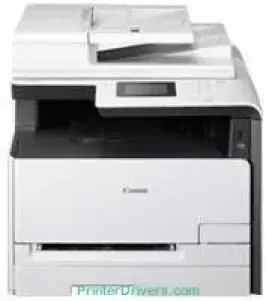
The Canon i-SENSYS MF623Cn printer model can produce a maximum of 30,000 pages in a month under standard conditions. However, the manufacturer recommends a print volume of not more than 1500 pages per month. Simultaneously, the machine takes about 23 seconds or less to warm up and be ready for printing. It also has a shared memory of 512 MB of RAM, together with other fantastic quality specifications.
Canon i-SENSYS MF623Cn driver Downloads for Microsoft Windows 32-bit – 64-bit and Macintosh Operating System.
Supported Toner Cartridges:
731 Black Toner Cartridge : Upto 1400 Pages
Cyan 731 Toner Cartridge : Yields approx 1500 Pages
Magenta Toner cartridge 731 : Approx 1500 Pages
Toner cartridge Yellow 731 : Upto 1500 Pages
Canon i-SENSYS MF623Cn Drivers for Windows
8909132ac711a34bf50a3a457e36d43d94800370a0378f10734baeb415df4f688909132ac711a34bf50a3a457e36d43d94800370a0378f10734baeb415df4f684d55a4a3e3f5a130bc7a9ccfc5f72f91edf71646e99efe25e959fc74157e973f04d2e8b6f97ecdbf6149ef728dccd1e27a7ad604327a8fa2972b7d5b6323ac32Canon i-SENSYS MF623Cn Drivers for macOS
d5f10278e0dd91a898757299adb4a566e5f14e6ad073c885da268768b7b8172e0485a03ef39ecfdf93f0d306d06db70162ec51ee6101b8b216a6bf379343eb35ff5d80d992a0f8b003104ffdc1bdf36bfe8bce0aa49cce77b27cdc9a95a5776c6708a180dad9484c82047dc4624ec4b3dd3438231e6ac5cbcdba793755e1ddb45efcaeccd8b1f1103d2bb966199a47fc50f0116996d987bd51178d61474c21518a9fe8a3ad9ee02fb65e10e05eda1e6d8e6ba268fa987a6e164d5ba661bb1240917e7c7089148ed46d637656f66159b2042287e9084b2b921ae5b5f5c0eb0e48da6c9cbd85a75754061053b0cd0086f0297ea2f9d52a2bb0056fff1438bcff1209431107d2b98a5c1a3d4ae6141590e902abf12a5f16be1d69712e8cfe98455935dc19aa61aba625226444a79ce3488bb61f99b0c653d1abf054c9b471d5a1b3e65a67c44f07e8c6ecf20e167ae2d83d355023809358287d3a2badbce65075856321f7ffd7900bcf8e4b8ce99f0d3d7af91556b836e302306ae8a25a2e16df9de6a48ab862ab2fa01c7793bae9776d4de130b89fe50e189ff8c78d1e5fa6183d360e961225a3a218f8f019abb06cafb6699a0ae2279c20467a32e972a2b98b6d02735f008f6d8f5882c2824e3f2b83f7ccf7de77a1e3cca3f3007e0d40da0aefCanon i-SENSYS MF623Cn Drivers for Linux
b7031f9f0aa035cbc5175cb86e3bd83d06f90673a63ea40105ffb5cc6c60237fCanon i-SENSYS MF623Cn Specifications
The physical dimensions of this machine include a
width of 430 mm, a depth of 484 mm, and a height of 429 mm. It also has a net weight of 26 kg. At the same time, it possesses a control panel of 8.9 cm in diagonal width. This screen is a color touch screen that creates a friendly environment for users. In a typical operating environment, the recommended temperature is between 10 and 30°C. In addition, this machine also supports relative humidity between 20 and 80% with no condensation.
This machine can print, copy, and scan documents as a multifunction printer, producing excellent output quality. Under printing, this machine can attain a print speed of up to 14 pages per minute (ppm) for monochrome and color printing. It also has an average print resolution of 600 x 600 dots per inch (dpi) under ideal conditions. On the other hand, the optimum print resolution is up to 1200 x 1200 dpi through an automatic image refinement (AIR) component.
The Canon i-SENSYS MF623Cn model also has a standard input capacity of up to 150 sheets of plain paper. Also, it possesses a manual feed slot that can hold one sheet of paper at a time. At the same time, it has an automatic document feeder (ADF), which can hold 50 sheets of plain paper. However, the paper output tray can accommodate up to 125 sheets of printed documents.
Technical Details
| Title | Canon i-SENSYS MF623Cn Drivers |
|---|---|
| Device Type | All-in-one printer |
| Driver Version | Varies by driver and operating system |
| Available Downloads | Drivers |
| License | Free |
| Manufacturer | Canon Inc. |