
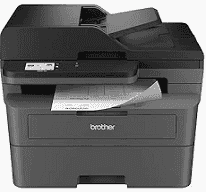
Brother MFC-L2820DW Driver helps the computer communicate correctly with this monochrome multifunction printer. Once the software recognizes the hardware, the computer can send print jobs and receive scanned documents, while copying and faxing remain available from the machine itself. A nearby computer can use USB for a direct link. Ethernet suits a wired network, and wireless networking lets the printer join the local network without a cable.
Brother MFC-L2820DW Drivers for Windows
de532f3ac62d4f4cb3146297d09350359fba06d8a1122ffb5bdf773eb25b2073df159124802c2fbd77835e50754f1c7c1e30ee7f9c52268de659ce5e0057d06edf159124802c2fbd77835e50754f1c7c1e30ee7f9c52268de659ce5e0057d06e0917273bb5bc10ee4775f36bd98bd05152835bf5370614cf5a803ffa9260b0adBrother MFC-L2820DW Drivers for macOS
141eae60f83145d63be2cdaaf51367b68ef8ba8ef12e63e98620d5a232d7019bBrother MFC-L2820DW Drivers for Linux
2182cc23ccec8f6f16cd9f90fd1c5eed559a155f6743fa44070e2df0282ae35e95d95e1d12cf596cf121a039fd690b2721d3784034b4cf31540e63706188e1ca9c3a200db3dc7b2b3332dff8c5226b4f3ee560d20b2e1f4918b1faf7124517b2197f63a52e89b8744f5a3c2d843abb3b76d003d5d4830bdfe675c44841a6c72bcda25534ea8e3018e7d46b970cb08b36084355adedc933aba0c8c7d03e903db901dc859f1978e645147ced5ec4b5448cc3e26b1c6d2f1104834f5891c0e17469d724746540a51f8286f2a318b47657227f7131d384a1a4f0475dacb7e3580f3ee74ef3a5529ebf3b26d6139ce15d75374a4538ba2efd48c28b209b0d705e5ec72ba3bffcf199fee6387cb79d6923214648db0f2df1c5a13f8f8f0a6fe0995c401404f2622e60470b4de25d0cdb4adc0f130ace6b380cc0d4b3d7714ad761c1aee28a8765f6637456d81ad1a56226e6857be2f1581fdcd9e4a5a4fbc4c42dd3450a4412b306b9ce2eb7e3ef4734a7b648f9561f525922b02541e98b545929dc2b82aa17ba2e331de1fcb34f0a839d27b9b193ac680d9742250a89e588a6bd56206c4e17c6dbcf263d9d08fb460ccd5b9f1a23fce79b30d0a41d96a224839322b2Brother MFC-L2820DW Specifications
The Brother MFC-L2820DW is a monochrome laser all-in-one for printing, scanning, copying, and faxing. Printing comes from an electrophotographic laser engine backed by 128 MB of memory. The control panel carries a 2.7-inch color touchscreen for local settings and cloud functions. Above the flatbed, a 50-sheet automatic document feeder keeps multipage originals moving without placing each sheet on the glass. Fax transmission uses a 33.6 Kbps modem.
Single-sided printing reaches up to 34 pages per minute on Letter paper or 32 pages per minute on A4. Automatic duplex printing is built in for compatible paper sizes. At the highest setting, print resolution reaches 1200 x 1200 dpi. Originals placed on the flatbed can be scanned at up to 1200 x 1200 dpi. The document feeder is limited to 600 x 600 dpi, and copies are produced at up to 600 x 600 dpi.
Most paper loads into the 250-sheet main tray, while a separate manual slot feeds one sheet at a time. The cassette takes everyday office sizes up to Legal and Folio. Envelopes and labels use the manual path, which can also accept bond paper and heavier stock up to 61 lb. Finished plain-paper documents collect face down in the 100-sheet output tray, so its capacity is lower than the main input tray.
A nearby computer can connect through Hi-Speed USB 2.0. For network use, the machine has 10Base-T/100Base-TX Ethernet and dual-band wireless LAN. Wi-Fi Direct can link compatible devices without sending the job through the regular network, using either the 2.4 GHz or 5 GHz band. Mobile jobs can come from AirPrint, Brother Mobile Connect, or Mopria. With supplies fitted, the machine weighs 25.5 lb and is about 16.1 x 15.7 x 12.5 inches.
Technical Details
| Title | Brother MFC-L2820DW Drivers |
|---|---|
| Device Type | All-in-one printer |
| Driver Version | Varies by driver and operating system |
| Available Downloads | Drivers |
| License | Free |
| Manufacturer | Brother Industries, Ltd. |