
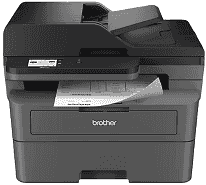
The Brother MFC-L2807DW Driver lets the computer send print, scan, copy, and fax instructions to the multifunction printer. Once installed, it helps the operating system identify the machine instead of treating it as an unknown device. Print jobs and scanned files can then move between the computer and printer without basic communication failures. A correct installation also keeps the selected network or direct connection available during routine office work.
Brother MFC-L2807DW Drivers for Windows
ae85a88fcd9d57c5e7ca826c86c11ea7170816da14e4b59212884b525d083154df159124802c2fbd77835e50754f1c7c1e30ee7f9c52268de659ce5e0057d06edf159124802c2fbd77835e50754f1c7c1e30ee7f9c52268de659ce5e0057d06e71169ef33cab91b5dc1e848ff483c40ad2eec7be44e69fcb0c084a590a79b49eBrother MFC-L2807DW Drivers for macOS
141eae60f83145d63be2cdaaf51367b68ef8ba8ef12e63e98620d5a232d7019bBrother MFC-L2807DW Drivers for Linux
77bb70d534bce2fbf3ee342620bf89e50069580fd23fa9ae8fa8b57712ccf8d717d031af09f5aa78159e9a6741826cd6f24d0a65122948a7658cedd336a3efdb9c3a200db3dc7b2b3332dff8c5226b4f3ee560d20b2e1f4918b1faf7124517b2197f63a52e89b8744f5a3c2d843abb3b76d003d5d4830bdfe675c44841a6c72bcda25534ea8e3018e7d46b970cb08b36084355adedc933aba0c8c7d03e903db901dc859f1978e645147ced5ec4b5448cc3e26b1c6d2f1104834f5891c0e17469d724746540a51f8286f2a318b47657227f7131d384a1a4f0475dacb7e3580f3ee74ef3a5529ebf3b26d6139ce15d75374a4538ba2efd48c28b209b0d705e5ec72ba3bffcf199fee6387cb79d6923214648db0f2df1c5a13f8f8f0a6fe0995c401404f2622e60470b4de25d0cdb4adc0f130ace6b380cc0d4b3d7714ad761c1aee28a8765f6637456d81ad1a56226e6857be2f1581fdcd9e4a5a4fbc4c42dd3450a4412b306b9ce2eb7e3ef4734a7b648f9561f525922b02541e98b545929dc2b82aa17ba2e331de1fcb34f0a839d27b9b193ac680d9742250a89e588a6bd56206c4e17c6dbcf263d9d08fb460ccd5b9f1a23fce79b30d0a41d96a224839322b2Brother MFC-L2807DW Specifications
The Brother MFC-L2807DW brings monochrome printing, scanning, copying, and faxing into one machine. Document processing runs on a 600 MHz processor with 128 MB of memory. The 2.7-inch color touchscreen places the main controls within easy reach. Above the flatbed, a 50-sheet automatic document feeder moves multi-page originals without loading each sheet by hand.
Print speed reaches 36 pages per minute, and the first sheet leaves ready mode in about 8.5 seconds. Resolution rises to 1200 × 1200 dpi for detailed text and graphics. Automatic duplexing turns the paper over for two-sided print jobs. The scanner records 1200 × 1200 dpi optically, with interpolation extending the stated figure to 19200 × 19200 dpi. Copies reach 600 × 600 dpi and can be resized from 25% to 400%.
A 250-sheet cassette supplies the main paper path. Envelopes, labels, thicker stock, and custom sizes enter one sheet at a time through the manual feed slot. The 50-sheet feeder also carries batches of originals for scanning, copying, or faxing. It does not scan both sides automatically, so double-sided originals need manual handling. Finished sheets collect in the 120-sheet output tray.
A nearby computer can use the Hi-Speed USB 2.0 connection. Gigabit Ethernet links the machine to a wired network, while dual-band Wi-Fi serves wireless setups. Wi-Fi Direct permits a compatible device to connect without relying on the home router. AirPrint, Mopria, and Brother Mobile Connect cover supported mobile print and scan tasks. With a body measuring about 16.1 × 15.7 × 12.5 inches, the printer weighs roughly 25.5 pounds. Brother lists a maximum monthly duty cycle of 35,000 pages, although the recommended monthly volume is no more than 2,500 pages.
Technical Details
| Title | Brother MFC-L2807DW Drivers |
|---|---|
| Device Type | All-in-one printer |
| Driver Version | Varies by driver and operating system |
| Available Downloads | Drivers |
| License | Free |
| Manufacturer | Brother Industries, Ltd. |