
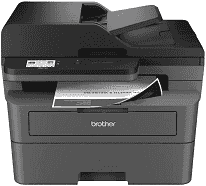
Brother MFC-L2802DN Driver lets a computer send print and scan jobs to this monochrome laser multifunction machine. Once installed, the software gives the operating system the device information it needs to recognize the printer and scanner correctly. A wired Ethernet connection can place the machine on a local network for shared computer access. Copy and fax functions remain available from the control panel without a computer.
Brother MFC-L2802DN Drivers for Windows
f9fe38c7dec6af642872d4721519933cc89d6ebe1aa84297e10355ba9c61310cdf159124802c2fbd77835e50754f1c7c1e30ee7f9c52268de659ce5e0057d06edf159124802c2fbd77835e50754f1c7c1e30ee7f9c52268de659ce5e0057d06e71169ef33cab91b5dc1e848ff483c40ad2eec7be44e69fcb0c084a590a79b49eBrother MFC-L2802DN Drivers for macOS
211802a0da07f400354753bcec93bf827f6a5521844e343c49435e4548695a45Brother MFC-L2802DN Drivers for Linux
dc794f830e7ab446f20caeddb91d4c468927ddf9801a8915bb89dd84c9c98dff1d9634a1b09e799db233f1d1e51be4f0195f1e5a1127a4cbf345140d0be278119c3a200db3dc7b2b3332dff8c5226b4f3ee560d20b2e1f4918b1faf7124517b2197f63a52e89b8744f5a3c2d843abb3b76d003d5d4830bdfe675c44841a6c72bcda25534ea8e3018e7d46b970cb08b36084355adedc933aba0c8c7d03e903db901dc859f1978e645147ced5ec4b5448cc3e26b1c6d2f1104834f5891c0e17469d724746540a51f8286f2a318b47657227f7131d384a1a4f0475dacb7e3580f3ee74ef3a5529ebf3b26d6139ce15d75374a4538ba2efd48c28b209b0d705e5ec72ba3bffcf199fee6387cb79d6923214648db0f2df1c5a13f8f8f0a6fe0995c401404f2622e60470b4de25d0cdb4adc0f130ace6b380cc0d4b3d7714ad761c1aee28a8765f6637456d81ad1a56226e6857be2f1581fdcd9e4a5a4fbc4c42dd3450a4412b306b9ce2eb7e3ef4734a7b648f9561f525922b02541e98b545929dc2b82aa17ba2e331de1fcb34f0a839d27b9b193ac680d9742250a89e588a6bd56206c4e17c6dbcf263d9d08fb460ccd5b9f1a23fce79b30d0a41d96a224839322b2Brother MFC-L2802DN Specifications
The Brother MFC-L2802DN is a mono laser all-in-one for printing, scanning, copying, and faxing. Printing comes from an electrophotographic laser engine, backed by 128 MB of memory. The control panel uses a two-line LCD with physical keys, so menu work stays button-based rather than touchscreen-driven. Scanning can happen on the flatbed glass, or through the 50-sheet automatic document feeder when several originals need to move through in one run.
Black output reaches 32 pages per minute on A4 paper. Automatic duplexing prints both sides at up to 16 sides per minute, which avoids manual page turning for ordinary two-sided documents. The first page can appear in up to 8.5 seconds from ready mode. Print resolution reaches 1200 x 1200 dpi. The flatbed scans at up to 1200 x 1200 dpi, but ADF scans are limited to 600 x 600 dpi. Copy resolution also tops out at 600 x 600 dpi.
Paper feeds from a 250-sheet main tray, with a separate one-sheet manual slot for heavier or less common media. Envelopes and labels use that manual feed, as do bond paper and thicker stock. Finished sheets collect in a 120-sheet A4 output area, so the output side holds less than the full input tray. For automatic duplex work, the machine stays with A4 plain, thin, or recycled paper. The main tray takes everyday sizes such as A4, Letter, A5, A6, and Executive. On the scan side, the glass accepts A4 or Letter originals.
A nearby computer can connect through Hi-Speed USB 2.0. For an office network, the wired port uses Fast Ethernet at 10Base-T or 100Base-TX speeds. Brother Mobile Connect, AirPrint, and Mopria handle mobile printing and scanning, but this DN version has no wireless hardware. With the carton removed, the body measures 410 x 399 x 319 mm and weighs 10.50 kg. Brother rates the recommended monthly print volume at up to 2,500 pages.
Technical Details
| Title | Brother MFC-L2802DN Drivers |
|---|---|
| Device Type | All-in-one printer |
| Driver Version | Varies by driver and operating system |
| Available Downloads | Drivers |
| License | Free |
| Manufacturer | Brother Industries, Ltd. |