
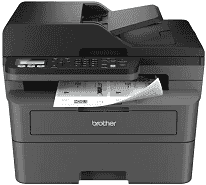
The Brother MFC-L2760DW Driver links the computer with the machine’s print, scan, copy, and fax functions. Printing and scanning commands can then pass between supported computer applications and the multifunction printer. A nearby computer can use the USB connection, while wireless jobs travel over the configured network. Proper driver setup also lets the computer recognize the machine correctly when a document needs to be printed or scanned.
Brother MFC-L2760DW Drivers for Windows
27cb85da20d82ece9f1224fef16d2ad504a7b4f3d5de7aacbfd05cba8a3e51dbdf159124802c2fbd77835e50754f1c7c1e30ee7f9c52268de659ce5e0057d06edf159124802c2fbd77835e50754f1c7c1e30ee7f9c52268de659ce5e0057d06e0917273bb5bc10ee4775f36bd98bd05152835bf5370614cf5a803ffa9260b0adBrother MFC-L2760DW Drivers for macOS
2d4593e907bdb615508d706557592b4d862250f626c4bb28449e8d98d566baccBrother MFC-L2760DW Drivers for Linux
d3a0547ddbba1ddc8d4d09ceb57efbdd3e67f76e4c8f67150ea75183fff739dbf3845138e3f63e6ae33cfa1dd16725af97682481cb84d39b95e0d40c453b43689c3a200db3dc7b2b3332dff8c5226b4f3ee560d20b2e1f4918b1faf7124517b2197f63a52e89b8744f5a3c2d843abb3b76d003d5d4830bdfe675c44841a6c72bcda25534ea8e3018e7d46b970cb08b36084355adedc933aba0c8c7d03e903db901dc859f1978e645147ced5ec4b5448cc3e26b1c6d2f1104834f5891c0e17469d724746540a51f8286f2a318b47657227f7131d384a1a4f0475dacb7e3580f3ee74ef3a5529ebf3b26d6139ce15d75374a4538ba2efd48c28b209b0d705e5ec72ba3bffcf199fee6387cb79d6923214648db0f2df1c5a13f8f8f0a6fe0995c401404f2622e60470b4de25d0cdb4adc0f130ace6b380cc0d4b3d7714ad761c1aee28a8765f6637456d81ad1a56226e6857be2f1581fdcd9e4a5a4fbc4c42dd3450a4412b306b9ce2eb7e3ef4734a7b648f9561f525922b02541e98b545929dc2b82aa17ba2e331de1fcb34f0a839d27b9b193ac680d9742250a89e588a6bd56206c4e17c6dbcf263d9d08fb460ccd5b9f1a23fce79b30d0a41d96a224839322b2Brother MFC-L2760DW Specifications
The Brother MFC-L2760DW is a monochrome laser all-in-one, so print, scan, copy, and fax work from one desktop chassis. Printing comes from an electrophotographic laser engine, backed by 128 MB of controller memory. The front panel uses a two-line LCD with 16 characters on each line. For stacked originals, the 50-sheet automatic document feeder can feed pages through scanning, copying, or faxing instead of leaving each sheet on the glass.
Print detail reaches up to 1200 x 1200 dpi. On plain single-sided jobs, output runs at 28 ppm on A4 paper or 30 ppm on Letter. Automatic duplex printing slows to 15 ppm, counted as 7.5 physical sheets per minute, which is the tradeoff for turning each sheet inside the machine. The flatbed scans at up to 1200 x 1200 dpi. Originals sent through the document feeder scan at up to 600 x 600 dpi, and copies use 600 x 600 dpi resolution.
The main paper tray holds 250 sheets and takes ordinary office stock such as plain, thin, recycled, and thick paper from 60 to 163 g/m². One-off media goes through the manual feed slot instead. That path is the place for envelopes, labels, bond paper, or heavier sheets up to 230 g/m². Finished documents collect face down in the 100-sheet output tray. A single sheet can also exit face up through the rear path when a straighter paper route is needed.
A nearby computer can connect through Hi-Speed USB 2.0. Wireless jobs can use the dual-band network radio or Wi-Fi Direct, but this exact model does not carry an Ethernet port. The wireless LAN works on 2.4 GHz and 5 GHz infrastructure networks, which helps when the router separates older and newer bands. With supplies installed, the body is listed at 16.1 x 15.7 x 12.5 inches and 25.5 lb. During printing, power use is about 450 W.
Technical Details
| Title | Brother MFC-L2760DW Drivers |
|---|---|
| Device Type | All-in-one printer |
| Driver Version | Varies by driver and operating system |
| Available Downloads | Drivers |
| License | Free |
| Manufacturer | Brother Industries, Ltd. |