
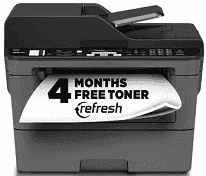
Brother MFC-L2717DW comes with a fantastic driver that impacts the efficient operations and functions of the machine. For example, the driver influences the device’s document copying, printing, and scanning capability. For instance, the driver supports black-and-white copy capability with 600 x 600 dpi (dots per inch) print resolution. Also, it helps with Flatbed design style, ID copy, sorting, and stand-Alone functions. Furthermore, the supported mobile device compatibility includes AirPrint, Google Cloud Print, Brother iPrint&Scan, Mopria, and Wi-Fi Direct.
Brother MFC-L2717DW Drivers for Windows
84d5fc6c37bb2f904f737f3d058bea951f47b16e98432298a7ad86d6b9fcb308073e152325c388c32fc673134e450934eb798df52e86041a3932466630560113Brother MFC-L2717DW Drivers for macOS
22007f8852355cf68a1201403c2f2a195b7251c540b6446f34c46fb53e8af4de26bc00dd4bc5e15beafeb450ee8aaee0b027455030026b200062203774e9314e64eb12a43642ac4e35e8307f535310549669a6f33fda3912324e79640c084607b08fc79eacb75b3f3ccb67ceb6cd5311bea2817029f2480ea638ecce0a16c31eb08fc79eacb75b3f3ccb67ceb6cd5311bea2817029f2480ea638ecce0a16c31ed44d7014d7d562999642169e80712bbab0f1d1297c1a6b604ffb208f5bac2c2bBrother MFC-L2717DW Drivers for Linux
a374407280c4fa2241c2659985ecf562288a25706120d251e904270610b25ebb64312120786ca514e5925383e3c83957b9ea434918fe5a057f7c71a11579a9d4027b73648722ac8c8eb1a9c419d284a6562cc763feac9740a2b75a683b0929727d7dcbe8349ae4d4ab816e4551017f2f1fd9fd6bf3f4f3c570fbd9576248dd9f4225e91dd7f7d0ba2a202f616b15b669be7800c271a7d25efed94191f71fc4508bd395b8a25a385eb4a5e2770d4b10b17735203006b7a90a6879a0ef69e5fe4df71dadda535bb90dbfaf88fd603897f96e8b09a2f3ae9bd4e2daafb925e896e24082d824222ec7a7646309260fd661387ca1aa5dc1ffe851db7bbefe5271b755Brother MFC-L2717DW Specifications
Moreover, the driver supports Auto fax receive date and time header with 258 broadcasting locations. In addition, its faxing capability includes black and white and works with an External TAD interface and document memory backup. Similarly, its supported fax modem speed is 33.6 kbps, with 208 auto-dial locations. At the same time, the Brother MFC-L2717DW printer supports Out-of-paper reception, and its quick scan and memory transmission is approximately 2.5 seconds per page. Also, the driver supports a 2-line LCD Display, toner save mode, and 64 MB standard memory.
Furthermore, its supported maximum monthly duty cycle is 15,000 printed pages, while the recommended monthly print volume is up to 2,000 pages. As for the paper handling, it supports duplex printing, and ADF (Automatic Document Feeder) can hold up to 50 sheets. In addition, Manual feed can handle one sheet while the output paper capacity is 100 sheets. Meanwhile, the supported media types by the driver include plain and recycled paper.
Similarly, the driver works compatibly with Windows, macOS, and Linux and supports a black print speed of a maximum of 34 ppm. In addition, the supported print resolution includes 2400 x 600 dpi class, and the First Page out time is up to 8.5 seconds. In addition, it supports B/W Laser print technology with GDI emulations. As for the scan function, the interpolated scan resolution includes 19200 x 19200 dpi (dots per inch). Meanwhile, the optical scan resolution on the flatbed is 600 x 600 and 1200 x 1200 dpi on ADF.
Technical Details
| Title | Brother MFC-L2717DW Drivers |
|---|---|
| Device Type | All-in-one printer |
| Driver Version | Varies by driver and operating system |
| Available Downloads | Drivers |
| License | Free |
| Manufacturer | Brother Industries, Ltd. |