
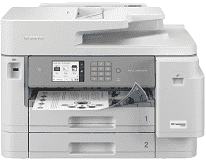
Brother MFC-J5955DW Driver gives the computer the software needed to use the machine’s print, scan, copy, and fax functions. The same installation also lets the computer identify the printer when it is connected by USB, Ethernet, or a wireless network. Print jobs and scans then move between the computer and the machine through the selected connection. Copying can still be started from the printer itself, while fax functions depend on the machine’s fax setup as well as the required software support on the computer.
Brother MFC-J5955DW Drivers for Windows
d30da3dabce625e472cdb9f82ecbe4bc6931fe554d95e0ec524529277abf85e376ddc3d3ac00c5aeb5f775581dd2d992d55d4406acb173225462f73ae3dcbd7976ddc3d3ac00c5aeb5f775581dd2d992d55d4406acb173225462f73ae3dcbd79128f1a418a8860a7bcce3afb675e0e4ad9dd38029f9814a16b63a0e98b9ee83d6eddedfff4131bc903d581f6dc86a8518e1c82980a4cd38b4396c4c1bb1338d30edce9170c3f46f065e52aa6335c093befa453212698a94c7d59fcfc5197fa7ec3db3f10657ece97a5dbae2b5490dd24b3691426d6add2c17e1cc1c2fc8b609d5f3ad9dd0475f7524f0e489aa7076da168c228bcd22031394a53fad4b9a2573f0917273bb5bc10ee4775f36bd98bd05152835bf5370614cf5a803ffa9260b0adBrother MFC-J5955DW Drivers for macOS
235aa7a7ba04443a435b72f5873abc96b494d89a58d9a02014a164562e0b02cfBrother MFC-J5955DW Drivers for Linux
2082e7977cbaed389ec4d04211dee9e4f833c90bea19437425efe867da8d63e9310ae10bb0c0e216583ca2588dd542ac592c98f6fcbaea8815956a288256d7f99c3a200db3dc7b2b3332dff8c5226b4f3ee560d20b2e1f4918b1faf7124517b2197f63a52e89b8744f5a3c2d843abb3b76d003d5d4830bdfe675c44841a6c72bcda25534ea8e3018e7d46b970cb08b36084355adedc933aba0c8c7d03e903db901dc859f1978e645147ced5ec4b5448cc3e26b1c6d2f1104834f5891c0e17469d724746540a51f8286f2a318b47657227f7131d384a1a4f0475dacb7e3580f3ee74ef3a5529ebf3b26d6139ce15d75374a4538ba2efd48c28b209b0d705e5ec72ba3bffcf199fee6387cb79d6923214648db0f2df1c5a13f8f8f0a6fe0995c401404f2622e60470b4de25d0cdb4adc0f130ace6b380cc0d4b3d7714ad761c1aee28a8765f6637456d81ad1a56226e6857be2f1581fdcd9e4a5a4fbc4c42dd3450a4412b306b9ce2eb7e3ef4734a7b648f9561f525922b02541e98b545929dc2b82aa17ba2e331de1fcb34f0a839d27b9b193ac680d9742250a89e588a6bd56206c4e17c6dbcf263d9d08fb460ccd5b9f1a23fce79b30d0a41d96a224839322b2Brother MFC-J5955DW Specifications
The Brother MFC-J5955DW combines print, scan, copy, and fax hardware in one color inkjet unit. Its piezo printhead uses 420 nozzles for black and another 420 for each color channel. A 3.5-inch color TFT touchscreen provides local control, backed by 512 MB of memory. Fax transmission runs through a Super G3 modem at up to 33,600 bps.
Printing reaches 1200 x 4800 dpi, with black and color output both rated at up to 30 ipm on A4 paper. Automatic duplex drops that rate to 21 ipm. The first page takes about 4.4 seconds in black and 4.6 seconds in color, so short jobs begin without a long warm-up. For scans, the flatbed reaches an optical resolution of 1200 x 2400 dpi.
Two 250-sheet paper trays form the main supply, and a separate 100-sheet multipurpose tray raises standard input to 600 sheets. The main trays take sheets as large as Ledger or A3. Unusual stock has more room in the multipurpose feed, which accepts widths down to 3.5 inches and lengths up to 47.2 inches. Above the scanner, the 50-sheet ADF reads both sides of an original in a single pass for scanning, copying, or faxing.
Borderless printing is available on Letter, A4, Ledger, A3, A6, several photo sizes, and 5 x 8-inch index cards. Copy jobs can run to 999 pages, with scaling from 25 to 400 percent and options for stacking or sorting. A nearby computer can connect by Hi-Speed USB 2.0, while Ethernet provides a wired network connection. Wireless jobs can use dual-band Wi-Fi or Wi-Fi Direct without relying on the normal network path. NFC and the front USB host port give compatible devices and USB storage another way to send files directly to the machine.
Technical Details
| Title | Brother MFC-J5955DW Drivers |
|---|---|
| Device Type | All-in-one printer |
| Driver Version | Varies by driver and operating system |
| Available Downloads | Drivers |
| License | Free |
| Manufacturer | Brother Industries, Ltd. |