
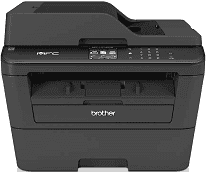
Purchasing the Brother MFC-L2740DW printer model is a guarantee for quality printing at the lowest cost possible. The printer model uses laser print technology that economizes printer resources without compromising quality. In the same way, the model classification is under the electrophotographic laser printers with a single pass user. Also, the internal memory capacity of the Brother MFC-L2740DW printer model is about 64 MB of RAM.
Brother MFC-L2740DW Drivers for Windows
1046b14c5b38778a1b14d7178d270b2d6aadab989fa179ada70910b3185d01d007a9f3e80ebb6a694536819231ab422126062c3a1517bd9472267ffa36c7a1eeb52f25587ca69fce927262d7b33c266ee2d74004ac420ff6b2abb100f3a361b6fd67e1d1f266068bad6a291365494ef113039f47ededa40bedc88865e4241b45Brother MFC-L2740DW Drivers for macOS
f3a27f3126f7b3b5a04e0481ad743564f6fd1d6e039ec33ec3c687af15a1aa0aab64878616f2d0ddbf65ea85e386b8e122bd5549079ad82012a8d47a21079c992b229ea56fe0606c51a04cf94f9d615a96308c25f6e7574d3490237b47e68261a438aa1f33362f2a479458c2f2b65b4c63587d7bc1a7c39543a860e830aa0ea96a9ef2865964ff4918dd1441876a80485fb8c329df36aa8d6680deff2eecd53e754b338bfeb6946c1f791f2622ac9d0e8d2c7624599aa0b8b8061fe9041fbe56a314aeb45f7ba51cb8989699479904e66af2b3bdfe9c46e581fa2cf5cde18df0f2eb877ed7c669e0885760b1989c9352db9195eb1066443c7658921e731dc02ebd1a950e38f9ffafcddd1963ba6ac60e9df0289be45a345eeb3dc0db2738584fca245471c017a7bd2f5ff15a26183b1693353ded71e7110bc9347bd97509cc0ef38907a1f4bee5b9da8898223ba2039a09e7d9d9f84d0cb969d3931f4fb6e0462d7785f0ecdb62e2b79781939dd3a8afca704585f11f48c01e4575f58cf043a165a76003b7261eaef78f07a2046120065ececf80908847fd66687223d4c5b25f1c314e965ea405afba0a391130d9e5dfcadfc1f48d1bc507e1e02e63f0e2be6247e26a481968bd3ae74b6d77b69c018982a7e0451375ed6990cb18cfd6c92b59e4bf794a28222ac967ab160a64d314c5b9d4dd21fcf4a9b629a63ed73722dd61788371da818f2c42cf42b38a7ffac375129e3830b6557441992664884b5236f967fc9252f2235c91dc8f270bea88d1ceb067770484c4838eb35b74e1370a90ddBrother MFC-L2740DW Drivers for Linux
078453e19f20ab6c7fc4d63c3e09f162f3d1410c04c23a294b6ffbd720b35ffb10a2bc672bd54e718b478f3afc7e47d451557f7d5513167d3ad349a3d00bffafc276d76dd0bf22aa6e2ec2af836c9240b1df384283c3b6cb00604896a684ebb08a42a31deedc9d89bc3993cbe23b0394fba04b5b883d735566180b07f5051a6f027b73648722ac8c8eb1a9c419d284a6562cc763feac9740a2b75a683b0929727d7dcbe8349ae4d4ab816e4551017f2f1fd9fd6bf3f4f3c570fbd9576248dd9f4225e91dd7f7d0ba2a202f616b15b669be7800c271a7d25efed94191f71fc4508bd395b8a25a385eb4a5e2770d4b10b17735203006b7a90a6879a0ef69e5fe4df71dadda535bb90dbfaf88fd603897f96e8b09a2f3ae9bd4e2daafb925e896e24082d824222ec7a7646309260fd661387ca1aa5dc1ffe851db7bbefe5271b755Brother MFC-L2740DW Specifications
This feature combines with the printer processor to ensure the production of impressive output quality. More so, the device has a display component on the control panel that measures about 2.7 inches in diagonal. Similarly, the TFT color touchscreen is of liquid crystal display (LCD) that supports 16 characters in 2 lines and supports basic fonts. Power usage is a component of the printing or copying process or quiet and ready modes.
The printer at peak performance consumes a power of up to 1104 watts but 510 watts for printing and copying. When the Brother MFC-L2740DW printer is running in quiet mode for printing and copying, the power usage is only 313 watts. In ready mode before printing, the power usage is approximately 60 watts while it uses 6.6 watts in sleep mode. When this printer is on standby, the power consumption is about 3.2 watts and 1.2 watts in deep sleep. The printer plugged into a power source but turned off will use 0.08 watts.
The physical dimensions of the printer include a width of 409 mm, depth of 398 and a height of 316.5 mm. The printing process also produces a sound pressure of up to 50 dB, 33 dB when ready and 45 dB in quiet mode. There are a few environmental factors that are important to the maximum yield of this printing device. These include an average temperature between 10 and 32°C during operations and between 0 and 40°C while in storage.
Technical Details
| Title | Brother MFC-L2740DW Drivers |
|---|---|
| Device Type | All-in-one printer |
| Driver Version | Varies by driver and operating system |
| Available Downloads | Drivers |
| License | Free |
| Manufacturer | Brother Industries, Ltd. |