
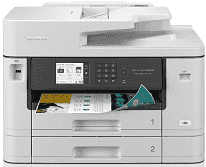
Brother MFC-J5740DW Driver helps the computer communicate correctly with this all-in-one inkjet printer. Once the setup is in place, the computer can send print jobs and reach the scan, copy, and fax functions without treating them as separate devices. A cable, wired network, or wireless link carries those commands to the same machine. That matters when pages, scans, and fax jobs need to move cleanly between the desk and the computer.
Brother MFC-J5740DW Drivers for Windows
1a49ac52b7a570e189cea33672d1ef66b3740a177477fb883a4d8b00bdb16a9b76ddc3d3ac00c5aeb5f775581dd2d992d55d4406acb173225462f73ae3dcbd7976ddc3d3ac00c5aeb5f775581dd2d992d55d4406acb173225462f73ae3dcbd790edce9170c3f46f065e52aa6335c093befa453212698a94c7d59fcfc5197fa7ec3db3f10657ece97a5dbae2b5490dd24b3691426d6add2c17e1cc1c2fc8b609d71169ef33cab91b5dc1e848ff483c40ad2eec7be44e69fcb0c084a590a79b49eBrother MFC-J5740DW Drivers for macOS
5d09788e98b2c9e91b297e4245f410a6e990743dddec3a740d0cf6a3735ae782Brother MFC-J5740DW Drivers for Linux
7edf524a0c5c563f781478e1a25addcebcaaa9b4c2f16d925740bba141c0086edd3a544ef568295acc1362bfa8779496b599e409b6df500f5ff39366c896634b9c3a200db3dc7b2b3332dff8c5226b4f3ee560d20b2e1f4918b1faf7124517b2197f63a52e89b8744f5a3c2d843abb3b76d003d5d4830bdfe675c44841a6c72bcda25534ea8e3018e7d46b970cb08b36084355adedc933aba0c8c7d03e903db901dc859f1978e645147ced5ec4b5448cc3e26b1c6d2f1104834f5891c0e17469d724746540a51f8286f2a318b47657227f7131d384a1a4f0475dacb7e3580f3ee74ef3a5529ebf3b26d6139ce15d75374a4538ba2efd48c28b209b0d705e5ec72ba3bffcf199fee6387cb79d6923214648db0f2df1c5a13f8f8f0a6fe0995c401404f2622e60470b4de25d0cdb4adc0f130ace6b380cc0d4b3d7714ad761c1aee28a8765f6637456d81ad1a56226e6857be2f1581fdcd9e4a5a4fbc4c42dd3450a4412b306b9ce2eb7e3ef4734a7b648f9561f525922b02541e98b545929dc2b82aa17ba2e331de1fcb34f0a839d27b9b193ac680d9742250a89e588a6bd56206c4e17c6dbcf263d9d08fb460ccd5b9f1a23fce79b30d0a41d96a224839322b2Brother MFC-J5740DW Specifications
The Brother MFC-J5740DW combines A3 colour printing with scanning, copying, and faxing. Its piezo inkjet engine uses separate black and colour printheads, backed by 256 MB of memory. Jobs and settings are managed from a 3.5-inch colour touchscreen. Multipage originals can go into the 50-sheet automatic document feeder instead of being placed on the glass one by one. For two-sided documents, the feeder can scan both faces of compatible originals automatically.
Printing reaches 1200 × 4800 dpi, with ISO speeds rated at 28 ipm for either black or colour output. Automatic two-sided printing is limited to A4, Letter, A5, and Executive sheets. Borderless jobs can be larger, extending to A3 and Ledger where the paper size is supported. The flatbed scans at up to 1200 × 2400 dpi optically. Originals sent through the ADF are scanned at up to 600 × 600 dpi, including compatible duplex jobs.
Two front trays hold 250 sheets each, so the main paper supply totals 500 sheets. Less routine stock goes into the separate 100-sheet multipurpose tray. That feed accepts A3 paper as well as envelopes and photo sheets, and a single long sheet can extend to 1200 mm. Finished A4 or Letter pages collect in the 100-sheet output tray. Larger output reduces that capacity to 50 sheets.
A nearby computer can connect over Hi-Speed USB 2.0. For network use, the machine has Ethernet and wireless LAN, with Wi-Fi Direct available when a direct wireless link is needed. The USB host port can read compatible flash drives for JPEG printing or save scans to removable media. With supplies fitted, the machine weighs 20.5 kg. Brother lists power use at about 36 W during copying under its stated test condition.
Technical Details
| Title | Brother MFC-J5740DW Drivers |
|---|---|
| Device Type | All-in-one printer |
| Driver Version | Varies by driver and operating system |
| Available Downloads | Drivers |
| License | Free |
| Manufacturer | Brother Industries, Ltd. |