
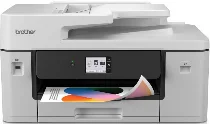
Brother MFC-J3660DW Driver gives the computer the software link needed for this all-in-one printer’s printing, scanning, copying, and faxing functions. After installation, the system can detect the machine through USB or a wireless connection. Scan and copy jobs pass through the same device connection, while fax tasks depend on stable command transfer between the computer and printer. Documents, scanned originals, copied pages, and fax data can then move through the machine without separate hardware.
Brother MFC-J3660DW Drivers for Windows
68c64d8eefe27910eabc8478f0c0546483134b996472d1eac7f3052622a33768aaf73007b2ce61e57400ca56a641f8fe75920cde0fc165fd2ac7d5e56891d6de07e8bc3de73b300a6f49f77cab7355010d9f776ba53b9cb997cac66d51df640f07e8bc3de73b300a6f49f77cab7355010d9f776ba53b9cb997cac66d51df640f0917273bb5bc10ee4775f36bd98bd05152835bf5370614cf5a803ffa9260b0adBrother MFC-J3660DW Drivers for macOS
e43395a286d281c7be9f62c1f0a53738005b95fba2f0fccbb499361cd0ac865aBrother MFC-J3660DW Drivers for Linux
a930ddbc16782f63501aa997237c36108954d180e40afe38f1f437e353c8df9efa9f7ad8652fcf85bc06397cfee7b8d22bb9411f34f16d0e2f7ea6ea7ba79b479c3a200db3dc7b2b3332dff8c5226b4f3ee560d20b2e1f4918b1faf7124517b2197f63a52e89b8744f5a3c2d843abb3b76d003d5d4830bdfe675c44841a6c72bcda25534ea8e3018e7d46b970cb08b36084355adedc933aba0c8c7d03e903db901dc859f1978e645147ced5ec4b5448cc3e26b1c6d2f1104834f5891c0e17469d724746540a51f8286f2a318b47657227f7131d384a1a4f0475dacb7e3580f3ee74ef3a5529ebf3b26d6139ce15d75374a4538ba2efd48c28b209b0d705e5ec72ba3bffcf199fee6387cb79d6923214648db0f2df1c5a13f8f8f0a6fe0995c401404f2622e60470b4de25d0cdb4adc0f130ace6b380cc0d4b3d7714ad761c1aee28a8765f6637456d81ad1a56226e6857be2f1581fdcd9e4a5a4fbc4c42dd3450a4412b306b9ce2eb7e3ef4734a7b648f9561f525922b02541e98b545929dc2b82aa17ba2e331de1fcb34f0a839d27b9b193ac680d9742250a89e588a6bd56206c4e17c6dbcf263d9d08fb460ccd5b9f1a23fce79b30d0a41d96a224839322b2Brother MFC-J3660DW Specifications
Brother MFC-J3660DW is an A3 color inkjet all-in-one for printing, scanning, copying, and faxing. Printing comes from a piezo print head with 420 black nozzles and 420 nozzles for each color. Four separate cartridges feed the black, cyan, magenta, and yellow ink channels. The front control area uses a 2.7-inch TFT color touchscreen, and the machine carries 512 MB of memory. That display size helps separate it from higher-screen versions in the same hardware group.
Print resolution reaches up to 1200 x 4800 dpi. On A4 paper, rated output is 31 ipm in monochrome and 30 ipm in colour. First-page timing is about 4.6 seconds for black output and 4.4 seconds for colour. Borderless printing works on A4, Letter, A3, Ledger, A6, photo sizes, and index cards. Scanning from the glass reaches 1200 x 2400 dpi. The automatic document feeder scans at up to 600 x 600 dpi.
Copy jobs can run in color or mono, with up to 999 pages from one job. Resizing ranges from 25 to 400 percent in one-percent steps. Paper loads through a 250-sheet main tray, and a one-sheet manual feed handles long paper. The tray accepts sizes from A3 and Ledger down to photo paper and index cards. Coated, glossy, recycled, envelope, and photo media can feed through the manual slot.
The automatic document feeder holds 50 sheets and accepts single-sided originals up to 297 x 431.8 mm. Longer ADF originals require the long-paper function. Printed pages collect in a 100-sheet output area for A4 or Letter paper. For sheets larger than A4 or Letter, output capacity drops to 50 sheets. Automatic duplex printing works on plain and recycled paper. A wired connection can use Hi-Speed USB 2.0 or Ethernet, while wireless work runs through wireless LAN, Wi-Fi Direct, AirPrint, or Mopria.
Technical Details
| Title | Brother MFC-J3660DW Drivers |
|---|---|
| Device Type | All-in-one printer |
| Driver Version | Varies by driver and operating system |
| Available Downloads | Drivers |
| License | Free |
| Manufacturer | Brother Industries, Ltd. |