
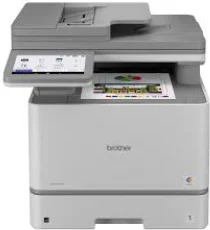
Brother MFC-EX575 Driver lets the computer communicate with this colour laser all-in-one printer. After installation, the computer can recognise the machine for printing, scanning, copying, and faxing. A direct setup can use USB, while wired and wireless network connections carry commands to the selected function. Those commands keep the document settings matched to the output task.
Brother MFC-EX575 Drivers for Windows
a0311de35904ef01274b95193c5660346e77b7d23fc50108b536456bdb9864518dd5f483a326a22ff6ec4b313745cbfffc94878f0eec74fbdc3c9349945665c68dd5f483a326a22ff6ec4b313745cbfffc94878f0eec74fbdc3c9349945665c64f6da368efca0f60fb4d4698714eb561c8d216a79b75ee019d647be104bd74a46eddedfff4131bc903d581f6dc86a8518e1c82980a4cd38b4396c4c1bb1338d3ee2cabe92d46f7f6804a469fbdf46bfefbc58df649a126f936d83c3cc990a4ef5f3ad9dd0475f7524f0e489aa7076da168c228bcd22031394a53fad4b9a2573f0917273bb5bc10ee4775f36bd98bd05152835bf5370614cf5a803ffa9260b0adBrother MFC-EX575 Drivers for macOS
5bb7976db952a45f68f7077d0badb0c5b51f4ae8858413d9f0726c186515c359Brother MFC-EX575 Drivers for Linux
b57e27c1c4f164e4da5bf61697b5ce07ede6c09a21a54731c835e2a841237d4fd01e8d32e9819b4e773402f07f11bc8386e71cb4e813aceb838299a5c38190a69c3a200db3dc7b2b3332dff8c5226b4f3ee560d20b2e1f4918b1faf7124517b2197f63a52e89b8744f5a3c2d843abb3b76d003d5d4830bdfe675c44841a6c72bcda25534ea8e3018e7d46b970cb08b36084355adedc933aba0c8c7d03e903db901dc859f1978e645147ced5ec4b5448cc3e26b1c6d2f1104834f5891c0e17469d724746540a51f8286f2a318b47657227f7131d384a1a4f0475dacb7e3580f3ee74ef3a5529ebf3b26d6139ce15d75374a4538ba2efd48c28b209b0d705e5ec72ba3bffcf199fee6387cb79d6923214648db0f2df1c5a13f8f8f0a6fe0995c401404f2622e60470b4de25d0cdb4adc0f130ace6b380cc0d4b3d7714ad761c1aee28a8765f6637456d81ad1a56226e6857be2f1581fdcd9e4a5a4fbc4c42dd3450a4412b306b9ce2eb7e3ef4734a7b648f9561f525922b02541e98b545929dc2b82aa17ba2e331de1fcb34f0a839d27b9b193ac680d9742250a89e588a6bd56206c4e17c6dbcf263d9d08fb460ccd5b9f1a23fce79b30d0a41d96a224839322b2Brother MFC-EX575 Specifications
The Brother MFC-EX575 is a colour laser all-in-one for print, scan, copy, and fax work. Inside, an electrophotographic laser engine runs with 1 GB memory. The front panel has a 7.0-inch TFT colour touchscreen for menus, shortcuts, and scan preview. Originals can lie on the legal-size flatbed or move through the 80-sheet automatic document feeder. Four toner cartridges work with a separate drum, belt unit, and waste toner box.
Print resolution starts at 600 x 600 dpi and reaches 2400 x 600 dpi class quality for finer processing. Black and colour pages run at up to 33 ppm on Letter paper or 31 ppm on A4. Automatic duplex printing ships enabled by default in some regions. Two-sided speed reaches 21 sides per minute on Letter or 20 sides per minute on A4. From ready mode, the first page comes out in less than 9.9 seconds.
The flatbed reads originals at up to 1200 x 1200 dpi. From the ADF, scan resolution reaches 600 x 600 dpi, and interpolated scanning goes up to 19200 x 19200 dpi. Loaded originals can pass through the feeder for automatic two-sided scanning, copying, and fax sending. Duplex scan speed reaches up to 104 ipm in black and 72 ipm in colour. Copy output reaches 1200 x 600 dpi, with sorting, 999-page stacking, and 25 to 400 percent scaling.
Paper starts in a 250-sheet standard tray. A 50-sheet multipurpose tray feeds envelopes, labels, glossy paper, and heavier media. Finished sheets land in a 150-sheet face-down output tray, and the face-up path takes one sheet. Hi-Speed USB 2.0 handles a direct computer link. Network and device access can use Gigabit Ethernet, dual-band wireless, Wi-Fi Direct, NFC, or the front and rear USB host ports.
Technical Details
| Title | Brother MFC-EX575 Drivers |
|---|---|
| Device Type | All-in-one printer |
| Driver Version | Varies by driver and operating system |
| Available Downloads | Drivers |
| License | Free |
| Manufacturer | Brother Industries, Ltd. |