
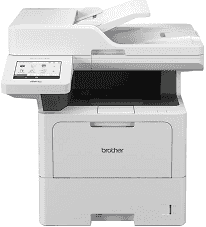
Brother MFC-EX910 Driver gives the computer access to this multifunction laser machine for printing, scanning, copying, and faxing. After installation, print jobs can move from supported applications to the printer, and scanning software can use the machine’s scanner. A nearby computer can use a direct USB connection. Network operation depends on the interfaces enabled on the MFC-EX910, so the driver must match the connection method used during setup.
Brother MFC-EX910 Drivers for Windows
66c15cd424d44505453b0930727528be75e4f1e1f045de68772f40efa961a6bdf13a9bd5c2a1619356eec76d2dfee8264722a2fc742ee4a69495740b4581a4a5f13a9bd5c2a1619356eec76d2dfee8264722a2fc742ee4a69495740b4581a4a5e03602d33d26952daa81cc8da4d5739ba571c6102073fc023b49aed3ad41cc446eddedfff4131bc903d581f6dc86a8518e1c82980a4cd38b4396c4c1bb1338d3ee2cabe92d46f7f6804a469fbdf46bfefbc58df649a126f936d83c3cc990a4efba40f5efe1d1d3896139bc31bc28b4a3f2e75c76684987239019db6a68d6977d5f3ad9dd0475f7524f0e489aa7076da168c228bcd22031394a53fad4b9a2573f0917273bb5bc10ee4775f36bd98bd05152835bf5370614cf5a803ffa9260b0adBrother MFC-EX910 Drivers for macOS
b1b9e8a5e01858a11b7ef55f2be536e08e48f3b9602bd42e244cf0d1eafad1a6Brother MFC-EX910 Drivers for Linux
69268ab55b3035bfdcb823267c03e5286cffab8e18596cadcfb9e91ddf57061df202ee335d129feebcdb5d5d29c11f69df0690e1dfb4ae421d4851c714d2f9eb9c3a200db3dc7b2b3332dff8c5226b4f3ee560d20b2e1f4918b1faf7124517b2197f63a52e89b8744f5a3c2d843abb3b76d003d5d4830bdfe675c44841a6c72bcda25534ea8e3018e7d46b970cb08b36084355adedc933aba0c8c7d03e903db901dc859f1978e645147ced5ec4b5448cc3e26b1c6d2f1104834f5891c0e17469d724746540a51f8286f2a318b47657227f7131d384a1a4f0475dacb7e3580f3ee74ef3a5529ebf3b26d6139ce15d75374a4538ba2efd48c28b209b0d705e5ec72ba3bffcf199fee6387cb79d6923214648db0f2df1c5a13f8f8f0a6fe0995c401404f2622e60470b4de25d0cdb4adc0f130ace6b380cc0d4b3d7714ad761c1aee28a8765f6637456d81ad1a56226e6857be2f1581fdcd9e4a5a4fbc4c42dd3450a4412b306b9ce2eb7e3ef4734a7b648f9561f525922b02541e98b545929dc2b82aa17ba2e331de1fcb34f0a839d27b9b193ac680d9742250a89e588a6bd56206c4e17c6dbcf263d9d08fb460ccd5b9f1a23fce79b30d0a41d96a224839322b2Brother MFC-EX910 Specifications
The Brother MFC-EX910 is a monochrome laser multifunction machine that prints, scans, copies, and faxes. Printing comes from an electrophotographic laser engine backed by 2 GB of memory. Local controls sit on a 7-inch colour touchscreen measuring 153.84 x 85.63 mm. An 80-sheet automatic document feeder takes multi-page originals and can process both sides automatically for scanning, copying, and fax transmission.
Print resolution reaches 1200 x 1200 dpi. On single-sided jobs, the engine runs at up to 50 ppm on A4 paper or 52 ppm on Letter, dropping to 24 sides per minute during automatic duplex printing. From Ready mode, the first printed page takes less than 6.7 seconds. The flatbed scans at up to 1200 x 1200 dpi, whereas originals fed through the ADF are captured at up to 600 x 600 dpi. Copies are produced at up to 1200 x 600 dpi.
The main paper cassette holds 520 sheets and accepts stock from 60 to 163 g/m². Heavier material goes through the separate 100-sheet multipurpose tray, which can take media up to 230 g/m² as well as labels and envelopes. Finished sheets collect face down, with room for 250 pages in the output area. Two optional lower trays can be fitted when the standard input capacity is not enough.
Gigabit Ethernet provides the built-in wired network connection, and USB 2.0 is available for direct computer or host use. Wireless networking is different: Wi-Fi and Wi-Fi Direct require the optional wireless module rather than being built into the standard configuration. NFC hardware is already fitted for compatible card-based functions. With supplies installed, the machine weighs 20.0 kg. Its listed physical outline is approximately 495 x 518 x 495 mm.
Technical Details
| Title | Brother MFC-EX910 Drivers |
|---|---|
| Device Type | All-in-one printer |
| Driver Version | Varies by driver and operating system |
| Available Downloads | Drivers |
| License | Free |
| Manufacturer | Brother Industries, Ltd. |