
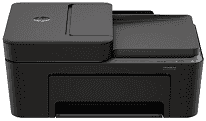
HP DeskJet Ink Advantage 4375 Driver lets a computer send the right print and scan instructions to this all-in-one inkjet printer. After installation, the system can recognise the machine for printing, flatbed scanning, and copying. A wireless setup depends on the printer and computer using the correct network path, so connection details matter before sending a job. Print settings and scan commands then reach the hardware in a form the machine can use.
HP DeskJet Ink Advantage 4375 Drivers for Windows
c8d2aa2725a82146f4cf0e31ad201cf8573cc64ed67fa905935e13958a525acb620068045902345004931235f980d18321eb73b2b9e83672a905b17b6e82367733a48d17157441a5f626bf8b2b5f85c04c1a524bacff1c548f899ad90978765ec11fe40d2b794ffeb0c9f87b6f22efe7b178646c583b58276f0dc4b24872778a83d239d64aa753b224ac1a5c229527fba7a264eb3653fb95af54a387b27b3b1bHP DeskJet Ink Advantage 4375 Specifications
The HP DeskJet Ink Advantage 4375 is a color inkjet all-in-one that prints, scans, and copies. Printing comes from an HP Thermal Inkjet engine using one black cartridge and one tri-color cartridge. A 1.0 GHz processor and 64 MB DDR1 memory sit behind the control hardware. For originals, the flatbed takes single sheets, and a 35-sheet automatic document feeder is available for longer jobs. Fax hardware is not part of the machine.
Black documents can reach 1200 x 1200 rendered dpi. Colour output goes as high as 4800 x 1200 optimized dpi when printing from a computer on selected HP photo paper. ISO speed is rated up to 8.5 ppm for black pages and 5.5 ppm for colour. A black first page can come out in about 15 seconds. Automatic duplex hardware is not fitted, so two-sided pages must be turned manually with help from the print driver.
Scanning reaches up to 1200 dpi optical resolution from both the flatbed and the automatic document feeder. The largest scan area is 216 x 297 mm, which corresponds to the flatbed’s document area. Copies reach up to 300 x 300 dpi in either black or colour. The control panel can request up to nine copies at a time. Borderless printing is not listed for this model.
Paper starts in a 60-sheet input tray, and the output tray holds up to 25 finished sheets. Standard sizes include A4, B5, and A6. DL envelopes also fit, while custom sheets can range from 76 x 127 mm to 215 x 355 mm. A nearby computer can use the Hi-Speed USB 2.0 connection. For wireless printing, the machine uses dual-band Wi-Fi. With its trays closed, the body measures 428 x 332 x 200 mm and weighs about 4.81 kg.
Technical Details
| Title | HP DeskJet Ink Advantage 4375 Drivers |
|---|---|
| Device Type | All-in-one printer |
| Driver Version | Varies by driver and operating system |
| Available Downloads | Drivers |
| License | Free |
| Manufacturer | HP Inc. |