
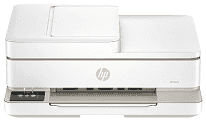
HP Envy 6500e Driver lets the computer recognize the all-in-one printer during setup. A nearby computer can connect by USB, or the printer can join a wireless network. Once detected, it receives print jobs and sends scanned pages back to the computer. Copying runs from the printer itself, while the software keeps print and scan settings matched to each job.
HP Envy 6500e Drivers for Windows
e0e0f9df60d60c59337ee702a9467424c16c3754719fce9f26cb6a3f4fae3349620068045902345004931235f980d18321eb73b2b9e83672a905b17b6e82367733a48d17157441a5f626bf8b2b5f85c04c1a524bacff1c548f899ad90978765ec11fe40d2b794ffeb0c9f87b6f22efe7b178646c583b58276f0dc4b24872778a83d239d64aa753b224ac1a5c229527fba7a264eb3653fb95af54a387b27b3b1bHP Envy 6500e Specifications
HP Envy 6500e is a colour thermal inkjet all-in-one for printing, scanning, copying, and mobile fax. Ink comes from replaceable black and tri-colour cartridges rather than refillable tanks. Multipage originals can pass through the 35-sheet automatic document feeder, while books and single sheets belong on the flatbed glass. A 2.4-inch colour touchscreen gives direct access to copy, scan, paper, and wireless controls.
HP rates black output at up to 10 pages per minute and colour at up to 7 pages per minute. Automatic duplexing turns ordinary documents without requiring each sheet to be flipped by hand. Borderless printing is limited to compatible photo sizes. The first black page takes about 19 seconds, while the scanner reads at up to 1200 dpi optical resolution. Copies are produced at 300 x 300 dpi, and the glass accepts originals up to 215.9 x 297 mm.
The main tray is listed for 100 sheets, though HP’s technical guide lowers the plain-paper figure to 80 sheets for some paper weights. It can also hold ten envelopes. Smaller media use the same tray, with space for 40 index cards or 30 photo sheets. Finished pages collect in a 25-sheet output tray, so longer jobs may need attention before the input tray empties. The paper path accepts cards up to 200 gsm and photo stock up to 300 gsm.
A nearby computer can connect through Hi-Speed USB 2.0. Wireless jobs travel over dual-band Wi-Fi on 2.4 GHz or 5 GHz networks, using 802.11a/b/g/n/ac standards. Phones and tablets can print or scan through supported HP app services, and the touchscreen shows the current wireless status. Power input ranges from 100 to 240 volts at 50 or 60 Hz.
Technical Details
| Title | HP Envy 6500e Drivers |
|---|---|
| Device Type | All-in-one printer |
| Driver Version | Varies by driver and operating system |
| Available Downloads | Drivers |
| License | Free |
| Manufacturer | HP Inc. |