
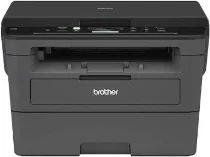
Brother DCP-L2535D Driver helps the computer communicate correctly with this monochrome multifunction printer. The driver lets the computer recognize the print, scan, and copy functions without adding fax support. This model uses a USB connection, so the correct driver keeps print jobs and scan commands matched to the machine. After setup, documents can move properly between the computer and printer.
Brother DCP-L2535D Drivers for Windows
e05b53fbd01649079680df57d1480f3f8c2cdbfa2ac50e5e6f530eb4b768e0816722a890472e2cab4d5c8347e7f6d3b47aa1b0375cbb3179888873251b043bf06722a890472e2cab4d5c8347e7f6d3b47aa1b0375cbb3179888873251b043bf0632666bd95643d05db8320ac2695b1fc95238ea2495ab0ef4d7ff1f37a56446b6eddedfff4131bc903d581f6dc86a8518e1c82980a4cd38b4396c4c1bb1338d3ee2cabe92d46f7f6804a469fbdf46bfefbc58df649a126f936d83c3cc990a4efba40f5efe1d1d3896139bc31bc28b4a3f2e75c76684987239019db6a68d6977da1eba9683e8b58e4686d7b8362f7297b80c9d454d051000da98ab810634f45d14d08250d1d8c34040671039b36a6d3ed3f551126c826f63b656cb9cd86754da35f3ad9dd0475f7524f0e489aa7076da168c228bcd22031394a53fad4b9a2573fBrother DCP-L2535D Drivers for macOS
e0c68c4dc939326de2735539c973e4f61ad2c147df5bb7b80127e7286875d486ac24dc9ef5043009b2f2646e04861883d81baeb6d1d13139b1686028b80f59c0Brother DCP-L2535D Drivers for Linux
2110b36451f0d38da1a32fe963dfe143577fb9b47c27bd14c5c2e023143aff5e5bb3006f549d1397bb10e6334810eae1d4e345c29b61b5144832a376af150f37027b73648722ac8c8eb1a9c419d284a6562cc763feac9740a2b75a683b09297289d82315fd9d629f8af7b5bc489f392da218acfe2436e42eec147246101636d5cda25534ea8e3018e7d46b970cb08b36084355adedc933aba0c8c7d03e903db901dc859f1978e645147ced5ec4b5448cc3e26b1c6d2f1104834f5891c0e174694225e91dd7f7d0ba2a202f616b15b669be7800c271a7d25efed94191f71fc4500fec3bcffeb597b2d23ef7ff31f34dc7bd8d4736a35c2d1ff5e56784d709ce532ba3bffcf199fee6387cb79d6923214648db0f2df1c5a13f8f8f0a6fe0995c401404f2622e60470b4de25d0cdb4adc0f130ace6b380cc0d4b3d7714ad761c1ae82aa17ba2e331de1fcb34f0a839d27b9b193ac680d9742250a89e588a6bd56206c4e17c6dbcf263d9d08fb460ccd5b9f1a23fce79b30d0a41d96a224839322b2Brother DCP-L2535D Specifications
The Brother DCP-L2535D is a monochrome laser multifunction printer with print, scan, and copy functions. Printing comes from laser electrophotographic technology, while scanning relies on CIS hardware beneath the flatbed glass. The machine carries 128 MB of memory and a two-line LCD with 16 characters per line. Brother lists no fax section or automatic document feeder for this compact desktop model.
A4 printing reaches up to 34 pages per minute. Maximum print resolution is 1200 x 1200 dpi, with HQ1200 also listed as 2400 x 600 dpi quality. Automatic duplex printing works with A4 paper, although two-sided output runs below the single-sided rate. Copying uses 600 x 600 dpi resolution. Enlargement and reduction run from 25% to 400%, and copy quantity can reach 99 pages.
The standard paper tray holds up to 250 sheets of 80 g/m² plain paper. It accepts A4, Letter, A5, A5 Long Edge, A6, and Executive sizes. For single sheets, the manual feed slot takes thicker media, labels, envelopes, or recycled paper. Printed pages leave through the face-down output tray, listed at up to 120 sheets. Without an ADF, multi-page originals must go on the flatbed one page at a time.
Connectivity stays simple because the machine uses Hi-Speed USB 2.0 rather than Ethernet or wireless networking. The body measures 410 mm wide, 398.5 mm deep, and 272 mm high. Listed weight is 10.5 kg with supplies. Power requirements are 220 to 240 V AC at 50/60 Hz, with about 42 W ready, 6.2 W sleep, and 0.03 W power-off consumption in normal operation.
Technical Details
| Title | Brother DCP-L2535D Drivers |
|---|---|
| Device Type | All-in-one printer |
| Driver Version | Varies by driver and operating system |
| Available Downloads | Drivers |
| License | Free |
| Manufacturer | Brother Industries, Ltd. |