
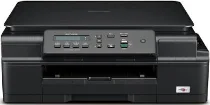
Brother DCP-J100 Driver helps the computer identify this inkjet multifunction printer before print or scan commands reach the machine. Desktop printing and scanning need proper USB communication so the software can find the printer and flatbed correctly. Copying runs from the printer’s own control panel, while the driver mainly affects computer-based print and scan tasks. With the USB connection set up correctly, documents and scans move with fewer recognition or command errors.
Brother DCP-J100 Drivers for Windows
02e147c78e6450b14050335e71143c8b62821a52f69edc0c602b7a8dd5c20f7bcbc76497a0739a2a0a1beddfc76763d92a33d10762f166b05b6da2791aefc9f7cbc76497a0739a2a0a1beddfc76763d92a33d10762f166b05b6da2791aefc9f70edce9170c3f46f065e52aa6335c093befa453212698a94c7d59fcfc5197fa7eBrother DCP-J100 Drivers for Linux
5c5067c980dedcdc9081335e1e6cce34204d3a49a02de0b0e5c225f6ad72e096915bee9acff6ff304d88f0a72ef90eb35bf4ed388d5dd2290bd9d4b16265467cc3c259c526ff439bf302b109d7f5aa3f65b78c2fbbd1e5e2678db9921005452fb2f9bcfc509fcb5c9a22663797a3f644f8629a4d0e90ca0b190921dc94b759a3027b73648722ac8c8eb1a9c419d284a6562cc763feac9740a2b75a683b09297289d82315fd9d629f8af7b5bc489f392da218acfe2436e42eec147246101636d5cda25534ea8e3018e7d46b970cb08b36084355adedc933aba0c8c7d03e903db901dc859f1978e645147ced5ec4b5448cc3e26b1c6d2f1104834f5891c0e174694225e91dd7f7d0ba2a202f616b15b669be7800c271a7d25efed94191f71fc4500fec3bcffeb597b2d23ef7ff31f34dc7bd8d4736a35c2d1ff5e56784d709ce532ba3bffcf199fee6387cb79d6923214648db0f2df1c5a13f8f8f0a6fe0995c401404f2622e60470b4de25d0cdb4adc0f130ace6b380cc0d4b3d7714ad761c1ae82aa17ba2e331de1fcb34f0a839d27b9b193ac680d9742250a89e588a6bd56206c4e17c6dbcf263d9d08fb460ccd5b9f1a23fce79b30d0a41d96a224839322b2Brother DCP-J100 Specifications
The Brother DCP-J100 is a colour inkjet multifunction printer for printing, scanning, and copying. Ink reaches the page through a piezo print head with 210 black nozzles and 70 nozzles for each colour channel. The machine carries 64 MB of memory. A 16-character, one-line LCD handles local status and menu work. Brother does not list fax hardware or an automatic document feeder for this DCP unit, so each original has to go on the flatbed.
Print resolution goes up to 1200 x 6000 dpi. Borderless output works on A4, Letter, A6, photo, Photo 2L, and index card sizes. From the glass, the scanner records up to 1200 x 2400 dpi optically. Brother’s scan utility can raise the interpolated figure to 19200 x 19200 dpi. Colour scans use 30-bit input and 24-bit output. For copies, output reaches up to 1200 x 2400 dpi. The copy menu can stack or sort up to 99 pages, with scaling from 25% to 400%.
Paper starts in a 100-sheet tray. That feed path takes plain paper, inkjet paper, glossy paper, transparencies, envelopes, photo sheets, and index cards. Brother lists Letter, Legal, Executive, A4, A5, A6, COM-10, DL, C5, and Monarch for the same tray. Photo paper sizes include 10 x 15 cm and 13 x 18 cm Photo 2L. Index cards can measure 127 x 203 mm. Finished pages collect in a 50-sheet output tray, and the flatbed accepts originals up to 215.9 x 297 mm.
A computer connects through USB 2.0 with an interface cable no longer than 2 metres. Ethernet, wireless LAN, Wi-Fi Direct, memory-card printing, and camera-direct printing are not listed for this exact model. The body is 435 mm wide, 374 mm deep, and 161 mm high. The unit weighs 7.1 kg. Power use is about 16 W during copying, 2.5 W in ready mode, 0.7 W in sleep, and 0.2 W when off.
Technical Details
| Title | Brother DCP-J100 Drivers |
|---|---|
| Device Type | All-in-one printer |
| Driver Version | Varies by driver and operating system |
| Available Downloads | Drivers |
| License | Free |
| Manufacturer | Brother Industries, Ltd. |