
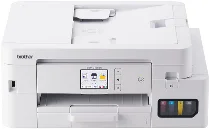
Brother DCP-J4250N Driver sets up computer communication with this inkjet multifunction printer for printing, scanning, and copying. After installation, the operating system can identify the Brother DCP-J4250N and route each job to the correct function. A nearby computer can connect through USB. For shared access, the machine can also work through wired or wireless network setup.
Brother DCP-J4250N Drivers for Windows
80ba5593ec925267fc83ce4cdbf9fc07793a808cce960aa7cadeb72dc6dd00e8940f5e4e81dbb3e9162f90a6236fb3b440916812a6205bef0d41fea604df23c1940f5e4e81dbb3e9162f90a6236fb3b440916812a6205bef0d41fea604df23c10edce9170c3f46f065e52aa6335c093befa453212698a94c7d59fcfc5197fa7e0917273bb5bc10ee4775f36bd98bd05152835bf5370614cf5a803ffa9260b0adBrother DCP-J4250N Drivers for macOS
3e25c08d380ad841fda125a40aa6ed20db86bd1a4d2188d1eeed831bfce5b167Brother DCP-J4250N Drivers for Linux
45675323e27386caa517c564dd08a04f8a9314acdfd133e4ea57a1ff00a8ad0f28ce14a0584055471fa23d20fd9b9d67ade92684934dbc9108ea9d1d5af2c4409c3a200db3dc7b2b3332dff8c5226b4f3ee560d20b2e1f4918b1faf7124517b2197f63a52e89b8744f5a3c2d843abb3b76d003d5d4830bdfe675c44841a6c72bcda25534ea8e3018e7d46b970cb08b36084355adedc933aba0c8c7d03e903db901dc859f1978e645147ced5ec4b5448cc3e26b1c6d2f1104834f5891c0e17469d724746540a51f8286f2a318b47657227f7131d384a1a4f0475dacb7e3580f3ee74ef3a5529ebf3b26d6139ce15d75374a4538ba2efd48c28b209b0d705e5ec72ba3bffcf199fee6387cb79d6923214648db0f2df1c5a13f8f8f0a6fe0995c401404f2622e60470b4de25d0cdb4adc0f130ace6b380cc0d4b3d7714ad761c1ae82aa17ba2e331de1fcb34f0a839d27b9b193ac680d9742250a89e588a6bd56206c4e17c6dbcf263d9d08fb460ccd5b9f1a23fce79b30d0a41d96a224839322b2Brother DCP-J4250N Specifications
The Brother DCP-J4250N is an A4 colour inkjet multifunction printer for printing, scanning, and copying. Fax and cordless telephone hardware are not part of this model. Its ink system uses four separate pigment cartridges from the LC516 and LC516XL series. The body carries 256 MB memory, while the control panel uses a 2.7-inch touchscreen LCD. A 20-sheet automatic document feeder works above the flatbed scanner.
Printing reaches up to 1200 x 4800 dpi, using a minimum 2 pl ink droplet size. A4 plain-paper speed is about 20 ipm in mono and 19 ipm in colour. In ink-save mode, speed reaches about 35 ppm mono and 29 ppm colour. First print time is about 5.8 seconds for mono and 5.9 seconds for colour, while automatic duplexing works with A4, A5, and B5 plain paper.
Copying has 3 mm margins in copy mode. Scanning can run from the flatbed for single originals or from the ADF for stacked sheets. Paper input comes through a front tray holding up to 150 sheets of plain paper, while printed output collects in a tray rated for up to 100 sheets. Print media include A4, Letter, Legal, B5, B6, A5, A6, postcards, index cards, L-size, 2L-size, and several envelope types.
Connections include Hi-Speed USB 2.0, 10Base-T or 100Base-TX Ethernet, and wireless LAN on IEEE 802.11a/b/g/n across 2.4 GHz and 5 GHz bands. Wi-Fi Direct and WPS are available, while AirPrint and Mopria handle direct mobile printing. USB flash-drive printing is built in. Size is 435 mm wide, 343 mm deep, and 180 mm high, with weight about 8.9 kg. Power use is about 21 W copying, 0.8 W asleep, and 0.1 W off.
Technical Details
| Title | Brother DCP-J4250N Drivers |
|---|---|
| Device Type | All-in-one printer |
| Driver Version | Varies by driver and operating system |
| Available Downloads | Drivers |
| License | Free |
| Manufacturer | Brother Industries, Ltd. |