
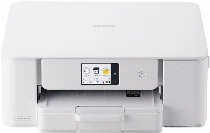
Brother DCP-J529N Driver sets up computer communication with this colour inkjet multifunction printer for printing, scanning, and copying. After installation, the operating system can identify the Brother DCP-J529N and send each job to the correct function. A nearby computer can connect through USB for a direct link. Network setup lets print jobs and scan requests move between the computer and the machine.
Brother DCP-J529N Drivers for Windows
238af93cc4e0d7793b59ac99e17b529d65ad9107d4741e182ac769eeac7c53e713e17877a6865860a35fc7a59dd4340ce6c384e1f0eefd83f29fac5532d36ab613e17877a6865860a35fc7a59dd4340ce6c384e1f0eefd83f29fac5532d36ab60edce9170c3f46f065e52aa6335c093befa453212698a94c7d59fcfc5197fa7e0917273bb5bc10ee4775f36bd98bd05152835bf5370614cf5a803ffa9260b0adBrother DCP-J529N Drivers for macOS
e577d28579e6e2ff6080419d465a901c47f2e39d83c4f7b061906259aacc969dBrother DCP-J529N Drivers for Linux
73929df695695a71491938024f6734ccac210c2c4caaf175dcdc8a5c30a2753fbdc5ae5ddf6499d10bd2e55a6437d971db97bd674377fb3e3d2bd997cbddf1c59c3a200db3dc7b2b3332dff8c5226b4f3ee560d20b2e1f4918b1faf7124517b2197f63a52e89b8744f5a3c2d843abb3b76d003d5d4830bdfe675c44841a6c72bcda25534ea8e3018e7d46b970cb08b36084355adedc933aba0c8c7d03e903db901dc859f1978e645147ced5ec4b5448cc3e26b1c6d2f1104834f5891c0e17469d724746540a51f8286f2a318b47657227f7131d384a1a4f0475dacb7e3580f3ee74ef3a5529ebf3b26d6139ce15d75374a4538ba2efd48c28b209b0d705e5ec72ba3bffcf199fee6387cb79d6923214648db0f2df1c5a13f8f8f0a6fe0995c401404f2622e60470b4de25d0cdb4adc0f130ace6b380cc0d4b3d7714ad761c1ae82aa17ba2e331de1fcb34f0a839d27b9b193ac680d9742250a89e588a6bd56206c4e17c6dbcf263d9d08fb460ccd5b9f1a23fce79b30d0a41d96a224839322b2Brother DCP-J529N Specifications
The Brother DCP-J529N is a colour inkjet multifunction printer with print, scan, and copy hardware. Its inkjet engine uses a piezo head with 210 black nozzles and 70 nozzles for each colour channel. Memory is 256 MB, and the control panel has a 2.7-inch TFT colour LCD. Fax is not part of this DCP model, and the listed body weight is approximately 6.3 kg.
Printing reaches up to 1200 x 6000 dpi on Windows. A4 plain-paper speed is about 15 ipm in mono and 9 ipm in colour. First print time is about 6.2 seconds for mono and 9.6 seconds for colour. Automatic duplex printing works with plain or recycled paper in A4, Letter, B5, A5, and B6 sizes. Borderless printing covers A4, Letter, A6, postcards, index cards, L-size, 2L-size, and Hagaki.
Scanning relies on the flatbed because this compact model has no automatic document feeder. Optical scan resolution reaches 1200 x 2400 dpi, while software interpolation extends to 19200 x 19200 dpi. The glass reads originals up to 213.9 mm wide and 295 mm long. Copying reaches up to 1200 x 1800 dpi, supports colour and monochrome output, runs to 99 copies, and scales from 25 to 400 percent.
Paper input comes through a 150-sheet front tray for plain paper, while the manual feed slot accepts one sheet at a time. Output capacity is up to 50 sheets. Supported media include A4, Letter, Legal, B5, B6, A5, A6, postcards, index cards, L-size, 2L-size, hagaki, double postcards, and several envelope sizes. Connections include Hi-Speed USB 2.0, IEEE 802.11a/b/g/n wireless LAN, and Wi-Fi Direct. AirPrint, Mopria, and Brother Mobile Connect support mobile printing.
Technical Details
| Title | Brother DCP-J529N Drivers |
|---|---|
| Device Type | All-in-one printer |
| Driver Version | Varies by driver and operating system |
| Available Downloads | Drivers |
| License | Free |
| Manufacturer | Brother Industries, Ltd. |