
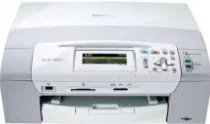
Brother DCP-383C Driver helps the computer communicate correctly with this inkjet multifunction printer. After installation, the operating system can recognize the machine for printing and scanner access. Copying runs from the printer hardware itself, so it does not depend on a computer command. Faxing is not built into this DCP model. A local connection handles the data path between the computer and the machine for document output.
Brother DCP-383C Drivers for Windows
0301c8ea17acf8653a2ae704946d2f4472978cb91e5ea928beea5e504ea0a0805cd4f049f75982062f378448306d7f283a4757a44d81edec80eab5f68bc2d7835cd4f049f75982062f378448306d7f283a4757a44d81edec80eab5f68bc2d7830f4080b9f78dac967c555271e19ad6eeef3a18a25a7a80e78d4cb90f900937520f4080b9f78dac967c555271e19ad6eeef3a18a25a7a80e78d4cb90f90093752Brother DCP-383C Drivers for Linux
90f6fc67e3dacfa69a30bc6b56fd26fcc23526618c013eeb225f09edc0536416926984064e3ad697e001d28060437672cd345e89680cdcc4ffeb8e7a8628e5098e55a7119aa7fd4f9666ddd8fd43b0499cd782b328ca1c1db27d13856fe05631e40ec5450a16e20ba90ca62cb98068f8508e1c4850385a36f69c13b66fc06ade446adf531bf39032892e9504ce34b7bf889e0f8628c0732cebb3b83fafb327b8b462dbded2d0f7ae511057bd3cb6f8379042b75d996eef2675998a4559cc5556cda25534ea8e3018e7d46b970cb08b36084355adedc933aba0c8c7d03e903db901dc859f1978e645147ced5ec4b5448cc3e26b1c6d2f1104834f5891c0e17469ad06665cac32035893f614d9305dabf73145af454f1aeb6b8b7c7fa2700fe2e65586fe264c7bd715e598b5d444f2851464ffe72857f2f48486466e7e2957f7922ba3bffcf199fee6387cb79d6923214648db0f2df1c5a13f8f8f0a6fe0995c401404f2622e60470b4de25d0cdb4adc0f130ace6b380cc0d4b3d7714ad761c1ae82aa17ba2e331de1fcb34f0a839d27b9b193ac680d9742250a89e588a6bd56206c4e17c6dbcf263d9d08fb460ccd5b9f1a23fce79b30d0a41d96a224839322b2Brother DCP-383C Specifications
Brother DCP-383C is a color inkjet multifunction printer for printing, scanning, and copying. Fax hardware is not built into this DCP model. The machine carries 32 MB of memory, and document capture relies on a CIS flatbed scanner. The glass accepts originals up to 215.9 x 297 mm. With supplies installed, the body measures 390 x 365 x 150 mm and weighs about 7.2 kg.
Printing reaches up to 1200 x 6000 dpi. The listed print width is 8.26 inches on Letter media, or 8.5 inches when borderless output is used. Brother specifies ink droplets at 4 pl for black. Cyan, magenta, and yellow use 1.5 pl droplets. Copy resolution reaches 1200 x 1200 dpi in mono and 600 x 1200 dpi in color. Reduction and enlargement settings run from 25% to 400%.
Scanning uses the flatbed CIS hardware at 1200 x 2400 dpi optical resolution. Maximum scan width is 210 mm, and gray scale depth is 256 levels. Brother lists interpolated resolution at 1200 x 1200 dpi. With the scanner utility on Windows XP or Windows Vista, it can rise to 19200 x 19200 dpi. The scan key can send files to image, e-mail, OCR, file, or card destinations.
Paper feeds from a 100-sheet input tray when using 80 g/m² plain paper. Printed pages collect in a 50-sheet output tray. Copying can stack up to 99 copies and create 2-in-1 or 4-in-1 layouts on Letter or A4 paper. Other copy modes handle poster, fit-to-page, book, and watermark output. Computer connection stays local through USB 2.0. Camera printing uses PictBridge through the USB direct interface. Card handling covers CompactFlash, Memory Stick, SD, SDHC, and xD Picture Card media.
Technical Details
| Title | Brother DCP-383C Drivers |
|---|---|
| Device Type | All-in-one printer |
| Driver Version | Varies by driver and operating system |
| Available Downloads | Drivers |
| License | Free |
| Manufacturer | Brother Industries, Ltd. |