
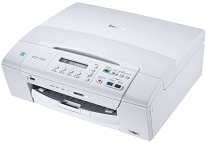
The print technology for the Brother DCP-195C printer is the piezoelectric inkjet component while the internal memory capacity of the printer is about 32 MB of RAM to support the inbuilt processor. The host interface takes a USB 2.0 port to connect to a PC with a USB cable that is no longer than 200 centimeters. The device also supports the use of a PictBridge connector to attach a camera to the printer for direct printing of photos.
Brother DCP-195C Drivers for Windows
00e7c72af09c2d3a45fe2133b40ee75629bcea6ac607f5147ae677e3aaaf0eb0882acd89cdd591276dd8e0235796aa93f804949f120fd085d8338887bc2a870b675c585875a8fd4cf89504c22a4c443ac9e70d405415b8aa9ad23fb26f75be02209ffb2e50583e295c7d14cc2690a539e145825500d7b955a096bddc52f94c809571e8f731cfb10bd2ec72de14eea0c2942a10f5979bca7a0ca9579be4e2f0d9b2a5b9919df9417e2abcc7c746f91098657a9745eba8806e6a7ea1a6a0f276d4Brother DCP-195C Drivers for macOS
8927aa5f3e32f0cef23e4b339771e443022e4d3d5b5433399188fcba8052b07a6a9ef2865964ff4918dd1441876a80485fb8c329df36aa8d6680deff2eecd53efe5c757fa972cfe84c87cdaeb684c2b6233f2dbd044a69240435e5948eeea2fb949467d5fd874da4f4bcf9028483495f8319aad70483dbb26c2c4db964fbc8a7ccf77ac934b5b9c39d8ce7f51743d95680053835e645b676e7993db898fea8887a561501401629bf6fa158d46c5a190eefe95941b2d995e77190840bfb4a58de59553d65e3e1fd0efacf7816fbbefce981bc6f2b27ffc20c6b452dba4c4a8d7c2811fb268c0ee6c15a5a8849b36e9f1854e5c8165afe527669d2a79692709352a47f2e6b9b5d9f4dc7bf154292f2e691176be4724779a06d00497673134f1a50e7500a1413a0ac29845a1de6f7dc8456e8b368cc68ddb8f996273e0ce804a2f147e26a481968bd3ae74b6d77b69c018982a7e0451375ed6990cb18cfd6c92b59db090e4122c377bebdd1f1d8003144d11985cad0dcc4dd1ff305de0f4217c1f1f7dedd6f853b70d8fe92f509e0732631db5f1e977abff39c11922290dccb2d3b725d85857205fabd1f1be41168dc0793ebc649cd48bfc5cc3086c74e7568c27e868ee1de715a54d657a791d0077a3621bbc02efe2d1d5e69a9b3472a42f1aad004a8579b472f5213e7129efcfe6cca432db6c46587ff9ffc455824e48e359883f8b36b787a34698bbe669254a86c305f6b4a595b292f97c41e6e82816be371ddBrother DCP-195C Specifications
The display component of the printer is part of the control panel and comprises a liquid crystal display (LCD) that supports 16 characters in a single line. The other part of the control panel also involves buttons for quick control and easier accessibility for the users. For media specifications, the printer supports A4, A5, A6, B5, B6, executive, envelopes, labels, transparencies, photo paper, letter, legal and postcards.
Scanning through the scanner glass can only take a maximum width and length of 8.7 inches and 11.7 inches respectively. Also, the standard weight is between 17 and 58 lbs for the standard tray with support for plain, inkjet, glossy and transparent sheets. This Brother DCP-195C color printer can work at a resolution that is up to 1200 x 6000 dots per inch (dpi) when printing on glossy, borderless photo paper or postcard. It also supports color enhancement with the aid of pre-installed enhancement software as well as a photo capture center.
The minimum inkjet droplet size is four picoliters for black and white printing and 1.5 picoliters for cyan, magenta, and yellow print. The resolution for copying and scanning is 600 x 1200 dpi, and it also supports multi-copy, otherwise known as stacking. The copying feature can reduce the image up to 25% and enlarge up to 400% of the original document in gradual increments of 1%.
Technical Details
| Title | Brother DCP-195C Drivers |
|---|---|
| Device Type | All-in-one printer |
| Driver Version | Varies by driver and operating system |
| Available Downloads | Drivers |
| License | Free |
| Manufacturer | Brother Industries, Ltd. |