
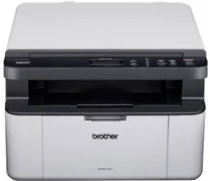
Brother DCP-1601 Driver connects the computer to this monochrome laser multifunction machine for printing, scanning, and copying. Print jobs move to the laser engine, while scan commands use the flatbed scanner to return image data to the computer. After installation, the operating system can identify the machine through the selected connection and route each command to the correct function. Correct driver setup keeps printed documents and scanned files working through the same Brother unit.
Brother DCP-1601 Drivers for Windows
b4bd959ed76c136e383ca22e783f4b4dcc63583c7b4d277c3809deae220255d0a9bdbdea9ca2d82a957170f908526326fef21ff30bc6759d1b0ff43db68ffed5a9bdbdea9ca2d82a957170f908526326fef21ff30bc6759d1b0ff43db68ffed5Brother DCP-1601 Drivers for macOS
ccd05a0ff77b516148780b0faac3e495cc38a6893f850a417f0d8275770fb253Brother DCP-1601 Drivers for Linux
677e41d6a5d1cf133ba02ab3dd2cb0856244cb2d18670618b4216fee182c0d941e4441a5d5ca0fa58f9d3bc757490bcb1a9448f739f309535f4a024152ba91a682f292819a000b6105c3a9557599fe614d55af0e6b5f4a34cea948b923d3d54298e56d2e14641c8c67132deeceb740751b920eb15e7d78fffe4baf4d9aaa9ff9027b73648722ac8c8eb1a9c419d284a6562cc763feac9740a2b75a683b09297289d82315fd9d629f8af7b5bc489f392da218acfe2436e42eec147246101636d5cda25534ea8e3018e7d46b970cb08b36084355adedc933aba0c8c7d03e903db901dc859f1978e645147ced5ec4b5448cc3e26b1c6d2f1104834f5891c0e174694225e91dd7f7d0ba2a202f616b15b669be7800c271a7d25efed94191f71fc4500fec3bcffeb597b2d23ef7ff31f34dc7bd8d4736a35c2d1ff5e56784d709ce532ba3bffcf199fee6387cb79d6923214648db0f2df1c5a13f8f8f0a6fe0995c401404f2622e60470b4de25d0cdb4adc0f130ace6b380cc0d4b3d7714ad761c1ae82aa17ba2e331de1fcb34f0a839d27b9b193ac680d9742250a89e588a6bd56206c4e17c6dbcf263d9d08fb460ccd5b9f1a23fce79b30d0a41d96a224839322b2Brother DCP-1601 Specifications
Brother DCP-1601 is a monochrome laser multifunction printer for printing, scanning, and copying, while the DCP body leaves out fax hardware. An electrophotographic laser engine works with 16 MB of memory and runs from a 220 to 240 V AC, 50/60 Hz supply. Document capture relies on the scanner glass, so originals go on the flatbed one sheet at a time for capture.
Print resolution reaches up to 2400 x 600 dpi with Brother HQ1200 technology. Single-sided output runs up to 20 pages per minute on A4 or 21 pages per minute on Letter. At Brother’s 23 °C and 230 V test condition, the first page comes out in less than 10 seconds. Colour scanning reaches 600 x 1200 dpi optically from the glass, while interpolated resolution rises to 19200 x 19200 dpi.
Copying covers a maximum copy width of 210 mm. Multiple-copy work can stack or sort up to 99 pages. Reduction and enlargement run from 25% to 400% in 1% steps, while copy resolution reaches up to 600 x 600 dpi. Under the 23 °C and 230 V rating, the first copy comes out in less than 16 seconds. The scanner glass accepts originals up to 215.9 mm wide and 300 mm long.
Paper input comes through a 150-sheet tray for plain or recycled paper. Printed pages collect in a 50-sheet face-down output tray. Along with A4, Letter, Legal, Folio, A5, B5, and Executive sizes, the cassette accepts 65 to 105 gsm paper. Hi-Speed USB 2.0 provides the only connection, using a Type A/B cable up to 2 meters long. With consumables installed, the body measures 385 x 340 x 255 mm and weighs 7.2 kg.
Technical Details
| Title | Brother DCP-1601 Drivers |
|---|---|
| Device Type | All-in-one printer |
| Driver Version | Varies by driver and operating system |
| Available Downloads | Drivers |
| License | Free |
| Manufacturer | Brother Industries, Ltd. |