
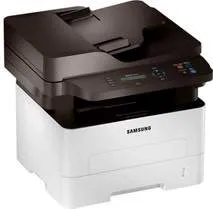
The Samsung Xpress SL-M2876 model of printer uses laser print technology and is a standby printer for monochrome production. This machine has two lines of display of the printer status through the liquid crystal display (LCD) screen. It can also produce up to 12000 impressions per month at maximum productivity level. The standard internal memory of the machine is up to 128 MB of RAM. Also, the device can produce the first-page printout only after 8.5 seconds of issuing the command.
Samsung Xpress SL-M2876 Drivers for Windows
e4256eca5151a5c923b75e781c763b961f6230ab465a23999eeb417bd58ee27fe32f7e01f04b70c74344bf2968545bf318d728a333571202c0a7a1966d3fd355b96c4669b99267f6321f58c4ee0a6937ad6c3f624140f5e65fef551d8e448be5ed7ba3cf15ba39158ef28454606db7ce1832cbe8bc059d2fca60a03bf1e65de5ece7cd5d432732ac7628723717801a8aa7ed90eb8215d3122656f99affce36b67e9244b9d42a27e6f2c712bfb8addd0bc3e9124da262072b9e9fa5ab73746534Samsung Xpress SL-M2876 Drivers for macOS
e9ce51d39f7213706576e7c849700138a5766a933a2b6e5629f2d3b5a1ca9000aa091be591f0a958b4588eba72153636941c0a4d519d8f849eb8c3770549c824bc18583816cd150a2ae02c30876bc4aa9f333848c5184d9767d319cc189b4b116f61cc8dd0c6959ddba08fb40c222316298a119e7ec68ad34c5f8656791bd2a569256b8b2ec0d835623a311556569e79bd002b504d1ad679d3db301362357d43Samsung Xpress SL-M2876 Drivers for Linux
0c38213b846644500526bf281caaa6e36c40b8f2241cac2f0398c97c3814540eSamsung Xpress SL-M2876 Specifications
In terms of the consumables in the package, it uses a black toner cartridge that can produce 1200 pages before exhaustion. When in sleep mode, the power consumption is about 0.9 watts, while the standby mode uses 45 watts. Then, at optimum operational performance, the printer power usage is up to 400 watts. Basic copying features include 2-up, 4-up, ID card copy, and poster copy amidst other features.
While copying as well, the machine can run at a speed of up to 29 copies per minute (CPM). But the copy resolution cannot exceed 600 x 600 dots per inch (dpi). The Samsung Xpress SL-M2876 machine also has EPEAT Bronze compliance as well as ENERGY STAR certification for suitability to the environment. In terms of printing, the Samsung Xpress SL-M2876 model can produce a print quality of up to 4800 x 600 dpi. The printer driver or emulations also include the Samsung Print Language (SPL), PCL 6, and PCL 5e.
When printing as well, the rate of work can reach 29 ppm while the first-page printout will be 8.5 seconds. Also, the sound emission from the machine is about 26 dBA when idle and 50 dBA when in operation. The main input paper tray will hold 250 sheets of plain paper while the bypass tray holds one at a time. On the other hand, the output tray will accommodate 120 sheets of printed documents.
Technical Details
| Title | Samsung Xpress SL-M2876 Drivers |
|---|---|
| Device Type | All-in-one printer |
| Driver Version | Varies by driver and operating system |
| Available Downloads | Drivers |
| License | Free |
| Manufacturer | Samsung Electronics Co., Ltd. |