
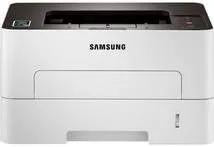
This machine is a classic member of the Samsung Xpress SL-M2830 printer series of workgroup categories. But this machine only prints in monochrome, which is black and white only. It is compatible with wireless services for printing through the Google Cloud Print feature. The printer power consumption varies with the ongoing processes. For instance, when in full operation, it uses up to 400 watts of power, but standby mode uses 45 watts.
Samsung Xpress SL-M2836DW Drivers for Windows
dc487832351c04d49d4fe41f5bef9c6ead1bb5054d3092c1f72b23a99d307bac8c1c530d9458701fb2b8ad7cf7ab789b7c689ff61285752d724dcff78642e8e1a10043b375951f195b63ddb19023482f74aa345cac4f0d851410937e8e3f282aSamsung Xpress SL-M2836DW Drivers for macOS
e9ce51d39f7213706576e7c849700138a5766a933a2b6e5629f2d3b5a1ca9000aa091be591f0a958b4588eba72153636941c0a4d519d8f849eb8c3770549c824bc18583816cd150a2ae02c30876bc4aa9f333848c5184d9767d319cc189b4b1125111afe06ce3607a35e781e3d29ba6f9ecf96e1a91e988f321cb9056ebc3223Samsung Xpress SL-M2836DW Drivers for Linux
0c38213b846644500526bf281caaa6e36c40b8f2241cac2f0398c97c3814540eSamsung Xpress SL-M2836DW Specifications
The standard means of connecting with this machine is either through the USB 2.0 wired technology or wireless component. The former feature includes the use of a recommended USB cable through the hi-speed port or Ethernet LAN. This machine also has an automatic duplexing feature, which enables printing on both sides of the page. At the same time, its first-page printout takes as low as 8.5 seconds for the black page.
The compatible media types for the Samsung Xpress SL-M2836DW model include archive paper, bond paper, index cards, and color-coded labels. Other types include cotton paper, envelopes, label paper, plain paper, preprinted paper, recycled paper, thick paper, thin paper, and transparencies. The total media capacity is about 250 sheets of plain paper, while the first consumable is a black toner cartridge. This one can print up to 1200 pages at maximum capacity.
The print speed of the internal processor reaches up to 400 watts while it also supports the print server for networking. The maximum resolution is up to 4800 x 600 dots per inch (dpi), while the optimum print speed is up to 29 ppm. The optimum capacity of this printer’s duty is about 12000 pages, while the operating sound emission is at 50 dBA. This machine can maximize print resources through laser print technology. The printer also has a net weight of 15.87 lbs.
Technical Details
| Title | Samsung Xpress SL-M2836DW Drivers |
|---|---|
| Device Type | Printer |
| Driver Version | Varies by driver and operating system |
| Available Downloads | Drivers |
| License | Free |