
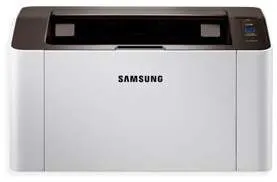
Printing with the Samsung Xpress SL-M2029 model first ensures that the user gets a good value for the invested money. Apart from its aesthetic value, which is work mentioning, the printer supports mobile printing capabilities through the Google Cloud Print feature. The power supply is by inter source, which helps a voltage of up to 230 volts at 50/60 Hz frequency. Then, the power consumption depends on the printer model, such as sleep or standby.
Samsung Xpress SL-M2029 Drivers for Windows
bfc5bc08737f97f5e12a79585bd1cc9923eb6f9143166801ef1d345ef85af47fdc487832351c04d49d4fe41f5bef9c6ead1bb5054d3092c1f72b23a99d307bac2e606ac5e5be7c2fd5371af6d3c182a7b16250274622e635416214d88f913f505deb90f7a88373717d81d6747adc0b488c5e3ca23de247e9e114b2f15a2fe0aaSamsung Xpress SL-M2029 Drivers for macOS
e9ce51d39f7213706576e7c849700138a5766a933a2b6e5629f2d3b5a1ca9000bc18583816cd150a2ae02c30876bc4aa9f333848c5184d9767d319cc189b4b11eb3df390efba15746c1c12d7fac5837a131d6eee9454e5439c2391d50a3403c5Samsung Xpress SL-M2029 Drivers for Linux
0c38213b846644500526bf281caaa6e36c40b8f2241cac2f0398c97c3814540eSamsung Xpress SL-M2029 Specifications
When the printer is in full printing operation, the power usage is up to 310 watts. But the standby mode uses 30 watts while the sleep mode requires about 1.1 watts on the average. The rate of printing also depends on the paper type, such as A4 or letter. When printing in black and white on an A4 paper, the print speed is up to 20 pages per minute (ppm). But the paper size in use is the letter, and the rate increases a bit to 21 ppm for optimum delivery.
On the other hand, it takes about 8.5 seconds for this machine to produce its first-ever page. Furthermore, this machine supports not only wired connectivity through a compatible USB 2.0 hi-speed port but also wireless connection. There also exists an image enhancement technology in a rendering engine for clean pages (ReCP) technology. It also supports language simulations which include PCL 6, and the Samsung Printer Language (SPL).
The supported media types include archive paper, bond paper, card stock, envelopes, plain paper, and preprinted paper. Others include recycled paper, thick paper, and thin paper. In terms of the various sizes, options include A4, A5, B5, Executive, Folio, JIS B5, Letter A size, and the Oficio. All of these paper types must have a weight that falls within the range of 60 and 163 gsm.
Technical Details
| Title | Samsung Xpress SL-M2029 Drivers |
|---|---|
| Device Type | Printer |
| Driver Version | Varies by driver and operating system |
| Available Downloads | Drivers |
| License | Free |