
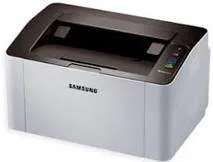
The Samsung Xpress SL-M2020 printer model is a classic choice of device for average print work for efficient productivity. For instance, the rate of printing in black at the normal mode is up to 20 pages per minute (ppm). Also, it produces its first page from the active style as fast as 8.5 seconds. But when the printer is waking up from the sleep mode, the rate of printing the first page is about 15 seconds. Furthermore, the best print quality for black printing as well is up to 1200 x 1200 dots per inch (dpi).
Samsung Xpress SL-M2020 Drivers for Windows
bfc5bc08737f97f5e12a79585bd1cc9923eb6f9143166801ef1d345ef85af47fe4256eca5151a5c923b75e781c763b961f6230ab465a23999eeb417bd58ee27f2e606ac5e5be7c2fd5371af6d3c182a7b16250274622e635416214d88f913f505deb90f7a88373717d81d6747adc0b488c5e3ca23de247e9e114b2f15a2fe0aab57fdb45f70c480d0aaf7ef96f6cf7c1c5dded710ea7c109cc8add4c2a3dbf287e9244b9d42a27e6f2c712bfb8addd0bc3e9124da262072b9e9fa5ab73746534Samsung Xpress SL-M2020 Drivers for macOS
e9ce51d39f7213706576e7c849700138a5766a933a2b6e5629f2d3b5a1ca9000aa091be591f0a958b4588eba72153636941c0a4d519d8f849eb8c3770549c824bc18583816cd150a2ae02c30876bc4aa9f333848c5184d9767d319cc189b4b11eb3df390efba15746c1c12d7fac5837a131d6eee9454e5439c2391d50a3403c5Samsung Xpress SL-M2020 Drivers for Linux
0c38213b846644500526bf281caaa6e36c40b8f2241cac2f0398c97c3814540eSamsung Xpress SL-M2020 Specifications
This machine achieves its print quality through the aid of the rendered engine for clean pages (ReCP) technology. Whereas, its duty cycle when printing on an A4 is up to 10,000 pages in a single month. But the manufacturer recommends a monthly range between 100 and 1500 pages for perfect condition. Also, the inbuilt processor runs at a speed of 400 MHz for efficient productivity. It also supports the use of the Samsung Printer Language (SPL) as a typical print emulation for it.
When the machine runs out of the packaged cartridge, the replacement options include a standard toner cartridge of 1000 pages yield. Also, there is a high yield toner cartridge with an approximate yield of 1800 pages. The choice of connection to the machine is through the standard USB 2.0 hi-speed port. Also, in addition to the processor, the device has a standard internal memory of 8MB, which is the maximum capacity.
The standard input tray paper capacity is up to 150 sheets of plain paper with an average weight of 20 lbs. But the output tray will only accommodate 100 sheets of plain paper at maximum output. This machine also works with a manual duplexer for adequate support for optimum performance.
Technical Details
| Title | Samsung Xpress SL-M2020 Drivers |
|---|---|
| Device Type | Printer |
| Driver Version | Varies by driver and operating system |
| Available Downloads | Drivers |
| License | Free |
| Manufacturer | Samsung Electronics Co., Ltd. |