
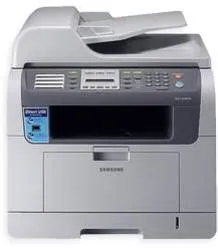
The Samsung SCX-5530 model of Samsung printers is a digital machine that can easily print, copy, and scan documents with finesse. It has a display component that comprises a liquid crystal display (LCD) screen and can show the status of the printer. This LCD screen can display the status in two lines and supports up to 16 characters. The applicable print technology for this machine is the laser print method, which ensures the optimization of print resources.
Samsung SCX-5530 Drivers for Windows
b070e320cb18bc9efe3dbdb1daa1214887d255e5b44005721f2e05710a5cbe6b418ace0b0541775af0e93eee665d2edaa489d86df1d31b2921bfea0bba4e7d7f9c4283f332abf54782ace5f9e7ae53d04769422c17d7613ef0989bf2b558ab9ef47c8758dc4e24c70c2da1893a6313d87b372335450bfd9b53868b8d4dfa3d38b4f1c95c0b2334aea0f1be5a966e064e8b1c3d3f7b5e9a9bdbfc4531fe39da9fba6ff74a0e4c45f36be539449aee9d9097ef76fc76cd19de0fa873ded0f26680ba497326758146d9b81e39a55b2517795db51a333f2d5ec478fc711af168e65eSamsung SCX-5530 Drivers for macOS
aae5aa2289d8ad782a474a2e5bf3bcd77029028497dbbd333d1f63a6807eddff275b6540774af204ba9ba094822e9a1d4be9a1097550ce0fc6468f691cbd75c5Samsung SCX-5530 Drivers for Linux
0c38213b846644500526bf281caaa6e36c40b8f2241cac2f0398c97c3814540eSamsung SCX-5530 Specifications
The printer can create up to 25000 impressions in a month, without compromising the standard or quality of the print. Furthermore, the standard internal memory of the printer is about 96 MB, which is expandable to 320 MB of RAM. Then, as a multifunction printer, it is also compatible with the MS Windows Vista certification. This feature comes with an MS Windows HD imaging that aids the scanning process.
The basic printer consumable is the single black cartridge that can produce up to 4000 pages. This component has a model number of Samsung SCX-D5330A and is replaceable with similar models. The Samsung SCX-5530 model prints its first copy document only in less than 8.5 seconds. Other features could relate to power consumption, which is dependent on the present printer status. By the way, additional power-specific details are available on the printer label on the actual machine.
For instance, in sleep mode, the power usage has an average of 20 watts and about 150 watts on standby. When the machine is in full operation, the power consumption is about 520 watts. Copying is at the maximum rate of 28 pages per minute when using the A4 size of paper. But the copy quality of the output is not more than 600 x 600 dots per inch (dpi). However, the warm-up time the machine takes is less than 20 seconds to be ready to work.
Technical Details
| Title | Samsung SCX-5530 Drivers |
|---|---|
| Device Type | All-in-one printer |
| Driver Version | Varies by driver and operating system |
| Available Downloads | Drivers |
| License | Free |