
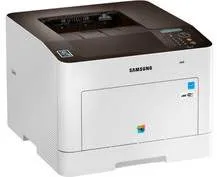
This model, Samsung ProXpress SL-C3010, is a workgroup printer with a laser print technology for color and monochrome printing. Its power type is an internal supply with a nominal voltage of up to 230 volts at a frequency of 50/60 Hz. In terms of power consumption, the rates depend on the model of the printer. For instance, the operational power consumption is up to 500 watts at the maximum limit.
Samsung ProXpress SL-C3010 Drivers for Windows
dc487832351c04d49d4fe41f5bef9c6ead1bb5054d3092c1f72b23a99d307bac0715d30bbc47933b659ce0d145f5ddb85c3e73e42f821daf180aa36e9e0d2da8ff712c96479927af3d326f4d6e60c43365c1c4335d7a8a186fc5796114d3dd11b070e320cb18bc9efe3dbdb1daa1214887d255e5b44005721f2e05710a5cbe6bfbddc44e09cad0be180f3f6684a171279be1d0e24eaaf0b65238cd9eb1626ea4a2452415325e5ca29ba4d00c398e9334c98b21bf4f5d8f8b10a2e734e610f674Samsung ProXpress SL-C3010 Drivers for macOS
e9ce51d39f7213706576e7c849700138a5766a933a2b6e5629f2d3b5a1ca9000aa091be591f0a958b4588eba72153636941c0a4d519d8f849eb8c3770549c824bc18583816cd150a2ae02c30876bc4aa9f333848c5184d9767d319cc189b4b118ff4b686c385084b95d119036d1599dff7b7df3e2c6dff1e3d87c8e93612d9c3Samsung ProXpress SL-C3010 Drivers for Linux
0c38213b846644500526bf281caaa6e36c40b8f2241cac2f0398c97c3814540eSamsung ProXpress SL-C3010 Specifications
On the other hand, the sleep mode consumes about 0.9 watts while the standby mode requires just 40 watts. In terms of the print speed, it runs at 30 pages per minute (ppm) when printing in black over A4. Similarly, when the letter-sized paper is in use, the rate is up to 31 ppm for black and white printing. Color printing on A4 paper is at the speed of 30 ppm, while that of letter-sized paper is 31 ppm. It takes less than 9 seconds for the first print out page.
At the same time, it has an inbuilt control panel with a liquid crystal display (LCD) that shows printer status. It takes different options to connect with this printer, such as a standard USB 2.0 port or Gigabit LAN component. Another way to use the device is by using wireless ingredients or a mobile printing option. It also has a rendering engine for clean pages (ReCP), which is an image enhancement technology for high-quality printing.
Another fanciful feature of the printer is the presence of automatic duplexing allowing printing on both sides of the page. The language simulation options include PCL 5e, PCL 6, PDF 1.7, Postscript 3, SPL-C, TIFF, and XPS. In terms of the paper handling properties, the machine can hold up to 250 sheets of plain paper. On the other hand, there is a multipurpose tray that can hold up to 50 sheets of plain paper.
Technical Details
| Title | Samsung ProXpress SL-C3010 Drivers |
|---|---|
| Device Type | Printer |
| Driver Version | Varies by driver and operating system |
| Available Downloads | Drivers |
| License | Free |