
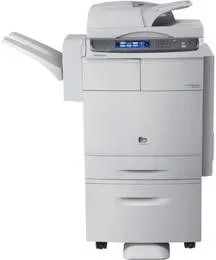
Samsung MultiXpress CLX-8540NX model of Samsung printer is a fantastic choice of a multifunction printer. Some of the outstanding attributes of this device include a print from USB flash drive and save to the same. It is also a digital machine that uses a laser print technology for color as well as black and white printing. At the optimum performance of the printer, it can produce up to 100,000 impressions in a single month.
Samsung MultiXpress CLX-8540NX Drivers for Windows
e4256eca5151a5c923b75e781c763b961f6230ab465a23999eeb417bd58ee27fe5da5d7392f2ef1e0292a7e1aebd78895001e495f30371ae9526a048ba705fc5bc6bcfa33cc9efb66b27a8d7589d849e11834ccbbcabba8e8d08e4a88f4f2d52e9298ee50c780056a21523012a213dd6ca1ba3d71c37fe22701823599bba67b78a0ef9b2b3905ccd40e7607238c3b33d8cf46bb9b4f56a136c2e6f423906d199b070e320cb18bc9efe3dbdb1daa1214887d255e5b44005721f2e05710a5cbe6bbfa5a06f2d87632b303ae07e0c0be5b48ad013a3d46b4c9ebc4f94cf417ef0beSamsung MultiXpress CLX-8540NX Drivers for macOS
42d1c47bd7a20963d5db3b76c8f575e2770817ecc1fc10990d3e659bd88904baa61976deda8748909d29b960cafae4dd1b56152b2ea82ee407c29e1492de8872Samsung MultiXpress CLX-8540NX Drivers for Linux
0c38213b846644500526bf281caaa6e36c40b8f2241cac2f0398c97c3814540eSamsung MultiXpress CLX-8540NX Specifications
It can also display the status of the printer in a liquid crystal display (LCD) touchscreen. This screen is up to 7 inches in diagonal size, which is equivalent to 17.8 cm. Samsung MultiXpress CLX-8540NX model of printer has a standard internal memory size of up to 1 GB. But this memory size is expandable to 2 GB of capacity with a hard disk drive of up to 160 GB. It also supports the use of supported USB flash drive.
The first-page print-out takes less than 14 seconds after issuing the command to the machine. In terms of the printer consumables, the options include one black cartridge that can produce up to 20,000 pages. Besides this option, each of the other colors can print up to 15,000 pages at maximum productivity. Apart from the print cartridges, this machine has a single drum that can produce up to 30,000 pages at optimum performance.
When copying, this machine can produce up to 40 pages per minute (ppm) for both monochrome and color. Also, the reproduction resolution is up to 1200 x 1200 dots per inch (dpi). Then, it takes less than 13 seconds for this printer to produce the first page from the minute of command. Whereas, document output enlargement can reach 400% of the original size of the document. On the other hand, the minimum document reduction reaches 25% of the initial scope of the input document.
Technical Details
| Title | Samsung MultiXpress CLX-8540NX Drivers |
|---|---|
| Device Type | All-in-one printer |
| Driver Version | Varies by driver and operating system |
| Available Downloads | Drivers |
| License | Free |
| Manufacturer | Samsung Electronics Co., Ltd. |