
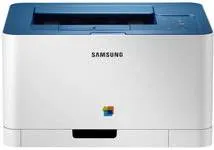
The Samsung CLP-366 printer model has outstanding qualities. One of such is the wireless LAN interface that uses the 802.11 b/g/n component. The wireless security features include WPS2 personal, shared key, open system, and WPA personal. It also supports the use of network protocols like the TCP/IPv4, DHCP, BOOTP, HTTP, SNMPv1/2/3, DNS, WINS, Bonjour, and others. This machine is also compatible with diverse operating system versions, from Windows to Linux to Mac OS.
Samsung CLP-366 Drivers for Windows
e4256eca5151a5c923b75e781c763b961f6230ab465a23999eeb417bd58ee27f9130746f2c5b7b6b8cb7f3ee81ed10edd715546f4240c62424303b40f37c4ca02635555fe94822703c536c2ef5ec1c80066393efe498a00702c10f6dfab14ab8595fbab4811aa169fb465fd54aa3a5ee28cdca1ce207ccefe7e5c9ceb61e887e242f2b5aca3359054c919bf0e570852bd0987fe910517674c4af49e1a2dfc7607e9244b9d42a27e6f2c712bfb8addd0bc3e9124da262072b9e9fa5ab73746534Samsung CLP-366 Drivers for macOS
fbfbec7e610c3192885f70c966f5435ab741a2a5774a0c687d95b0e5ffcd1694Samsung CLP-366 Drivers for Linux
0c38213b846644500526bf281caaa6e36c40b8f2241cac2f0398c97c3814540eSamsung CLP-366 Specifications
The Samsung CLP-366 driver compatible Windows OS versions include Windows Server 2003, Vista, 7, and Server 2008 R2. Also, it is compatible with Mac OS X 10.4 to 10.8. The printer also has an input tray that can hold up to 150 sheets of plain paper with 20 lbs average weight. At the same time, the supported paper type is not just the plain paper, but also thick, thin, and glossy photo papers. In terms of sizes, the varieties include letter, legal, executive, envelopes, officio, ISO B5, JIS B5, A5, A6, and A4.
Under normal circumstances, this machine has a build that is compatible with both private and commercial working environments. For instance, the width of the machine is about 15 inches. The depth is 12.2 inches, while the height is 8.3 inches. The weight of the machine is about 21.69 lbs, which is equivalent to 9.84 kg. Furthermore, in order to achieve maximum output from this printer, temperature and humidity standards must be in place.
In other words, the recommended temperature range for operations is between 10 and 320C. Whereas, during storage, the manufacturer recommends a range between 0 and 400C. The humidity range for operation is between 20 and 80% relative humidity without condensation. Nevertheless, in storage, it ranges between 10 and 90 RH without condensation. In terms of the power rating, there are two categories, one that uses between 110-127 volts and another between 220-240 volts.
Technical Details
| Title | Samsung CLP-366 Drivers |
|---|---|
| Device Type | Printer |
| Driver Version | Varies by driver and operating system |
| Available Downloads | Drivers |
| License | Free |
| Manufacturer | Samsung Electronics Co., Ltd. |